Customizing the Request
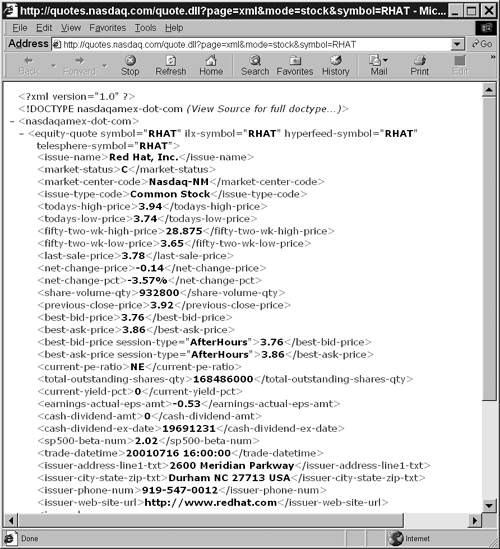
| Services like Slashdot's Backslash and RSS work because little input is neededthe same document is requested repeatedly. This is acceptable for retrieving documents from a file system on a remote server, but sometimes a little more customization is required. The client wants not only to request an XML document, but also to parameterize that document. For example, it might want to ask for headlines that include certain keywords or articles posted between two dates. The standard HTTP means of accomplishing this is to place the request parameters in a query string that is either attached to the end of the URL or included as the body of the HTTP request. Note There are other ways to encode request parameters. For example, Amazon lets you query its database by putting the ISBN number in the path of the URL. However, this requires a relatively specialized HTTP server. The two methods I discuss here are the standard approaches that most servers support. Query StringsA query string is merely a list of name =value pairs, much like attributes in an XML document, except that the values aren't quoted and names can be repeated. In a query string, the fields are separated by ampersands. For example, following is a query string with four fields: one named page with the value xml, one named mode with the value stock, one named symbol with the value IBM, and another named symbol with the value SUNW. page=xml&mode=stock&symbol=IBM&symbol=SUNW The characters permitted in URLs, including their query string parts , are the ASCII letters A to Z in both uppercase and lowercase, the digits 0 through 9, and the punctuation characters -, _, ., !, ~, *, ', (, and ). Except for these 71 characters, all other characters used in query string names and values must be x-www-form-urlencoded. ( :, /, &, ?, #, and = can also be used, but only in specific roles within the URL. When used as parts of file names or query string values, they need to be encoded too.) In x-www-form-urlencoding, each character is first converted to UTF-8, and then each byte in the UTF-8 representation of that character is replaced by a percent symbol and the two hexadecimal digits that represent that byte. For example, the dollar sign has Unicode code point 36, or 0x24 in hexadecimal. Its UTF-8 representation is the single byte with that value. Thus it is escaped in URLs as %24. The Greek letter y has Unicode code point 968, or 3C8 in hexadecimal. It is encoded in UTF-8 as two bytes, 207 and 136. Thus, after converting these bytes to hexadecimal, y is encoded as %CF%88. As a special case, the space character can be replaced by the plus sign. Java includes a java.net.URLEncoder class that can encode any string in this format. Java 1.2 and later also includes a java.net.URLDecoder class that can decode a string in this format. The simplest way to attach a query string to an HTTP request is to append it to a URL, using a question mark to separate it from the rest of the URL. For example, the NASDAQ makes quotes available in XML from its server at quotes.nasdaq.com . To request a stock quote, you ask the server quotes.nasdaq.com for the file quotes.dll , and you pass it a query string with three fields: page, mode, and symbol. Set the page field to xml, the mode field to stock, and the symbol field to the stock symbol for the company. For example, to get a quote for Red Hat, you would load the URL http://quotes.nasdaq.com/quote.dll?page=xml&mode=stock&symbol=RHAT into your browser as shown in Figure 2.2. If you were connecting to the server manually, you would request the document /quote.dll?page=xml&mode= stock&symbol=RHAT like this: GET /quote.dll?page=xml&mode=stock&symbol=RHAT HTTP/1.0 Host: quotes.nasdaq.com Accept: text/xml, application/xml Accept-Language: en, fr;q=0.50 Accept-Charset: ISO-8859-1, utf-8;q=0.66, *;q=0.66 HTTP/1.1 200 OK Server: Microsoft-IIS/5.0 Date: Mon, 16 Jul 2001 21:51:32 GMT Content-Length: 2057 Content-Type: text/xml <?xml version="1.0" ?> <!DOCTYPE nasdaqamex-dot-com SYSTEM "http://nasdaq.com/reference/NasdaqDotCom.dtd"> <nasdaqamex-dot-com> <equity-quote symbol="RHAT" ilx-symbol="RHAT" hyperfeed-symbol="RHAT" telesphere-symbol="RHAT"> <issue-name>Red Hat, Inc.</issue-name> <market-status>C</market-status> <market-center-code>Nasdaq-NM</market-center-code> <issue-type-code>Common Stock</issue-type-code> <todays-high-price>3.94</todays-high-price> <todays-low-price>3.74</todays-low-price> <fifty-two-wk-high-price>28.875</fifty-two-wk-high-price> <fifty-two-wk-low-price>3.65</fifty-two-wk-low-price> <last-sale-price>3.78</last-sale-price> <net-change-price>-0.14</net-change-price> <net-change-pct>-3.57%</net-change-pct> <share-volume-qty>932800</share-volume-qty> <previous-close-price>3.92</previous-close-price> <best-bid-price>3.76</best-bid-price> <best-ask-price>3.86</best-ask-price> <best-bid-price session-type="AfterHours">3.76</best-bid-price> <best-ask-price session-type="AfterHours">3.86</best-ask-price> <current-pe-ratio>NE</current-pe-ratio> <total-outstanding-shares-qty> 168486000</total-outstanding-shares-qty> <current-yield-pct>0</current-yield-pct> <earnings-actual-eps-amt>-0.53</earnings-actual-eps-amt> <cash-dividend-amt>0</cash-dividend-amt> <cash-dividend-ex-date>19691231</cash-dividend-ex-date> <sp500-beta-num>2.02</sp500-beta-num> <trade-datetime>20010716 16:00:00</trade-datetime> <issuer-address-line1-txt> 2600 Meridian Parkway</issuer-address-line1-txt> <issuer-city-state-zip-txt> Durham NC 27713 USA</issuer-city-state-zip-txt> <issuer-phone-num> 919-547-0012</issuer-phone-num> <issuer-web-site-url>http://www.redhat.com</issuer-web-site-url> <issuer-logo-url> http://a676.g.akamaitech.net/f/676/838/1h/nasdaq.com/logos/RHAT.GIF </issuer-logo-url> <trading-status>ACTIVE</trading-status> <market-capitalization-amt>636877080</market-capitalization-amt> <option-root-symbol symbol=""/> <tick-code tick-type="last-sale"></tick-code> <tick-code tick-type="best-bid"></tick-code> <tick-code tick-type="best-ask"></tick-code> </equity-quote> </nasdaqamex-dot-com> Figure 2.2. NASDAQ Stock Data Retrieved via a Query String Most of the hard work here is on the server side. From a client perspective, you just appear to be requesting a file with a slightly different name. This approach to sending a query string to a server is sometimes known as CGI GET, even though it's not necessarily a CGI program that responds to the request. It could be a servlet, a PHP page, an Active Server Page (ASP), or something else. When the response needs to be customized for different users but the information the client sends to the server isn't too large, don't underestimate the power of CGI GET. It may be simpler to send a query string than a full XML document because you can take advantage of the many client- and server-side CGI libraries already available to you. Java includes standard classes for encoding and decoding data in the x-www-form-urlencoded format. However, limitations in much software does mean that query strings embedded in URLs are limited to approximately 200 characters. Furthermore, the data they can encode is fairly flat. A query string cannot represent complex, hierarchical structures very well. XML, of course, is ideal for such structures. To encode the request in XML as well as the response, we need to explore an alternative to the GET method called HTTP POST. How HTTP POST WorksHTTP GET probably accounts for more than 90 percent of normal web browsing. The browser sends a small request for a document, and the server sends an HTTP header followed by the requested document, or perhaps an error message. However, when you fill out a form and click the submit button, the process is a little different. In particular, if the form uses the POST method, then the browser not only sends the request line and the HTTP header. It also sends the form data as the request body, separated from the header by a blank line. Customarily, browsers send an x-www-form-urlencoded query string as the body of the request. A typical POST form submission looks something like this: POST /cartmgr.cgi HTTP/1.1 Host: www.irs.gov User-Agent: Mozilla/5.0 (Windows; U; WinNT4.0; en-US; rv:0.9.2) Accept: application/xml, text/html;q=0.9, image/png, */*;q=0.1 Accept-Language: en, fr;q=0.50 Accept-Encoding: gzip,deflate,compress,identity Accept-Charset: ISO-8859-1, utf-8;q=0.66, *;q=0.66 Keep-Alive: 300 Connection: keep-alive Content-type: application/x-www-form-urlencoded Content-Length: 264 action=DISPLAY_CART&template=cartmgr.cart_display.html.txt &error_template=default_error.html.txt &Show+me+my+cart=Show+me+my+cart&action=DISPLAY_DOC &CreditCard=1234567898769876&CardHolder=Elliotte+Harold &expiresMonth=07&expiresYear=2003&type=Visa &template=cartmgr.redirect.html.txt Normally you have to send an x-www-form-urlencoded data query string in the body of a POST request because that's what the server expects. Likewise, the CGI program on the server has to be prepared to read x-www-form-urlencoded query strings because that's what browsers send. But if you control both the server and the client, then you aren't limited to this format. You can send any kind of data you like in the HTTP request body, including a complete XML document! And indeed this is exactly what both XML-RPC and SOAP do. Note The java.net.URL class, query strings, x-www-form-urlencoding, the GET and POST methods, HTTP headers, HTTP response codes, and many other aspects of working with HTTP in Java are covered in much more detail in another of my books: Java Network Programming , 2000. Sebastopol, CA: O'Reilly & Associates. ISBN 0-13-089468-0. |

EAN: 2147483647
Pages: 191