Chapter 6. DataSetsThe DataSet is a memory-resident representation of data including tables, relationships between the tables, and both unique and foreign key constraints. It is used for working with and transporting data in a disconnected environment. There are four important characteristics of the DataSet :
DataSets
exist as both untyped and strongly typed.
Strongly typed
DataSet
s are a collection of automatically
generated classes that inherit from the
DataSet
,
DataTable
, and
DataRow
classes, and provide
additional properties,
The data stored in the
DataSet
can be manipulated
programmatically and
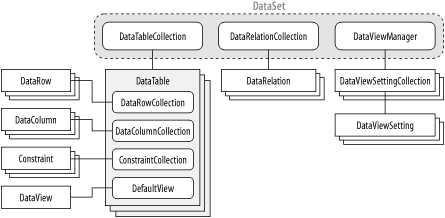
Figure 6-1 shows the structure of the DataSet and the contained classes. Figure 6-1. The DataSet class
|
6.1 Creating an Untyped DataSet
There are several ways a
DataSet
can be created. In the
simplest case, a
DataSet
is created using the
new
keyword. The constructor accepts on optional argument that allows
the
DataSetName
property to be set. If the
DataSetName
argument isn't supplied, the default
DataSet ds = new DataSet("MyDataSet");
A
DataSet
can also be created from another
DataSet
. The
Copy( )
method can create a new
DataSet
containing both the schema and data from the
original
DataSet
. The
Clone( )
method creates a
new
DataSet
with the same schema, but none of the data of
the original. Finally, the
GetChanges( )
method creates a
new
DataSet
containing data that has changed since the
DataSet
was last loaded or the pending changes were
accepted. These
|
6.2 Working with Tables in the DataSet
Tables
Tables are added to the
DataSet
using the
Add(
)
method of the
DataTableCollection
. The
Add(
)
method takes an optional table
DataSet ds = new DataSet("MyDataSet");
DataTable dt = new DataTable("MyTable");
// ... code to define the schema for the newly constructed DataTable
ds.Tables.Add(dt);
The AddRange( ) method allows more than one table to be added to the DataSet in the same statement. The method takes an array of DataTable objects as the argument, as the following example shows:
// create two new tables
DataTable dt1 = new DataTable();
DataTable dt2 = new DataTable();
// use the AddRange() method to add them to the DataSet.
ds.Tables.AddRange(new DataTable[] {dt1, dt2});
A
DataTable
can also be created automatically in a
DataSet
when the
Fill( )
or
FillSchema(
)
method of the
DataAdapter
is called. A new table is
created and filled with the data or schema, respectively, from the
data source, as
// connection and select command strings
String connString = "Data Source=(local);Integrated security=SSPI;" +
"Initial Catalog=Northwind;";
String selectSql = "SELECT * FROM Orders";
// create a new DataSet to receive the data
DataSet ds = new DataSet();
SqlDataAdapter da = new sqlDataAdapter(selectSql, connString);
// an empty table named OrdersSchema will be created in the DataSet
da.FillSchema(ds, SchemaType.Mapped, "OrdersSchema");
// a table named Orders will be created in the DataSet
// filled with data as specified by the SQL statement
da.Fill(ds, "Orders");
The DataAdapter class and the Fill( ) and FillSchema( ) methods are discussed in detail in Chapter 14. Existing tables within the DataSet can be accessed by an indexer, which usually is passed the table name or the position of the table within the DataTableCollection as an argument as shown in the following examples: // using the table name DataTable dt = ds.Tables["MyTable"]; // using the table ordinal DataTable dt = ds.Tables[0]; The Count property returns the number of tables within the DataSet : Int32 tableCount = ds.Tables.Count; The Contains( ) method determines whether a table with a specified table name exists within a DataSet :
// Boolean tableExists = ds.Tables.Contains("MyTable");
The
IndexOf( )
method returns the index of the table
within the collection using either a reference to the table object
or the name of a table. The following example
// get the index using the name of the table
Int32 tableIndex = ds.Tables.IndexOf("MyTable");
// get the index using a reference to a table
DataTable dt = ds.Tables.Add("MyTable")
// ... build the table and do some work
// get the index of the table based on the table reference
Int32 tableIndex = ds.Tables.IndexOf(dt);
The Remove( ) , RemoveAt(), and Clear( ) methods remove tables from the DataSet . The Remove( ) method takes an argument that specifies either a table name or a reference to the table to be removed, as shown in the following example:
DataTable dt = ds.Tables.Add("MyTable");
// remove by table reference
ds.Remove(dt);
// remove using the table name
ds.Remove("MyTable");
The
RemoveAt( )
method
// removes the first table from the tables collection in the DataSet ds.RemoveAt[0]; The Clear( ) method removes all tables from the DataSet , as shown here: ds.Tables.Clear(); |