Section 1.7. Storage Driver Hierarchy and Driver Types
1.7 Storage Driver Hierarchy and Driver Types
As explained briefly in the preceding sections, Windows NT has an architecture that layers multiple drivers into a hierarchy. The advantage is that the architecture is extensible, and new drivers can easily be introduced anywhere in the hierarchy. Thus, by layering drivers one on top of another, we can create complex functionality. From the point of view of the Windows NT Executive, all drivers have similar structures and driver functionality can be invoked in a similar manner, no matter what driver is being invoked to provide a particular functionality.
This section presents an overview of the Windows NT storage driver stack. Note that this is an overview of just the basic drivers involved and not a comprehensive review of all storage-related drivers. For example, the Remote Storage Services “ related drivers are presented in Chapter 7 and omitted here, in the interest of keeping things simple.
Figure 1.5 shows the Windows NT storage driver stack. Note that the figure depicts the architectural layering of the drivers, but depending on the situation, one or more layers may or may not be relevant. For example:
-
All layers are relevant when I/O is done to a physical disk such as an IDE or SCSI disk. The class and port layers are needed here, as are the file system and volume management layers. All of these layers are explained later in this section.
-
The volume management and file system layers are not relevant when I/O is done to a tape device.
Figure 1.5. Windows NT Storage Driver Stack
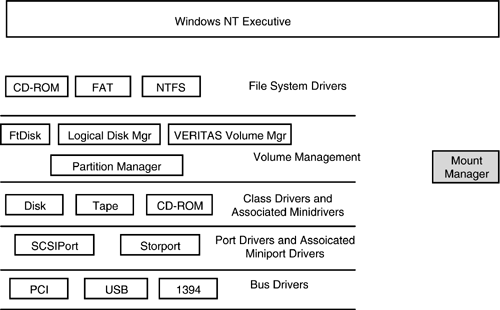
Sections 1.7.1 through 1.7.7 explain the bus, port, and class, volume management, file system, and filter drivers shown in Figure 1.5.
1.7.1 Bus Drivers
A Windows NT bus driver exposes functionality provided by a bus for the benefit of other drivers. The term bus is used here in a fairly generic sense, being defined as any device, either virtual or physical, onto which other devices are connected. Bus drivers are required to have enumeration routines that can be called by the Plug and Play (PnP) manager to enumerate the devices connected to the bus. Bus drivers are also required to provide code to handle PnP, as well as power management IRPs. Microsoft provides bus drivers for all physical buses that a PC-based computer typically has (e.g., SCSI, PCI, 1394, USB), although independent hardware vendors can also provide a bus driver if needed. A bus driver creates a physical device object (PDO) for each device that it enumerates on its bus.
1.7.2 Port Drivers
A port driver implements device-specific functionality and insulates a class driver from the specifics of the hardware. A port driver must implement a set of specified functionality for the benefit of the class driver and may implement additional functionality. A port driver receives IRPs and passes SCSI request blocks with embedded command descriptor blocks to a miniport driver that is dynamically linked to the port driver. Miniport drivers do not create a device object and simply use the device object created by the port driver. As described in Section 1.4.2, port drivers create a device PDO that is required to communicate with the device.
Windows NT ships with some predefined port drivers, including SCSIPort and 1394. Windows Server 2003 ships with an additional port driver called the Storport driver. For now, suffice to say that whereas the SCSIPort driver caters to older SCSI-2 and earlier devices, the Storport driver is intended to cater to newer SCSI-3 and Fibre Channel devices. More details about the Storport driver can be found in Chapter 2.
Port drivers in turn , typically have miniport drivers that are implemented by independent hardware vendors. Miniports provide the vendor-specific device-level functionality not provided by the port driver. Miniport drivers are written with the Windows NT Driver Development Kit.
1.7.3 Class Drivers
A class driver implements general device-independent support for a range of devices. A class driver depends on either miniclass drivers or miniport drivers to provide device-specific functionality. Storage class drivers in particular are used to handle both SCSI and non-SCSI devices. Among other functions, a class driver does the following:
-
Creates a device FDO. An FDO is needed to use a device. Examples of data in the FDO include details of disk organization (partition table) and the DVD region.
-
Validates I/O request parameters.
-
Retries failed requests .
In particular, a storage class driver also does the following:
-
Splits large read or write requests (received via IRP_MJ_READ and IRP_MJ_WRITE IRPs, respectively) into smaller multiple requests as needed to meet the capacity of the underlying HBA adapter.
-
Receives IRPs and translates them into appropriate SCSI request blocks (SRBs) that contain embedded command descriptor blocks. These SRBs are then sent to the next driver in the stack chain, which can be a filter driver or a port driver. The SRBs are incomplete in the sense that the class driver does not fill out the addressing information in the SRB and depends on a lower-level driver to do this.
-
Plays an important role in power management, adding and removing devices, and setting timeout values for I/O on devices. In other words, storage class drivers are heavily involved in implementing PnP and power management.
Class drivers interact with port drivers at the next lowest level in the storage stack. The interface between class driver and port driver consists of a private IOCTL interface, as well as the exchange of SRBs. Some parts of the SRB are used only for class or port interface, and some are meant to be used by the port driver.
Examples of storage class drivers in Windows NT include disk, tape, and CD-ROM class drivers; these can deal with various types of devices, including SCSI, IDE, USB, and 1394 devices.
From the point of view of the I/O Manager, a storage class driver is just like any other driver, so the storage class driver must follow all the requirements, such as having I/O startup, unload, and completion routines, and so on.
A storage class driver often behaves like a bus driver, enumerating child devices. A good example is the disk class driver (disk.sys) that reads the partition table on the disk and creates a device object for each disk partition that it finds.
Some class drivers define a miniclass driver interface. A miniclass driver, typically written by an independent hardware vendor, is simply a kernel mode DLL that interfaces with the class driver, typically provided by Microsoft. The miniclass driver registers its hardware adapters with the class driver, and the class driver creates a device object for each registered adapter. The miniclass driver does not have a device object and simply uses the device object of the class driver. Miniclass drivers typically help fill out details of the SCSI request blocks that the class driver builds. A good example is the tape miniclass driver.
Interestingly, with Windows 2000, Microsoft introduced a new library called ClassPnP . This library implements all PnP functionality common across class drivers. Some functionality is implemented entirely within the class library. For other functionality, the driver using the class library needs to provide callback routines that the class driver can invoke as needed. All of the Microsoft-provided class drivers (disk, tape, and CD-ROM class drivers) use the services of the ClassPnP library (implemented in the file classpnp.sys). This situation remains true for Windows XP and Windows Server 2003 products as well.
1.7.4 Windows NT Device Tree for Storage Devices
The description of various layers in Figure 1.5 is still incomplete. However, before the discussion of the volume management and file system layers, it will be useful to deviate a little and understand the device tree built up by the operating system. A good understanding of the device object tree will make it easier to understand storage-related topics such as high-availability multipath I/O (described in Chapter 9) and reparse points (described in Chapter 6). This discussion will make more sense while the information presented about device objects, class drivers, and port drivers in the preceding sections is still fresh.
As stated earlier, PnP plays a major role in device enumeration. PnP loads bus drivers one at a time and initiates device enumeration on these buses. As devices are detected , PnP plays a role in loading the appropriate drivers. In particular, device enumeration starts with a virtual bus driver called the root . The root driver is responsible for enumerating legacy drivers, and typically it also enumerates the PCI bus. Drivers loaded by the root driver are often referred to as root-enumerated . The MPIO bus driver (described in Chapter 9) is one such example.
As drivers load and enumerate the devices for which they are responsible, they report the devices to PnP. PnP builds a tree linking the various driver objects in a proper fashion to show their logical and physical relationships. Note that PnP can only build a tree; it cannot support a device graph. That is, with PnP, a child node can have only a single parent; a node can never have multiple parents.
Figure 1.6 shows a simple configuration in the top left-hand corner. A Windows NT server with a single host bus adapter (HBA) and a single storage disk connected to that HBA. In the interest of keeping things simple and relevant, we will ignore other peripheral devices that would typically be connected to this Windows NT server.
Figure 1.6. Driver Device Tree
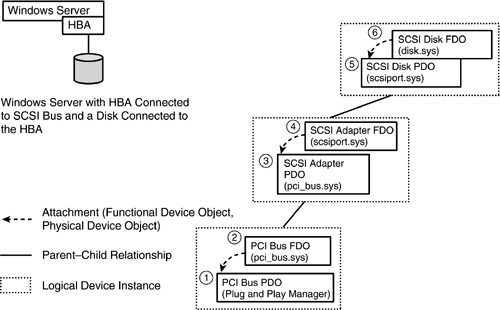
Figure 1.6 shows a detailed overview of just some parts of Figure 1.5. In particular, Figure 1.6 does not show the volume management and file system layers. Figure 1.6 shows just the port and class driver layers corresponding to Figure 1.5. Starting from the bottom right-hand corner of Figure 1.6, the series of steps in building the device tree is as follows :
- Step 1. The Windows NT Executive (Plug and Play Manager in particular) creates a PDO (physical device object) for the PCI bus driver.
- Step 2. The PCI bus driver in turn creates an FDO (functional device object) for the PCI bus and attaches it to the PDO.
- Step 3. The PCI bus driver also enumerates adapters and finds the SCSI (storage) adapter. Upon discovering the SCSI adapter, the PCI bus driver creates a PDO for it. For the sake of simplicity, we do not consider other adapters that the PCI bus driver may discover.
- Step 4. The Plug and Play Manager loads the SCSIPort driver, and after this driver has initialized , calls it at its AddDevice entry point and passes it the PDO created by the PCI bus driver. The SCSIPort driver creates an FDO for the HBA device. The port driver attaches the newly created FDO to the PDO created by the PCI bus driver.
- Step 5. As discussed earlier, a driver can show multiple examples of driver-type behavior and the SCSIPort driver now acts as a bus driver, enumerating devices it finds on its SCSI bus. It finds the disk and reports this to the Plug and Play Manager, which loads the disk class driver (disk.sys). The disk class driver, after it has initialized, is called at its AddDevice entry point, with the PDO created by the SCSI driver as a parameter.
- Step 6. The disk class driver creates an FDO for the disk that is connected to the HBA and attaches it to the PDO created by the SCSIPort driver. In reality, the HBA is more likely to be connected to a fabric switch, and the HBA will enumerate a lot more devices. This example is deliberately kept simple. In addition, the device stack does not end here. In the interest of keeping the discussion focused and simple, the device stack farther up into the volume management and file system layers is discussed later and shown in Figure 1.7.
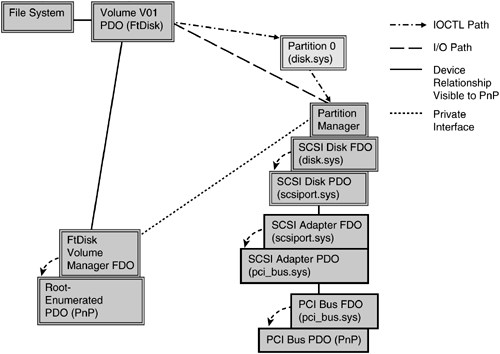
Figure 1.7. Device Object Tree for a Volume Stack
Notice that two drivers cooperate to create a logical device instance such as the PCI bus driver and the SCSIPort driver. This is logical (as Spock would say), because the device interfaces to the PCI bus on one end and exposes a SCSI interface at the other end. Thus a single device has characteristics of PCI at one end of the card and SCSI at the other end, so it needs processing by both the PCI bus driver and the SCSIPort driver.
1.7.5 Volume Management Layer
We can now return to Figure 1.5 and discuss the volume management layer. Volumes are a logical entity created to facilitate storage management. Physical disks ”for example, an IDE or SCSI disk ”may be logically divided into entities called partitions . A partition is simply a set of physically contiguous sectors on a disk. Partitions are then combined in some fashion to construct a volume. The advantage is that this combination can result in some enhanced functionality; for example, multiple partitions may be concatenated to construct a volume that is larger than any of the physical disks. Another example would be creating a mirrored volume by constructing a volume out of two partitions of exactly the same size . Volumes are explained in more detail in Chapter 6. For now, the topic at hand is to understand how volume-related functionality is implemented in Windows NT by a software device driver.
Windows 2000, Windows XP, and Windows Server 2003 support three different volume managers: FtDisk, Microsoft Logical Disk Manager, and VERITAS Volume Manager. All three are described in detail in Chapter 6. For now, the example will take the simplest of the three, the Microsoft FtDisk Manager. A device tree with the other volume managers is presented in Chapter 6. To keep things simple, the device tree in Figure 1.7 pertains to a situation in which there is a single SCSI disk, organized into two partitions, and the two partitions are concatenated to form a single volume.
To understand how volume managers work, consider Figure 1.7, starting from the bottom right-hand corner. The PnP subsystem and PCI bus drivers cooperate to create the PDO and FDO for the PCI bus. Next the PCI bus driver enumerates devices on the PCI bus and creates a PDO for the SCSI adapter. The SCSIPort driver creates the FDO for the SCSI adapter. Next the SCSIPort port driver and disk class drivers create a PDO and an FDO for the one disk that is present in the system configuration. Until now, the description of Figure 1.7 has simply summarized the description for Figure 1.6.
The Partition Manager is an upper-level filter driver (filter drivers are described in Section 1.7.7) that registers with the Windows NT PnP subsystem requesting notifications for new device objects created by the disk class driver. The Partition Manager was newly introduced in Windows 2000 and is also present in Windows XP and Windows Server 2003 products. The Partition Manager communicates with the volume managers in general (and FtDisk in particular in Figure 1.7) using a private interface and forwards notifications of device creation to the Partition Manager. When the volume manager finds that it has all disk partitions that collectively constitute a volume, it creates a device object representing the volume. The Partition Manager also ensures the notification to PnP of partition or device object destruction (e.g., when deleting a partition). The Partition Manager communicates with the FtDisk driver to inform it about partitions that dynamically come and go.
Newly introduced in Figure 1.7 (as compared to Figure 1.6) is the Partition Manager. The Partition Manager watches the IRPs go by and ensures that it is in the I/O path for IRP completion. When the Partition Manager sees a QDR (IRP_MN_QUERY_DEVICE_RELATIONSHIPS) request being completed, it quietly removes all details of devices discovered ”in this case the device objects for partition 0, created by the disk.sys disk class driver. Hence the device object partition 0 is never discovered by the PnP subsystem at all. That's why the device object for partition 0 is shaded differently from the other device objects in Figure 1.7.
The Partition Manager passes details of the device objects it discovers (and "steals") to registered volume managers. For now, the discussion is limited to cases with just one volume manager. Chapter 6 discusses a similar situation, but with multiple volume managers involved. The volume manager inspects the devices represented by the device objects "stolen" by the Partition Manager and either claims or rejects ownership. In the example, the FtDisk driver claims ownership of these device objects. The FtDisk manager then inspects the volume configuration and determines that the volume has a single underlying partition, as well as ownership of the relevant partition. At that point the FtDisk driver will create a device object to represent the volume (called "Volume V01" in Figure 1.7). The file system can then be mounted on this volume. Details of operations involved in mounting a file system are described in Chapter 6.
What is noteworthy here is that there are actually two separate device stacks. One stack represents the logical entity, the volume; the other stack encompasses the physical devices in the system, such as the PCI bus, the SCSI adapter, and the disk drive. The volume manager acts as a bridge between the two stacks.
In Figure 1.7, the FtDisk driver sends all IRPs that it understands directly to the disk class driver. Of course, the FtDisk driver also transforms volume relative offsets to disk relative offsets before it does so. These I/O operations are shown with the thick dashed lines. The thin dotted line shows the private interface between the volume manager and the Partition Manager. In addition, the FtDisk driver sends I/O controls that it does not understand directly to the partition device object. This is shown with dashed- dotted line in Figure 1.7.
1.7.6 File System Drivers
File system drivers are Windows NT device drivers that implement file system functionality. Although the file systems reside on physical media such as a disk or CD, the file system drivers themselves are considered logical drivers that do not directly manipulate any hardware. File system drivers rely on class and port drivers to do the actual I/O to disk. A file system driver typically receives IRPs to perform a request and takes one of two actions:
-
It fills in the next IRP stack location with necessary information to complete the I/O. Then it sends the IRP on to the class driver.
-
It builds a series of associated IRPs to accomplish the requested I/O.
A file system driver has metadata on the media. The metadata includes things such as file system access permissions and a file allocation table (location on disk). The file system driver receives the IRP that specifies a particular operation relative to a file, reads metadata if needed, and issues an IRP request that is now relative to a disk block rather than to a file. Windows NT ships with several file system drivers, including
-
NTFS
-
UDFS
-
FAT file system
Writing file system or file system filter drivers was a black art with Windows NT 3.X. Subsequently, Microsoft made available the Installable File System Kit, which provides necessary header files, some documentation, and samples for writing file system and file system filter drivers.
Both file system and file system filter drivers need to implement support for PnP IRPs, including power management, removal of media, and removal of the storage device itself, such as an external USB floppy.
1.7.7 Filter Drivers
Filter drivers are drivers that layer themselves over some device objects and perform preprocessing and/or postprocessing of I/O requests in order to modify the system behavior. Filter drivers are typically used for the following reasons:
-
To provide modularized functionality ”for example, CD-ROM audio filter driver
-
To add functionality such as CD-ROM burning/writing to a device
-
To add functionality to a file system ”for example, file system encryption filter drivers, reparse point filter drivers, and Single Instance Storage filter drivers (all of which are described in Chapter 6)
-
To add functionality such as AGP support and ACPI BIOS extensions support, both done through filter drivers, to a bus
-
To adjust I/O for hardware functionality quirks such as breaking up I/O into smaller chunks
Filter drivers always create a device object that is attached to either a functional device object or a physical device object (both described in Section 1.4.2). This object is essential to the ability of the filter driver to receive I/O requests and perform pre- and/or postprocessing on the I/O request. Some filter drivers create a secondary device object, often called a control device object (CDO) because it is used to send control/management information to the filter driver from an accompanying management applet. Filter drivers that attach to the FDO created by a class driver are called upper filter drivers . Filter drivers that attach to the PDO (which is lower down in the stack) created by port drivers are called lower filter drivers .
Lower filter drivers are much more difficult to write than upper filter drivers. One technical issue is related to deciding which errors should be propagated and from which particular I/O operations. Another problem is that all of the available samples relate to upper filter drivers, and hence no samples are available for lower filter drivers. In the rare instances that lower filter drivers are used, they provide protocol converter functionality or functionality to work around a particular device limitation.
Filter drivers have existed in Windows NT since the first commercial release of the operating system. The Windows NT Installable File System (IFS) Kit (http://www.microsoft.com/ddk/IFSKit) documents the filter driver architecture and is a good reference for developers.
Starting with Windows 2000, a significant change has been made in the way filter drivers are loaded. Previously, the person writing the filter driver had to do some extra work to make sure that the driver was loaded at the correct time. If the driver is loaded too early, the device to which the filter driver wants to attach will not yet have been created. If the driver is loaded too late, the device to which the driver wants to attach may already be claimed and attached to by another driver, forcing the filter driver to attach itself higher up the driver stack than it would like. With Windows 2000, the driver writer specifies whether the filter driver is above or below a particular functional or physical device object, and the Plug and Play Manager loads the driver at the correct time.
Ironically, Microsoft may have made creating a filter driver too easy. The driver stack chain is becoming a bit crowded, with implications for performance and memory hits (each IRP needs more stack locations, and IRPs are allocated out of nonpaged memory). Consider the known filter drivers already being loaded (these are discussed later in the book):
-
Encrypting file system (EFS) filter driver
-
Hierarchical Storage Management/Remote Storage Services filter driver
-
Single Instance Store (SIS) for Remote Installation Services (RIS) filter driver
-
Reparse point filter drivers that other vendors may have written
-
Virus-checking software filter drivers
On the other hand, writing a filter driver is also rather difficult. Consider a driver that wants to do some very simple encryption on data as it is written to disk and read from disk. All this driver really wants is to have a facility that allows it access to buffers before they are written and after they have been read. But the driver writer does not have a facility for simply registering a callback that accomplishes the desired functionality quickly. The driver writer needs to deal with all kinds of overhead, including handling canceled IRPs.
 |
| Top |

EAN: 2147483647
Pages: 111