Section 13.3. Tying Revisions to Issue Tracking
13.3. Tying Revisions to Issue TrackingIssue tracking and development go hand-in-hand, so it makes sense to have your issue-tracking system and Subversion work together. With a little bit of forethought and setup, you can do just that. For most issue-tracking systems, there are ways that they can control external systems, and vice versa. So, by hooking Subversion and your issue-tracking system up to each other, you can automate a lot of the drudgery that is involved in keeping both systems in sync. 13.3.1. Issue-tracking PropertiesThe TortoiseSVN GUI interface for Subversion has an interesting extra feature that adds integration with bug tracking to Subversion. By setting certain properties on project directories, you can control how the TortoiseSVN interface is able to automatically query the user about issue-tracking information, and store it in a manner that allows the GUI to present bug-tracking data to the user. Also, in addition to being used by TortoiseSVN, these properties are also gaining traction as a standard for Subversion issue-tracker integration, and are also used by WebSVN now. The full standard for these properties can be found in the document issuetracker.txt, which is located in the TortoiseSVN project's Subversion repository (svn.collab.net/repos/tortoisesvn/trunk/doc). bugtraq:labelThis property allows you to specify a label for the text box that the Subversion client displays to ask you to enter an issue number to associate a revision with. If this property is left unset, the client displays some sort of default value (something like Issue ID:). This allows you to personalize the bug-tracking interface, to appropriately match the terminology used by your issue-tracking system. bugtraq:messageThis property is used to turn issue-tracking integration on or off in a compliant Subversion client. If the property is unset, no issue-tracking integration is used. If it is set, integration is turned on, and the client uses the value of this property to set a special line in the log files of your commits. The line is added to the end of each log message, and %BUGID% is replaced with the appropriate issue numbers (usually; see bugtraq:append later in this section). For instance, if your bugtraq:message property is equal to this: Associated issues: %BUGID% Then a commit that is given the issue IDs 247, 342, and 771 will have the following line added to the end of its log message: Associated issues: 247, 342, 771 bugtraq:numberThis property is used to indicate whether your issue-tracking system identifies issues with numbers exclusively, or if it allows other characters. If only numbers are allowed, this property should be set to true (or left unset). If other characters are allowed, you should set this property to false. bugtraq:urlThis property is used to allow a Subversion client to present you with a link to the issues referenced by the log message. The value of this property is a URL, which contains %BUGID%. Just like in the bugtraq:message property, this URL replaces %BUGID% with the appropriate issue ID when the link is displayed. bugtraq:warnifnoissueSubversion revisions aren't always associated with a specific issue in your issue tracker, but for some projects, unassociated revisions are the exception, not the norm. If this is the case for your project, you may want to have the Subversion client warn the user if he doesn't enter an issue number when he commits. To turn that warning on, you have to set this property to true. If you don't want the warnings, just leave this property unset. bugtraq:appendThe default for adding the issue message to your log messages is to append the message to the end of the log. If you would rather have the message appear at the top of each log message, you can set this property to false. In either case, the message appears on its own line. 13.3.2. Automating Interaction with Issue TrackingIf you're up for a little bit of scripting, much of the Subversion issue-tracking interaction can be automated, which allows you to keep your issue tracking system more consistently in sync with your Subversion repository, as well as alleviate some of the drudgery of entering information into both systems.
TracAnother option for integrating Subversion with issue tracking is the Trac project management system (www.edgewall.com). TRac provides a Web-based environment for managing projects, including an issue tracker and a wiki that integrate with a Web-based interface to Subversion. Log messages can directly reference issues (called tickets) and wiki pages (with links generated by Trac when viewing the log message from the Trac interface), and ticket/wiki pages can reference specific repository revisions (also with links). Trac even includes a post-commit hook script that allows you to automatically update the status of Trac tickets based on information provided in the log message. Figure 13.1 shows the Trac interface displaying its repository browsing screen. Figure 13.1. The Trac repository browser.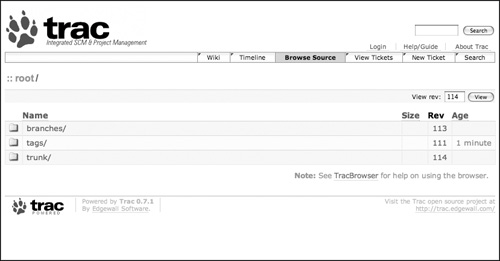 |

EAN: N/A
Pages: 132