Flash Cards and Digital Film Memory Devices
Flash Cards and Digital "Film" Memory DevicesFlash memory has been around for several years as a main or an auxiliary storage medium for laptop computers. However, the rise of devices such as digital cameras and MP3 players and the presence of USB ports on practically all recent systems have transformed this technology from a niche product into a mainstream must-have accessory . How Flash Memory WorksFlash memory is a type of nonvolatile memory that is divided into blocks, rather than bytes as with normal RAM memory modules. Flash memory, which also is used in most recent computers for BIOS chips, is changed by a process known as Fowler-Nordheim tunneling . This process removes the charge from the floating gate associated with each memory cell . Flash memory then must be erased before it can be charged with new data. The speed, low reprogramming current requirements, and compact size of recent flash memory devices have made flash memory a perfect counterpart for portable devices such as laptop computers and digital cameras, which often refer to flash memory devices as so-called "digital film." Unlike real film, digital film can be erased and reshot. Ultra-compact, USB-based keychain drives that use flash memory are replacing both traditional floppy drives and Zip/SuperDisk drives for transporting data between systems. Types of Flash Memory DevicesSeveral types of flash memory devices are in common use today, and it's important to know which ones your digital camera is designed to use. The major types include the following:
Some of these are available in different sizes (Type I/Type II). Table 10.28 shows the different types of solid-state storage used in digital cameras and other devices, listed in order of physical size. Table 10.28. Different Flash Memory Devices and Physical Sizes
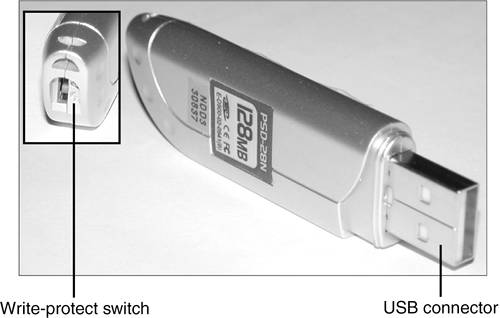
CompactFlashCompactFlash was developed by SanDisk Corporation in 1994 and uses ATA architecture to emulate a disk drive; a CompactFlash device attached to a computer has a disk drive letter just like your other drives. The original size was Type I (3.3mm thick); a newer Type II size (5mm thick) accommodates higher-capacity devices. Both CompactFlash cards are 1.433'' wide by 1.685'' long, and adapters allow them to be inserted into laptop computer PC Card slots. The CompactFlash Association (www.compactflash.org) oversees development of the standard. SmartMediaIronically, SmartMedia (originally known as SSFDC for solid state floppy disk card ) is the simplest of any flash memory device; SmartMedia cards contain only flash memory on a card without any control circuits. This simplicity means that compatibility with different generations of SmartMedia cards can require manufacturer upgrades of SmartMedia-using devices. The Solid State Floppy Disk Forum (www.ssfdc.org.jp/english) oversees development of the SmartMedia standard. MultiMediaCardThe MultiMediaCard (MMC) was co-developed by SanDisk and Infineon Technologies AG (formerly Siemens AG) in November 1997 for use with smart phones, MP3 players, digital cameras, and camcorders. The MMC uses a simple 7-pin serial interface to devices and contains low-voltage flash memory. The MultiMediaCard Association (www.mmca.org) was founded in 1998 to promote the MMC standard and aid development of new products. In November 2002, MMCA announced the development of the Reduced Size MultiMedia Card (RS-MMC), which reduces the size of the standard MMC by about 40% and can be adapted for use with standard MMC devices. SecureDigitalA SecureDigital (SD) storage device is essentially an improved and updated version of MMC, and MMC cards can be read in SD slots. SD has several enhancements over MMC and is available in greater capacities . SD, which was co-developed by Toshiba, Matsushita Electric (Panasonic), and SanDisk in 1999, gets its name from two special features. The first is encrypted storage of data for additional security, meeting current and future Secure Digital Music Initiative (SDMI) standards for portable devices. The second is a mechanical write-protection switch. The SD slot can also be used for adding memory to Palm PDAs. The SDIO standard was created in January 2002 to enable SD slots to be used for small digital cameras and other types of expansion with various brands of PDAs and other devices. The SD Card Association (www.sdcard.org) was established in 2000 to promote the SD standard and aid the development of new products. Sony Memory Stick and Memory Stick ProSony, which is heavily involved in both laptop computers and a wide variety of digital cameras and camcorder products, has its own proprietary version of flash memory known as the Sony Memory Stick . These devices feature an erase-protection switch, which prevents accidental erasure of your photographs. Sony has also licensed Memory Stick technology to other companies, such as Lexar Media. Lexar introduced the enhanced Memory Stick PRO in 2003, with capacities ranging from 256MB up to 1GB. Memory Stick Pro includes MagicGate encryption technology, which enables digital rights management, and Lexar's proprietary high-speed memory controller. ATA Flash PC CardAlthough the PC Card (PCMCIA) form factor is now used for everything from game adapters to modems, from SCSI interfacing to network cards, its original use was computer memory, as the old PCMCIA (Personal Computer Memory Card International Association) acronym indicated. Unlike normal RAM modules, PC Card memory acts like a disk drive, using the PCMCIA ATA (AT Attachment) standard. PC Cards come in three thicknesses (Type I is 3.3mm, Type II is 5mm, and Type III is 10.5mm), but all are 3.3'' long by 2.13'' wide. Type I and Type II cards are used for ATA-compliant flash memory and the newest ATA-compliant hard disks. Type III cards are used for older ATA-compliant hard disks; a Type III slot also can be used as two Type II slots. xD-Picture CardIn July 2002, Olympus and Fujifilm, the major supporters of the SmartMedia flash memory standard for digital cameras, announced the xD-Picture Card as a much smaller, more durable replacement for SmartMedia. In addition to being about one third the size of SmartMedia ”making it the smallest flash memory format yet ”xD-Picture Card media has a faster controller to enable faster image capture. Initial capacities range from 16MB up to 128MB, but eventual capacities are expected to reach up to 1GB or above. 16MB and 32MB cards (commonly packaged with cameras) record data at speeds of 1.3MBps, whereas 64MB and larger cards record data at 3MBps. The read speed for all sizes is 5MBps. The media is manufactured for Olympus and Fujifilm by Toshiba, and because xD-Picture media is optimized for the differences in the cameras (Olympus's media supports the panorama mode found in some Olympus xD-Picture cameras, for example), you should use the same brand of camera and media. USB Keychain DrivesAs an alternative to floppy and Zip/SuperDisk-class removable-media drives, USB-based flash memory devices are rapidly becoming the preferred way to move data between systems. The first successful drive of this type ”Trek's ThumbDrive ”was introduced in 2000 and has spawned many imitators, including many that incorporate a keychain or pocket clip to emphasize their portability. Unlike other types of flash memory, USB keychain drives don't require a separate card reader; they can be plugged into any USB port or hub. Although a driver is usually required for Windows 98 and Windows 98SE, most USB keychain drives can be read immediately by newer versions of Windows, particularly Windows XP. As with other types of flash memory, USB keychain drives are assigned a drive letter when connected to the computer. Most have capacities ranging from 32MB to 128MB, with some capacities as high as 2GB. However, typical performance is about 1MBps. Tip If you have a card reader plugged into a USB hub or port on your computer, you might need to disconnect it before you can attach a USB keychain drive. Use the Windows Safely Remove Hardware icon in the system tray to stop the card reader before you insert the USB keychain drive. After the USB keychain drive has been recognized by the system, you should be able to reattach the card reader. For additional protection of your data, some USB keychain drives have a mechanical write-protect switch; others include or support password-protected data encryption as an option, and some are capable of being a bootable device (if supported in the BIOS). The Kanguru MicroDrive+ can be upgraded with SD or MMC flash cards for additional capacity. Figure 10.22 shows the features of a typical USB keychain drive, the NexDisk USB storage device from Jungsoft. Figure 10.22. The Jungsoft NexDisk USB storage device holds 128MB of data, which can be write-protected to help prevent accidental erasure. Comparing Flash Memory DevicesAs with any storage issue, you must compare each product's features to your needs. You should check the following issues before purchasing flash memory devices:
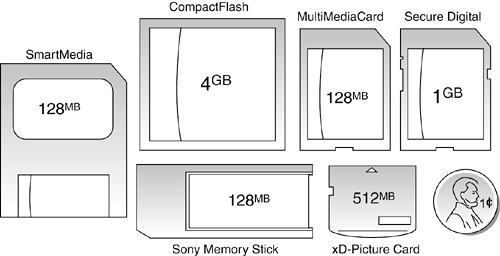
Only the ATA Flash cards can be attached directly to a laptop computer's PC Card slots. All other devices need their own socket or some type of adapter to transfer data. Figure 10.23 shows how the most common types of flash memory cards compare in size to each other and to a penny. Figure 10.23. SmartMedia, CompactFlash, MultiMediaCard, Secure Digital, xD-Picture Card, and Sony Memory Stick flash memory devices. Shown in maximum capacity versions and in relative scale to a U.S. penny (lower right). Table 10.29 provides an overview of the major types of flash memory devices and their capacities. Table 10.29. Flash Memory Card Capacities
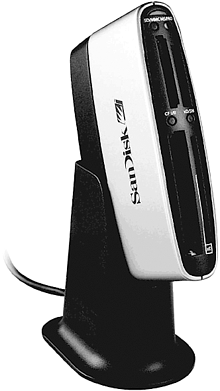
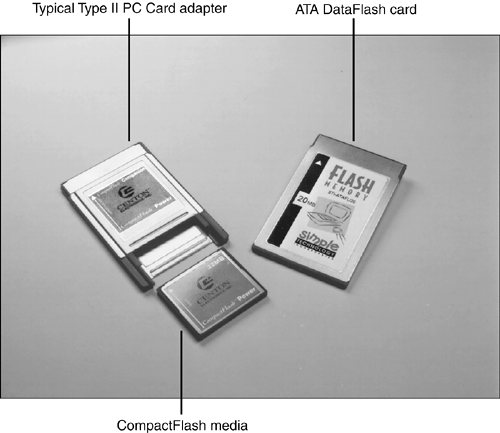
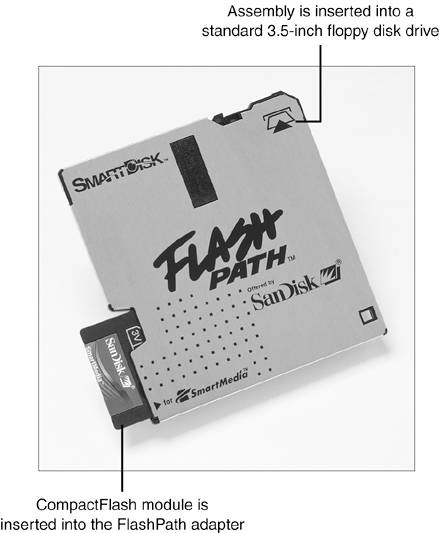
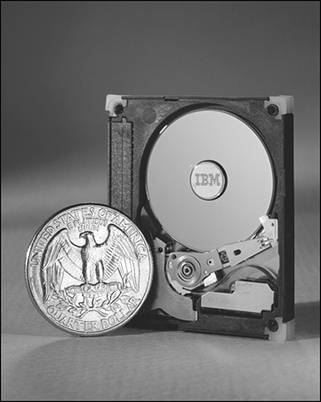
I normally recommend devices (cameras, PDAs, and so on) that use CompactFlash (CF) or Secure Digital (SD) storage. Any of the others I generally do not recommend due to limitations in capacity, performance, proprietary designs, and higher costs. CompactFlash (CF) is the most widely used format in professional and consumer devices, and it offers the highest capacity, at the lowest prices, in a reasonably small size. CF cards plug directly into PC Card slots on all laptops by using a simple passive adapter that is extremely inexpensive. That means when you're not using one of those cards in your camera, you can use them as a solid-state hard disk in a laptop. For a long time I would not even consider a camera or other device that did not use CF storage. I have relaxed on that stance a little bit, but it is still by far the best overall format, available in capacities of up to 4GB or higher. It is also significantly faster than the other formats. Secure Digital (SD) is becoming more popular, is reasonably fast, and available in capacities up to 1GB. SD sockets also take MultiMediaCards (MMCs), which are basically a thinner version of SD. Note that the opposite is not true; that is, MMC sockets will not accept SD cards. MultiMediaCard (MMC) is also available in versions up to 128MB. Finally, SmartMedia (SM) is a very thin format, which has grown in popularity. Capacities are currently limited to 256MB. In general I would not consider any device that used the other formats, especially Memory Stick, which is a Sony proprietary format (didn't they learn anything from Betamax versus VHS?). The xD and RS-MMC formats are found in a limited number of devices with a very limited capacity. ATA Flash was great, but they are physically big, mostly obsolete, and can easily be replaced by a CompactFlash card in a PC Card adapter. Moving Data in Flash Memory Devices to Your ComputerSeveral types of devices can be purchased to enable the data on flash memory cards to be moved from digital cameras and other devices to a computer. Although some digital cameras come with an RS-232 serial cable for data downloading, this is a painfully slow method, even for low-end cameras with less than a megapixel (1,000-pixel horizontal width) resolution. Card ReadersThe major companies that produce flash card products sell card readers that can be used to transfer data from proprietary flash memory cards to PCs. These card readers typically plug into the computer's USB ports (some older versions might use the parallel port) for fast access to the data on the card. In addition to providing fast data transfer, card readers enable the reuse of expensive digital film after the photos are copied from the camera and save camera battery power because the camera is not needed to transfer information. External card readers can be used with any computer with the correct port type and a supported operating system. USB readers, for example, should be used with Windows 98 or above. Because many computer and electronics device users might have devices that use two or more types of flash memory, many vendors now offer multiformat flash memory card readers, such as the SanDisk ImageMate 8 in 1 Card Reader/Writer shown in Figure 10.24. Figure 10.24. The SanDisk ImageMate 8 in 1 Card Reader/Writer is a high-speed USB 2.0 device that can read CompactFlash Type I/II, Memory Stick, Memory Stick Pro, SmartMedia, xD-Picture Card, Secure Digital, and MultiMediaCard formats. Type II PC Card AdaptersFor use in the field, you might prefer to adapt flash memory cards to the Type II PC Card slot. You insert the flash memory into the adapter; then, you slide the adapter into the laptop computer's Type II PC Card slot. Figure 10.25 shows how a CompactFlash card Type II PC Card adapter works. As with card readers, check with the major companies that produce your type of flash memory device for the models available. Figure 10.25. A typical Type II PC Card adapter for CompactFlash media (left) compared to an ATA DataFlash card (right). Floppy AdaptersIf you have a standard 3 1/2'' floppy drive connected to a standard floppy controller, you have a third alternative for reading the contents of flash memory cards: SmartDisk (www.smartdisk.com) makes the FlashPath line of flash memory card adapters that fit in place of a 3 1/2'' floppy disk. Separate models are available for SmartMedia, Sony Memory Stick, and CompactFlash cards. As shown in Figure 10.26, the flash memory devices are inserted into the FlashPath adapter. Then, the FlashPath adapter is inserted into a 3 1/2'' floppy drive. Figure 10.26. A CompactFlash module is inserted into the FlashPath adapter; the assembly is then inserted into a standard 3 1/2'' floppy drive. (Photo courtesy of SanDisk.) Note that this adapter does not work with the SuperDisk drives found in some computers; it works only with 1.44MB floppy drives. Microdrive TechnologyIf you prefer magnetic storage for digital camera data storage, consider the Hitachi Microdrive, originally developed by IBM and now manufactured and sold by Hitachi Global Storage Technologies. The Hitachi Microdrive is also sold by various other companies under OEM agreements. When first introduced by IBM, the Microdrive was released in a 170MB capacity. Current models, though, have capacities of 340MB, 512MB, 1GB, and 4GB. The 4GB model uses a new five-layer version of the Pixie Dust AFC media technology originally developed by IBM. Microdrives can be used with several digital cameras, many laptop computers, and other devices. The Microdrive is a true hard drive at 1'' wide and works in CompactFlash+ Type II slots, enabling it to be a direct replacement for standard CompactFlash memory cards on compatible equipment. The Microdrive is also available as part of a Travel Kit containing a PC Card adapter, and the drive is compatible with many standard CompactFlash card readers. See the www.hgst.com Web site for more information about Microdrive products, a compatibility matrix, and other information. Figure 10.27 shows how Microdrive's mechanism compares in size to a standard U.S. quarter. Figure 10.27. A U.S. quarter is just slightly smaller than the Hitachi (originally IBM) Microdrive. (Photo courtesy of International Business Machines Corporation. Unauthorized use not permitted.) | ||||||||||||||||||||||||||||||||||||||||||||||||||||||||||||||||||||||||||||||||||||||||||||||||||||||


EAN: 2147483647
Pages: 182