Crash Dump Files
| < Day Day Up > |
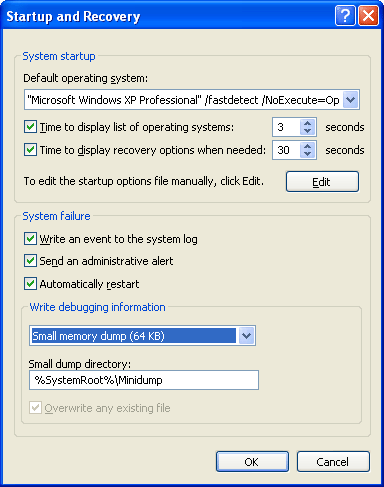
| By default, all Windows systems are configured to attempt to record information about the state of the system when the system crashes. You can see these settings by opening the System tool in Control Panel, and then in the System Properties dialog box, click the Advanced tab and then click the Startup And Recovery button. The default settings for a Windows XP Professional system are shown in Figure 14-3. Figure 14-3. Crash dump settings
Three levels of information can be recorded on a system crash:
While a complete memory dump is a superset of the other options, it has the drawback that its size tracks the amount of physical memory on a system and can therefore become unwieldy. It's not unusual for large server systems to have several gigabytes of memory, resulting in crash dump files that are too large to be uploaded to an FTP server or burned onto a CD. Because user mode code and data are not used during the analysis of most crashes (because crashes originate as a result of problems in kernel memory, and system data structures reside in kernel memory) much of the data stored in a complete memory dump is not relevant to analysis and therefore contributes wastefully to the size of a dump file. A final disadvantage is that the paging file on the boot volume (the volume with the \Windows directory) must be at least as large as the amount of physical memory on the system plus 1 MB. Because the size of paging files required, in general, inversely tracks the amount of physical memory present, this requirement can force the paging file to be unnecessarily large. You should therefore consider the advantages offered by the small and kernel memory dump options. An advantage of a minidump is its small size, which makes it convenient for exchange via e-mail, for example. In addition, each crash generates a file in the directory \Windows\Mini-dump with a unique file name consisting of the string "Mini" plus the date plus a sequence number (for example, Mini082604-01.dmp). A disadvantage of minidumps is that to analyze them, you must have access to the exact images used on the system that generated the dump at the time you analyze the dump. (At a minimum, a copy of the matching Ntoskrnl.exe is needed to perform the most basic analysis.) This can be problematic if you want to analyze a dump on a system different from the system that generated the dump. However, the Microsoft symbol server contains images (and symbols) for Windows XP systems and later, so you can set the image path in the debugger to point to the symbol server and the debugger will automatically download the needed images. (Of course, the Microsoft image server won't have images for third-party drivers you have installed.) A more significant disadvantage is that the limited amount of data stored in the dump can hamper effective analysis. You can also get the advantages of minidumps even when you configure a system to generate kernel or complete crash dumps by opening the larger crash with Windbg and using the .dump /m command to extract a minidump. Note that on Windows XP and Windows Server 2003, a minidump is automatically created even if the system is set for full or kernel dumps. Note
The kernel memory dump option offers a practical middle ground. Because it contains all of kernel-mode owned physical memory it has the same level of analysis-related data as a complete memory dump, but it omits the usually irrelevant user-mode data and code, and therefore can be significantly smaller. As examples, on a system running Windows XP with 256 MB of RAM, a kernel memory dump was 34 MB in size; and on another Windows XP system with 1.5 GB of RAM, a kernel memory dump took up 72 MB. When you configure kernel memory dumps, the system checks whether the paging file is large enough (as outlined in Table 14-1), but these are only estimated sizes because there is no way to predict the size of a kernel memory dump. The reason you can't predict the size of a kernel memory dump is because its size depends on the amount of kernel-mode memory in use by the operating system and drivers present on the machine at the time of the crash.
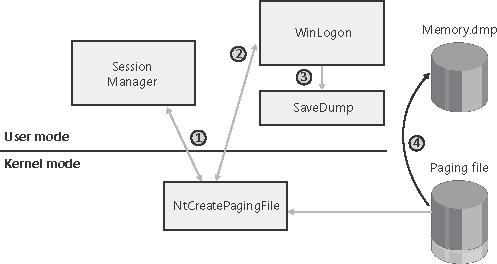
Therefore, it is possible that at the time of the crash, the paging file is too small to hold a kernel dump. If you want to see the size of a kernel dump on your system, force a manual crash either by configuring the option to allow you to initiate a manual system crash from the console or by using the Notmyfault tool described later in this chapter. (Both these approaches are described later in the chapter.) When you reboot, you can check to make sure a kernel dump was generated and check its size to gauge how large to make your boot volume paging file. To be conservative, on 32-bit systems you can choose a page file size of 2 GB plus 1 MB, because 2 GB is the maximum kernel mode address space available. Finally, even if the system successfully records the crash dump in the paging file at the time of the crash, there must be enough free disk space to extract the dump file. If there is not enough disk space, the crash dump is lost because the space used in the paging file to hold the dump is released and will be overwritten as the system begins to use the paging file. If you do not have enough space on the boot volume for saving the memory.dmp file, you can choose a location on any other local hard disk through the dialog box shown in Figure 14-3. Crash Dump GenerationWhen the system boots, it checks the crash dump options configured by reading the registry value HKLM\System\CurrentControlSet\Control\CrashControl. If a dump is configured, it makes a copy of the disk miniport driver used to write to the boot volume in memory and gives it the same name as the miniport with the word "dump_" prefixed. It also checksums the components involved with writing a crash dump including the copied disk miniport driver, the I/O Manager functions that write the dump, and the map of where the boot volume's paging file is on disk and saves the checksum. When KeBugCheckEx executes, it checksums the components again and compares the new checksum with that obtained at the boot. If there's not a match, it does not write a crash dump, because doing so would likely fail or corrupt the disk. Upon a successful checksum match, KeBugCheckEx writes the dump information directly to the sectors on disk occupied by the paging file, bypassing the file system driver (which might be corrupted or even have caused the crash). When SMSS enables paging during the boot process, the system looks in the boot volume's paging file to see whether a crash dump is present and protects the part of the paging file occupied by a dump. This makes part or all of the boot volume paging file unusable for the early part of the boot, which can cause notifications to display that the system is running low on virtual memory, a condition that is only temporary. Later in the boot, Winlogon determines whether or not a crash dump is in the paging file by calling the undocumented NtQuerySystemInformation API, and if a crash dump is there, it launches the Savedump process (\Windows\System32\Savedump.exe) to extract the crash dump from the paging file and copy it to its final location. These steps are shown in Figure 14-4. Figure 14-4. Crash dump file generation
|

| < Day Day Up > |

EAN: 2147483647
Pages: 158