Automated Software Deployment
|
| < Day Day Up > |
|
Whether one is concerned with license compliance or keeping hackers at bay, it is impossible to address the problem manually. In the week of January 16, 2002, alone, for example, 50 virus definitions were added to Norton Antivirus. In response to this situation of having to get out hundreds of updates to thousands or tens of thousands of desktops and servers, a fairly new brand of software has evolved dealing with software deployment and distribution. In its simplest form, IT personnel must go from desktop to desktop to load this deployment software. Once it is on every machine, however, new updates and upgrades can be transmitted to each box relatively quickly. A more sophisticated approach to this problem, fortunately, is now starting to become the standard — loading the software onto one server and having it take care of update distribution automatically without IT intervention. Thus, a systems manager can decide to send the latest virus signatures once a day to all users and set up the server to relay the updates without any further effort.
Next we take a look at the main approaches to automated software deployment and software management. Some are appropriate for large organizations, others for smaller outfits. The key is to understand the software deployment marketplace, the tools available, and the enterprise's needs and current infrastructure; at that point, the choice of approach will become obvious.
Frameworks and Software Deployment
Large enterprises have the option of using network management frameworks such as IBM's Tivoli, Computer Associates' Unicenter TNG, or Hewlett-Packard's Openview. For entities that have already installed such a system, it is probably best to utilize the vendor's inventory/deployment modules. New York City's Fordham University, for example, implemented Computer Associate's Unicenter Software Deployment Option (SDO) along with the Asset Management Option (AMO). The school's three campuses and over 3000 desktops represented a significant problem when it came time to load new applications. Thousands of hours were consumed by IT, with deployment of Microsoft Office alone taking a team of two IT staff several months to load on every desktop. Now, instead of loading applications by hand, IT staff use SDO to automatically distribute applications throughout the university's distributed IT environment, without leaving the institution's primary support facilities.
Microsoft Tools and Software Deployment
For Windows networks, an alternative approach is to use Microsoft's Systems Management Server (SMS) 2.0, which has both inventory and deployment functions. SMS normally requires a dedicated server and is less expensive and quicker to install than a management framework. SMS was the route taken by Los Alamos National Laboratory (www.lanl.gov). In addition to having two of the world's eight fastest supercomputers for modeling nuclear reactions, the laboratory also has 11,000 desktops. Although it needed to ensure its security functions were top notch, labor requirements made this prohibitive. The laboratory's Information Architecture (IA) team for desktop systems calculated that, even if only one updated virus definition, a single operating system patch, and one browser patch were installed each month, it would take 87 staff working full time (at an average of 19 updates per person per day) to manually keep up with the changes. The IA team simply did not have the personnel to do this, so they decided to investigate enterprisewide desktop management (DM) systems. After evaluating several DM products, they piloted Microsoft's SMS and then rolled it out to five sites serving more than 1500 desktops. In a nine-month period, the SMS team produced and distributed over 70 software packages with a total technical resource investment of 210 person-days. To do the same job manually would have required 5530 person-days.
Implementing a DM system, however, involved significant startup costs including buying a server and paying for all the software licenses, as well as hiring the tech personnel. For a 150-user group, these costs came to $272,541, or $1,817 per client. The IA team discovered, however, that as they rolled out SMS across a larger and larger portion of its overall organization, more attractive economies of scale come into play that eventually brought the cost per client down to less than $200. SMS goes way beyond software deployment, into the areas of remote desktop support and network management. This added functionality, however, also means added complexity for deployment and administration. SMS is not something one can take out of the box, load, and put to use. So, before deploying it, an enterprise must make sure it has available IT resources with the experience to cope with it.
Site Licensing/Tracking Software
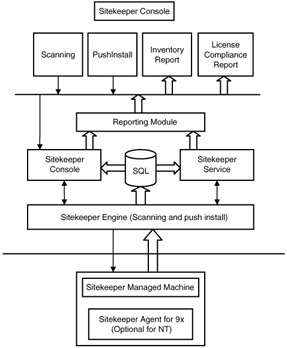
The above approaches are comprehensive solutions, but can be overkill — too complex or expensive for someone who wants to deal with the immediate problem of managing licenses and updates. A full framework, for example, typically comes with a price tag of hundreds of thousands or millions of dollars and can take over a year to put in place — not the sort of pace required when the BSA might come knocking at any moment. Luckily, several easier and quicker approach to software deployment and licensing are available. Dedicated deployment tools take care of the software deployment and distribution task without burdening users with all the bells and whistles of a framework or SMS. One of the better ones is Executive Software's Sitekeeper. This is a tightly focused tool dealing with automated software distribution, inventory, updating, and license tracking that costs about $15 per machine for large enterprises (Exhibit 1).
Exhibit 1: Sitekeeper High-Level Data/Control Flow Diagram
 |
|
After installing Sitekeeper, the first step is to launch Inventory Tracker, which contains a setup wizard to guide the administrator through the process of designating which domains or machines to inventory and how often. It does not install any agents on the workstations but scans the Windows Registry to gather software names, versions (major and minor), build number or patch level, and name of publisher. It typically inventories five to ten machines per second, so a thousand-user network would be done in two to three minutes. Data is stored in a database, and a browser-based inventory report is generated. This shows both the inventory on each machine, as well as which machines have a particular product installed.
Another module, License Tracker, generates a license report based on the completed inventory. The administrator enters the number of licenses purchased, and the report informs the administrator if the organization has excess licenses, if it needs to purchase some more, and if users are installing software locally without permission. From there on out, the module will continue to notify the administrator as licenses expire or new inventories show changes in license status.
Sitekeeper's PushInstall is of most relevance to software deployment. This feature remotely installs and uninstalls software, updates, upgrades, and patches. It works with any Windows 2000, XP, or Microsoft installer-compliant program, as well as most software designed for NT. Software, updates, and patches can be scheduled to use minimum resources, which takes a little longer but has less impact on users. When speed is more important, such as when installing a new virus definition, the administrators can run the program at a higher priority. Once the administrator selects the target machines or domains and the installation speed, the program automatically installs the software and reports the results of each installation back to the administrator.
Sitekeeper is a quick-to-implement, simple-to-run, and inexpensive software management application. For those looking for a "set it and forget it" method of staying on top of licensing and software management headaches, it does the job well.
Software Deployment Case Study
-
Organization — Unisea, Inc. (Redmond, Washington, and Dutch Harbor, Alaska; www.unisea.com).
-
Business/mission — Unisea is one of the world's leading fish product companies, with peak production of over 60 metric tons of fish per hour.
-
Goal — The primary goal was to create accurate hardware and software inventories and ensure license compliance; the secondary goal was to be able to run routine checks for users installing unauthorized software.
-
Scope — Software is installed at two locations, the headquarters in Washington and the processing facility in Alaska; the company has about 1200 employees.
-
Solution — Executive Software's Sitekeeper was installed to automate inventorying, deployment, and license compliance.
-
Results — Inventories are now taken and maintained automatically. Routine deployment of software updates has been reduced to one hour per site during normal business hours (no more coming in early or working late).
-
Cost savings — Personnel time required for software updates was reduced 85 percent; process revealed that the company had more software licenses than it needed.
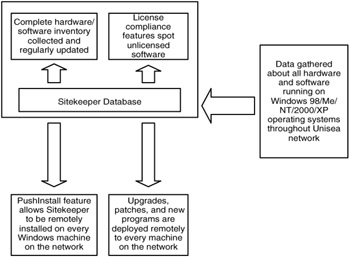
For many years, Unisea systems staff performed updates and inventories manually. Administrators tracked licenses using paper and pen, consolidating various notes into an Excel spreadsheet. Similarly, deploying software updates required visits to every desktop every time a new patch came in, and IT staff worked nights going from box to box to install the latest patch. As a result, their workload became backlogged and critical updates were delayed. Unisea purchased Sitekeeper by Executive Software to automate these processes and to add the capability of checking company machines periodically for unauthorized software (Exhibit 2).
Exhibit 2: Unisea's Sitekeeper Architecture
|
|
Unisea uses a mix of Windows NT 4.0 and Windows 2000 servers running in a NT 4.0 domain. This meant that Unisea did not have to install any agents on these boxes, as Sitekeeper works without agents on Windows NT, 2000, and XP boxes, which greatly speeded up installation because the software had to be loaded only on the host machine in order to automatically inventory all client boxes at a rate of about ten per second.
While many firms are concerned about license compliance because of the huge penalties that could be incurred following surprise audits from policing bodies such as the BSA or SIIA, this was not a concern for Unisea. The company had purchased enough licensing; in fact, initial inventories revealed that the company had actually paid for more licenses on some software than it needed.
The benefits experienced from automated inventorying, though, were overshadowed by the amount of time saved in software deployment utilizing Sitekeeper's PushInstall feature. In one sixty-day period, for example, two critical Internet Explorer (IE) security patches came out. Unfortunately, Microsoft decided to release these IE patches individually by version, rather than one release covering a range of versions. Earlier, an update like this would have meant that Unisea IT staff would have had to go around to each box to apply the appropriate patches. Manually installing patches could require the IT staff to come in at 4:00 in the morning or work late into the evening so they would not have to kick users off their machines. Depending on existing priorities, it could take days or even weeks for every machine receive the update. Using Sitekeeper, however, the system administrator identified the various IE versions on each box and remotely applied the appropriate patch to every workstation and server. This reduced the workload from two days to a few minutes. Today, Unisea updates software as soon as a patch comes in, even during business hours; thus, system security is enhanced as known vulnerabilities are immediately remedied. Further, it means that all needed updates do get done, as opposed to being lost in the line behind scores of other updates.
|
| < Day Day Up > |
|

EAN: N/A
Pages: 197