VLANs
|
| < Day Day Up > |
|
Will the WLAN you're about to implement support roaming and/or bandwidth-intensive applications? If so, consider building the WLAN upon a virtual local area network (VLAN) architecture. Adding VLAN capabilities to an existing WLAN, or deploying a new WLAN using VLAN technology, enables wireless clients to roam without dropping a connection, and segments "chatty" applications so that other WLAN users don't experience degraded service. For example, if the WLAN is to support voice over IP, videoconferencing, or other bandwidth hogging applications, a VLAN can be used within the WLAN to segment this bandwidth intensive traffic. A VLAN can also logically segment WLAN users on an organizational basis, i.e. by functions, departments, project teams, applications, etc., rather than on a physical or geographical basis. For example, a WLAN built upon a VLAN architecture, can segment all computing devices and servers used by a particular segment so that they connect to the same VLAN, regardless of their physical connection to the network. (Marketing personnel in different physical locations and on different network topologies could be part of one VLAN, while engineering personnel could form another distinct VLAN.)
When VLANs were introduced in the late 1990s, they were touted as a way to simplify address management by letting IT departments physically deploy servers and PCs anywhere on a network, and then associate the machines into virtual groups. Software on most managed network equipment can be used to associate client MAC addresses with VLANs, letting the computing device automatically connect to its network when moved from one port to another.
Most of today's VLANs are based on the IEEE 802.1Q and 802.1P standards. 802.1Q provides a standard method for inserting VLAN membership information into Ethernet frames, and 802.1P gives Layer 2 switches the ability to prioritize traffic and perform dynamic multicast filtering.
A VLAN architecture, whether in a wired, wireless, or mixed network environment, can provide the following benefits:
Improved scalability: This is especially true in LAN environments that support protocols and applications that can flood packets throughout a network.
Network organization based on function: VLANs allow logical network topologies to overlay the physical switched infrastructure, such that any arbitrary collection of LAN ports can be combined into an autonomous user group. Logically segmented portions of the network are separated into Layer 2 broadcast domains, whereby packets can be switched between ports that are designated as being within the same VLAN. By containing traffic originating on a particular LAN only to other LANs in the same VLAN, the virtual networks avoid wasting bandwidth. (This is a drawback inherent to traditional bridged and switched networks in which packets are often forwarded to LANs with no need for them.)
Common broadcast domains: By offering common broadcast domains, there can be complete isolation between VLANs. Just as switches isolate collision domains for attached hosts and only forward appropriate traffic out a particular port, VLANs can provide isolation between VLANs.
Improved security: Not only can firewall protection be provided for individual VLANs, high-security users can be grouped into a VLAN where no users outside that VLAN can communicate with them.
Improved performance: A VLAN supports logical grouping of users. Thus it is possible to improve general network performance through traffic segmentation, e.g. isolating groups with high bandwidth usage that can slow down other users sharing the network. This in turn allows the intensive use of a specific application (e.g. an accounting suite sitting on a group of servers), or the use of a bandwidth intensive application (e.g. videoconferencing), to be assigned to a VLAN that contains one specific group and its servers (such as the R&D department), or that specific application server and its users (videoconferencing application and its local attendees). Thus that group's work or application's usage will not affect other users on the same network.
Wireless VLANs
The majority of WLAN products and technology available today focus only on the Data Link Layer and on solving discrete security and mobility problems. None provide the comprehensive capabilities needed to help enterprises centralize control and to easily and cost-effectively deploy, secure and scale wireless LANs. However, it is possible to extend the concept of Layer 2 wired VLANs to wireless LANs, using wireless VLANs. As with wired VLANS, wireless VLANs define broadcast domains and segregate broadcast and multicast traffic between VLANs. Without a VLAN, the deployment team must install additional wireless LAN infrastructure to segment traffic between user groups or device groups. For example, to segment traffic between employee and guest VLANs requires two APs to be installed at every location where both are expected to access the WLAN. (See Fig. 8.3.)
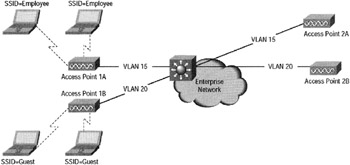
Figure 8.3: User segmentation without wireless VLANs. Graphic courtesy of Cisco Systems, Inc.
However, with the use of wireless VLANs, one access point at each location can provide access to both groups. VLAN architecture can also be of great help in a WLAN infrastructure where there are roaming difficulties. VLANs can provide a means for wireless clients to roam among 802.11 (a, b or g) access points without losing connectivity.
Consider Bridgewater State College in Massachusetts, which deployed more than 100 Enterasys Networks RoamAbout 802.11 dual-mode APs, along with a mix of Cisco and Enterasys stackable switches throughout the campus so that students could access the Web. As long as the students were on campus, they could get online. According to Pat Cronin, telecommunications director at Bridgewater State, "After getting over a few cross-vendor VLAN configuration issues, students and faculty now can roam anywhere and stay connected on the same VLAN, whether they are connected to a Cisco or Enterasys switch." Cronin goes on to say, "If we didn't segregate the wireless traffic into its own VLAN, it would be a nightmare with people moving around campus who want to stay connected. Putting all wireless traffic on a VLAN ensures that no one drops off the network as they move from access point to access point."
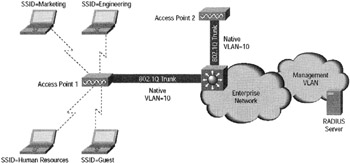
Figure 8.4: An indoor wireless VLAN deployment where four wireless VLANs are provisioned across a campus to provide WLAN access to full-time employees (segmented into engineering, marketing, and human resources user groups) and guests. Graphic courtesy of Cisco Systems, Inc.
Criteria for a VLAN in a Wireless Network
To properly deploy wireless VLANs, the deployment team must evaluate the need for VLANs within the existing or proposed WLAN architecture. The evaluation should include, but not be limited to:
-
A review of any existing wired VLAN deployment rules and policies, since existing wired VLAN policies can be used as the basis for wireless VLAN deployment policies.
-
Identification of the common applications used by all WLAN users, e.g. wired network resources (such as servers). Then determine the Quality of Service (QoS) level needed for each application.
-
A list of the common devices used to access the wireless LAN.
Once the data is gathered, determine (1) what security mechanisms, e.g. static WEP, MAC authentication, Extensible Authentication Protocol (EAP) authentication (LEAP, EAP-TLS or PEAP), virtual private networking, and so forth, are supported by each device; (2) which wired network resources (such as servers), are accessed by each WLAN device group; and (3) the QoS level needed to support each device group.
After completing the evaluation, determine the VLAN deployment strategy for your WLAN. There are two standard deployment strategies. One is segmentation by user groups. For example, three separate wired and wireless VLANs could be created-one for R&D, another for accounting, and a third for guest access. The other is segmentation by device type. This allows a variety of different devices with different access-security "levels" to access the WLAN. For example, handheld computers that support only 40/128-bit static-WEP shouldn't coexist in the same VLAN with WLAN client devices that support 802.1X with dynamic WEP. Instead, group and isolate these devices by their different "levels" of access security into separate VLANs.
The next step is to define implementation criteria such as use of policy group (set of filters) to map wired policies to the wireless side; use of 802.1X to control user access to VLANs using either RADIUS-based VLAN assignment or RADIUS-based SSID access control; and use of separate VLANs to implement different quality of service or class of service.
Deploying a Wireless VLAN
The criteria for a wireless VLAN deployment differs according to whether the VLAN is operating in an indoor or outdoor environment. For indoor deployments, the APs are generally configured to map several wired VLANs to the wireless LAN. For outdoor environments, 802.1Q trunks are deployed between bridges with each bridge terminating and extending as an 802.1Q trunk, participating in the 802.1D-based Spanning Tree Protocol process.
Each wireless VLAN is configured with appropriate network policies and mapped to a wired VLAN. A network manager enforces the appropriate network policies within the wired network for each different user group.
VLANs and Security
A VLAN architecture ups the WLAN's security quotient by allowing network managers to define appropriate restrictions per VLAN, using the APs as the security policy vehicles.
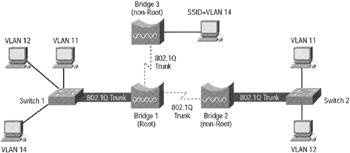
Figure 8.5: An outdoor wireless VLAN deployment scenario. Wireless trunking connects the root bridge to the non-root bridges. The root and non-root bridges terminate the 802.1Q trunk and participate in the Spanning-Tree Protocol process of bridging the networks together. Graphic courtesy of Cisco Systems, Inc.
Cisco Systems offers an example of configurable parameters on a SSID wireless VLAN and on the wired VLAN side. SSID wireless VLAN parameters include:
-
SSID name-configures a unique name per wireless VLAN.
-
Default VLAN-ID mapping on the wired side.
-
Authentication types-open, shared, and network-Extensible Authentication Protocol (EAP) types.
-
MAC authentication-under open, shared, and network-EAP.
-
EAP authentication-under open and shared authentication types.
-
Maximum number of associations-ability to limit maximum number of WLAN clients per SSID.
 |
Symbol Technologies Inc., a big provider of wireless and wireless LAN products, offers a Mobius Axon Wireless Switch that delivers centralized wireless connectivity through Mobius Axon Access Ports. The switch supports 802.11b, 802.11a, 802.11g, and legacy Symbol wireless protocols. Existing wireless LAN products require customers to integrate and manage separate products for wireless connectivity, security, and management.
The product uses a virtual LAN architecture and policy-based networking to deliver bandwidth, security, and networking services by device, by user, by application, and by location, all from a single access port. It performs traditional Layer 2, Layer 3, and Layer 4 switching, all of which is managed through an XML-based or command-line user interface.
There are two hardware components: the Mobius Axon Wireless Switch and Mobius Axon Access Ports. Software components include the Symbol MobiusGuard security portfolio, authentication features and virtual private network capabilities, and wireless network management.
|
The wired VLAN parameters are:
-
Encryption key-this key is used for broadcast and multicast traffic segmentation per VLAN. (It is also used for static WEP clients.) Network managers must define a unique encryption key per VLAN. With an encryption key configured, the VLAN supports standardized WEP.
-
Enhanced Message Integrity Check (MIC) verification for WEP-enables MIC per VLAN.
-
Temporal Key Integrity Protocol (TKIP)-enables per-packet key hashing per VLAN.
-
WEP (broadcast) key rotation interval-enables broadcast WEP key rotation per VLAN. This is only supported for wireless VLANs with IEEE 802.1X EAP protocols enabled (such as EAP Cisco Wireless [LEAP], EAP-Transport Layer Security [EAP-TLS], Protected Extensible Authentication Protocol [PEAP], and EAP-Subscriber Identity Module [EAP-SIM]).
-
Default policy group-applies policy group (set of Layer 2, 3, and 4 filters) per VLAN. Each filter (within a policy group) is configurable to allow or deny certain types of traffic.
-
Default priority-applies default class of service (CoS) priority per VLAN.
|
| < Day Day Up > |
|

EAN: 2147483647
Pages: 273
- Challenging the Unpredictable: Changeable Order Management Systems
- Enterprise Application Integration: New Solutions for a Solved Problem or a Challenging Research Field?
- Context Management of ERP Processes in Virtual Communities
- Data Mining for Business Process Reengineering
- A Hybrid Clustering Technique to Improve Patient Data Quality