Optimizing Vectors
All vector graphics are made up of paths in one shape or another. A path can be as simple as a straight line with two points, a curved line with two points, or 500 or more points along an irregular shape or fill. For this reason, vector graphics are best suited for graphic images such as logos, architectural drawings, and clip art that do not include continuous tones. Fonts are also made up of paths. As you've seen with Flash-drawn graphics, you can scale them to any size without any loss of resolution, unlike raster (bitmap) artwork, which cannot scale larger than its original size without loss of resolution.
| Note | Vector graphics are eventually rasterized, so to speak. The vector formatting for drawn shapes and text is more of a simplified storage structure that contains a mathematical description (that is, smaller than a bit-for-bit description) of an object or set of objects. When the vector graphic is displayed, especially with anti-aliasing, the video card needs to render the edges in pixels. Likewise, the PostScript RIP (Raster Image Processor) of a laser printer needs to convert the vector information, or an EPS (Encapsulated PostScript) file, into printer "dots." |
When you use imported vector graphics in Flash movies, you should minimize the number of points describing curved lines or intricate outlined graphics (for example, "traced" raster images). The problem with creating cool graphics in vector-based applications such as Illustrator, FreeHand, and 3D Studio Max is the large number of points used to describe lines. When these graphics are imported into Flash, animations are slower and harder to redraw (or refresh) on the computer screen. In addition, the file size of the Flash movie grows considerably. Most vector applications include features that will enable you to optimize or simplify artwork before importing it to Flash.
| Cross-Reference | For tips on optimizing vector artwork in other applications, including Adobe Illustrator, Streamline, and Macromedia FreeHand, as well as coverage of export options, refer to Chapter 37, "Working with Vector Graphics," on this book's CD-ROM. |
There are also a number of ways that you can simplify artwork after it has been imported to Flash. We have discussed many of these Flash features in previous chapters, but we will briefly summarize them here.
Tracing Complex Vector Artwork
Many graphics programs, such as Discreet 3D Studio Max and Adobe Dimensions, can create some astonishing vector-based graphics. However, when you import vector versions of those graphics into Flash, they either fall apart (display horribly) or add unrealistic byte chunks to your Flash movie. But this doesn't mean that you can't use these intricate graphics in your Flash movies. You can try several different procedures with intricate vector artwork, including smoothing, as described previously, to make complex graphics more Flash-friendly.
Depending on the specific use of the artwork, you may also be able to output small raster equivalents that won't consume nearly as much space as highly detailed vector graphics. However, in some instances, the best solution is a bit more labor-intensive. To get just the right "translation" of a complex vector graphic in your Flash movie, you may need to try redrawing the artwork in Flash. Sound crazy and time-consuming? Well, it's a bit of both, but some Flash designers spend hour after hour getting incredibly small file sizes from "hand-tracing" vector designs in Flash.
For example, if you made a highly detailed technical drawing of a light bulb, and wanted to bring it into Flash, you could import the original version of the drawing into Flash, place it on a locked Guide layer, and use Flash drawing tools to re-create a stylized sketch version of the object (see Figure 16-21).
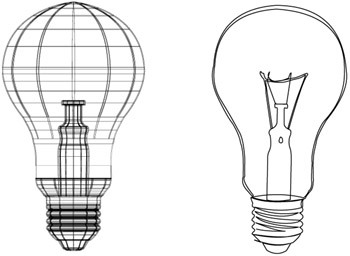
Figure 16-21: Compare the original imported vector artwork of the light bulb (left) with the stylized version drawn in Flash (right).
| Tip | Many other Flash SWF tools can help to speed up the work of optimizing vector artwork — for example, Electric Rain's Swift 3D can simplify 3D models and output .swf files. The art and science of creating 3D Flash graphics is a complex topic that is beyond the scope of this book. If this is an area that you would like to learn more about, we suggest you refer to The Flash MX 3D Graphics Bible by Matthew David (Wiley, 2003). |
Converting Text to Outlines
Another aspect of vector graphics that you need to keep in mind — especially when working with other designers — is font linking and embedding. With most vector file formats, such as Illustrator, FreeHand, or EPS, you can link to fonts that are located on your system. However, if you give those files to someone who doesn't have those fonts installed, then he won't be able to see or use the fonts. Some formats enable you to embed fonts into the document file, which circumvents this problem. However, whether the fonts are linked or embedded, you may be unnecessarily bloating the size of the vector graphic.
You can break apart imported text in Flash by using the Modify ð Break apart command (Ctrl+B or z+B). You have to first break the text into letters and then break them apart a second time to get basic shapes.
You can also convert any text into outlines (or paths) in most drawing or illustration programs (see Figure 16-22). In Macromedia FreeHand, select the text as a text block (with the Selection tool, not the Text tool) and choose Text ð Convert to Paths. In Adobe Illustrator, select the text as an object and choose Type ð Create Outlines.
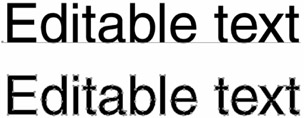
Figure 16-22: Make sure that you have finished editing your text before converting it into outlines. The text at the top can be edited, whereas the text at the bottom can only be modified as individual shapes.
If you have a lot of body text in the graphic, you may want to copy the text directly into a Flash text box and use a _sans, _serif, or other device font. These fonts do not require additional file information (as embedded fonts do) when used in a Flash movie.
Optimizing Curves
You can also reduce the complexity of paths within Flash by using the Modify ð Shape ð Optimize command. This has the same effect as the Simplify command in FreeHand, with a couple of extra options. When working with bitmaps or symbols, be sure to use the Modify ð Break apart command, and if you are working with a group, ungroup it (Modify ð Ungroup) before you use the Optimize command (Alt+Shift+Ctrl+C or Option+Shift+z+C) — you can't optimize groups or symbols. The Optimize Curves dialog box enables you to specify multiple passes, which means that Flash will optimize the graphic at a given setting as much as it possibly can. Figure 16-23 shows the effect of maximum smoothing on a complex seashell graphic.
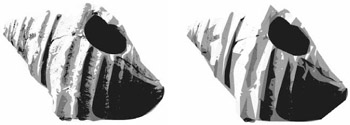
Figure 16-23: A complex vector graphic simplified with maximum smoothing
| Cross-Reference | For a more detailed description of the Optimize curves options, refer to Chapter 5, "Drawing in Flash." |
Runtime Bitmap Caching
Flash 8 includes a brand-new feature designed to improve rendering performance of animation that uses complex vector graphics. This option appears as a small check box in the Property inspector when a Movie Clip instance is selected in the Flash authoring environment (as shown in Figure 16-24). If bitmap caching is enabled, Flash will convert the vector graphic into a bitmap image at run time. The advantage of using this technique is only evident as you start to build more complex files that require Flash to redraw elements in an animation. If your vector artwork is optimized and uses very few points, converting from vector to bitmap will not offer any performance improvements. However, if you have created a highly detailed vector background that you will use to layer with other animated elements, Flash will be able to dedicate more resources to rendering smooth animation if the background is converted into a cached bitmap. Because the bitmap graphic is only rendered once, the speed and smoothness of your animation will not be hindered by Flash having to constantly redraw the points and lines that make up your vector background. These same principles apply if you are using a very complex vector graphic that is motionless but modified with Filter effects. Bitmap caching makes it possible for Flash to convert the complex vectors into a simpler pixel surface while it dedicates resources to rendering the Filter transformations.
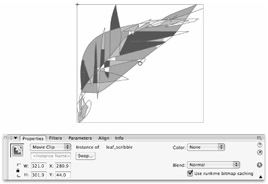
Figure 16-24: Bitmap caching can be enabled in the Property inspector when a Movie Clip or Button symbol is selected in the authoring environment.
There are a few limitations to bitmap caching that you should keep in mind:
-
Bitmap caching uses significantly more memory than rendering vectors. Use bitmap caching only when it will noticeably improve the performance (smoothness) of your animation.
-
If your animation requires a tight zoom on vector content, it will look pixilated if the cache as bitmap option is enabled for that item.
-
Bitmap caching will fail if it is applied to a symbol that is larger than 2,880 pixels tall or wide.
-
If the graphic with bitmap caching enabled is nested inside of another symbol that is rotated or scrolled, bitmap caching will be ignored for the nested graphic.
-
If the Flash Player runs out of memory (producing an error), bitmap caching will be canceled.
| Cross-Reference | Bitmap caching can also improve performance on applications with scrolling text fields or overlapping windows. For an example of using bitmap caching with a scrollable text field, refer to Chapter 30, "Applying HTML and Text Field Formatting." |
| Web Resource | We'd like to know what you think about this chapter. Visit www.flashsupport.com/feedback to fill out an online form with your comments. |

EAN: 2147483647
Pages: 395