11.3 Advanced JDBC
| You can develop entire applications using only the JDBC I have presented so far in this chapter. What you have seen, however, is not the end of database programming. JDBC provides many more interfaces to support a variety of less common, yet very important database programming needs. 11.3.1 Batch ProcessingComplex systems often require both online and batch processing. Each kind of processing has very different requirements. Because online processing involves a user waiting on application processing, the timing and performance of each statement execution in a process is important. Batch processing, on the other hand, occurs when a bunch of distinct transactions need to occur independent from user interaction. A bank's ATM machine is an example of a system of online processes. The monthly process that calculates and adds interest to your savings account is an example of a batch process. JDBC enables you to assign a series of SQL statements to a JDBC Statement (or one of its subclasses) to be submitted together for execution by the database. Using the techniques you have learned so far in this book, account interest calculation processing occurs roughly in the following fashion:
This style of processing requires a lot of back and forth between the Java application and the database. JDBC batch processing provides a simpler, more efficient approach to this kind of processing:
Under batch processing, there is no back and forth to the database for each account. Instead, all Java-level processing ”the binding of parameters ”occurs before you send the statements to the database. Communication with the database occurs in one huge burst; the huge bottleneck of stop-and-go communication with the database is gone. Statement and its children all support batch processing through an addBatch( ) method. For Statement , addBatch( ) accepts a String that is the SQL to be executed as part of the batch. The following code shows how to use a Statement object to batch process interest calculation: Statement stmt = conn.createStatement( ); int[ ] rows; for(int i=0; i<accts.length; i++) { accts[i].calculateInterest( ); stmt.addBatch("UPDATE account SET balance = " + accts[i].getBalance( ) + " WHERE id = " + accts[i].getId( )); } rows = stmt.executeBatch( ); The addBatch( ) method is basically nothing more than a tool for assigning a bunch of SQL statements to a single JDBC Statement . Because it makes no sense to manage results in batch processing, the statements you pass to addBatch( ) should be some form of an update: a CREATE , INSERT , DELETE , or UPDATE statement. Once you are done assigning statements, your application calls executeBatch( ) . This method returns an array of rows affected by each statement in the batch. For example, the first element contains the number of rows affected by the first statement. Upon completion, the list of SQL calls associated with the Statement instance is cleared. Using prepared statements and callable statements works very much like regular statements, except you are assigning batches of parameters instead of batches of individual statements. Interest calculation with a prepared statement looks like this: PreparedStatement stmt = conn.prepareStatement("UPDATE account " + "SET balance = ? " + "WHERE id = ?"); int[ ] rows; for(int i=0; i<accts.length; i++) { accts[i].calculateInterest( ); stmt.setDouble(1, accts[i].getBalance( )); stmt.setInt(2, accts[i].getId( )); stmt.addBatch( ); } rows = stmt.executeBatch( ); 11.3.2 MetadataThe term metadata sounds officious, but it is really nothing more than extra data about some object that would otherwise waste resources if it were actually kept in the object. For example, simple applications do not need the name of the columns associated with a ResultSet ”the programmer probably knew that when the code was written. Embedding this extra information in the ResultSet class is thus not considered by JDBC's designers to be part of the core ResultSet functionality. Data such as column names , however, is very important to some data programmers ” especially to those writing dynamic database access. The JDBC designers provide access to this extra information ”the metadata ”via the ResultSetMetaData interface. For example, this class can tell you:
Example 11-6 shows some of the source code from a command-line tool that accepts arbitrary user input and sends it to a database for execution. Example 11-6. An application for executing dynamic SQL import java.sql.*; public class Exec { static public void main(String[ ] args) { Connection conn = null; String sql = ""; for(int i=0; i<args.length; i++) { sql = sql + args[i]; if( i < args.length - 1 ) { sql = sql + " "; } } System.out.println("Executing: " + sql); try { Class.forName("org.gjt.mm.mysql.Driver") .newInstance( ); String url = "jdbc:mysql://localhost/Web"; Statement stmt; conn = DriverManager.getConnection(url, "dvl", "dvl"); stmt = conn.createStatement( ); if( stmt.execute(sql) ) { ResultSet rs = stmt.getResultSet( ); ResultSetMetaData meta = rs.getMetaData( ); int cols = meta.getColumnCount( ); int row = 0; while( rs.next( ) ) { row++; System.out.println("Row: " + row); for(int i=0; i<cols; i++) { System.out.print(meta.getColumnLabel(i+1) + ": " + rs.getObject(i+1) + ", "); } System.out.println(""); } } else { System.out.println(stmt.getUpdateCount( ) + " rows affected."); } stmt.close( ); } catch( Exception e ) { e.printStackTrace( ); } finally { if( conn != null ) { try { conn.close( ); } catch( SQLException e ) { } } } } } This code introduces a few new features. The first is the introduction of the execute( ) method. As you might guess from this code, execute( ) enables you to send arbitrary SQL to the database when you may not know whether it is an update or a query. It returns true if the SQL you sent it returned results. When the SQL sent to execute( ) does return results, you can retrieve them through a call to getResultSet( ) . On the other hand, you can get the number of rows touched by an update through getUpdateCount( ) . The point of this example, however, is to illustrate the use of ResultSetMetaData . When this application executes SQL that returns results, it needs to find out about those results. It does so by getting the metadata through a call to getMetaData( ) . The metadata tells the application how many columns are in the result set so the application can loop through all of the columns and get the column values. JDBC supports other kinds of metadata. You will most often be interested in DatabaseMetaData ”one of the most massive interfaces in the entire J2EE platform. DatabaseMetaData provides information about your database connection and the database to which it is connected. Finally, you can retrieve information on statement parameters through the new ParameterMetaData interface. 11.3.3 Hidden FeaturesSome of JDBC's best features are things you never see as a programmer ”your JDBC driver handles all the details. You turn them on through configuration parameters in your data source. 11.3.3.1 Connection poolingThe most important hidden feature is JDBC connection pooling. Up to this point, you have created a connection, done your database business, and closed the connection. This process clearly works fine for the examples I have presented to this point in the book. Unfortunately, it does not work in real world server applications. It does not work because the act of creating a database connection is a very expensive operation for most database engines. If you have a server application such as a Java servlet or middle- tier application server, that application is likely going back and forth between the database many times per minute. Suddenly, the " open connection, talk to the database, close the connection" model of JDBC programming becomes a huge bottleneck. Through specialized data sources, JDBC supports the concept of connection pooling . Connection pooling is a mechanism through which open database connections are held in a cache for use and reuse by different parts of an application. In a Java servlet, for example, each user initiates the execution of the servlet's doGet( ) method, which grabs a Connection instance from the connection pool. When it is done serving that user, it returns the Connection instance to the pool. The Connection is never closed until the web server shuts down. Unlike the parts of the JDBC API you have encountered so far, driver vendors do not necessarily implement connection pooling. As I noted earlier, connection pooling requires the use of specialized data sources. It can therefore be a function of your application server, your driver, or even your own custom data source. Consequently, you can take advantage of connection pooling even if your JDBC driver has no support for it. Because connection pooling occurs in the data source, JDBC code using connection pools looks just like the JDBC code we have covered to this point. Your data source that supports connection pools provides you with a special, logical connection implementation that returns the physical connection to the pool when you call close( ) . Figure 11-3 shows an activity diagram illustrating JDBC connection pooling. Figure 11-3. An activity diagram showing how connection pooling works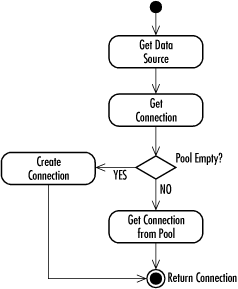 The same as with all other JDBC code, your application grabs a Connection from a DataSource using the getConnection( ) method. Internally, the DataSource talks to a ConnectionPoolDataSource that holds pooled database connections. This ConnectionPoolDataSource enables connection pooling. When you close the connection in your application, it returns to the connection pool. Any subsequent attempts to close that connection by your application will cause an error . 11.3.3.2 Prepared statement poolingPrepared statement pooling is to prepared statements as connection pooling is to connections. In other words, prepared statement pooling enables you to keep a prepared statement open so you can avoid the potential overhead of re-creating the same prepared statement multiple times. Prepared statement pooling rides on top of connection pooling and looks exactly like all other JDBC code from an application perspective. The only difference is that some data sources that support connection pooling keep any prepared statements associated with their connections open for later reuse. As with connection pooling, when you close a pooled prepared statement, the close( ) method returns the prepared statement to the pool. Connection pooling is naturally a trade-off between storing a number of connections in memory and the cost of making connections. You nearly always want to opt to take the memory hit. Prepared statement pooling, on the other hand, does not involve such an obvious trade-off. If you pool all of your prepared statements, you will eat up memory and database resources. You should therefore plan your prepared statement pooling to pool only those statements for which pooling will provide an obvious advantage. 11.3.3.3 Distributed transactionsAll database access so far in this chapter has involved transactions against a single database. In this environment, your DBMS manages the details of each transaction. This support is good enough for most database applications. As companies move increasingly toward an enterprise model of systems development, however, the need for supporting transactions across multiple databases grows. Where single data source transactions are the rule today, they will likely prove the exception in large-scale programming in the future. Distributed transactions are transactions that span two or more data sources. For example, you may have an Informix database containing your corporate digital media assets and an Oracle database holding product data. When you delete a product from Oracle, you probably want to delete the commercials and pictures for that product from Informix. Without support for distributed transactions, you run the risk of one transaction succeeding and the other failing ”your data thus ends up in an inconsistent state. You could avoid the issue by picking one database to hold everything. If you choose a nice supercomputer with terabytes of storage space and RAM, such a solution might work. A more practical alternative, however, is to choose database engines that are well suited for the type of data being stored and split the data across multiple databases. As with prepared statement pooling, distributed transactions ride on top of JDBC connection pooling. From the application's point of view, programming with distributed transactions looks nearly like single data source transactions. Behind the scenes, your one data source actually hides many data sources. When you get a connection from it, you are actually getting a connection that manages two-phase commits through a midtier transaction monitor. I say that your application code is nearly the same as code against a single data source because there are some small differences. In short, your code should not call commit( ) , rollback( ) , or setAutoCommit(true) . Any attempt to do so will result in an SQLException . You do not have to add any special code. The application server's transaction monitor handles the details of your distributed transaction. The two-phase commit that it manages is a standard protocol for handling a commit across two data stores. Under a simplistic description, the following events take place in a two-phase commit:
The only reason either of the actual commits can fail is due to a server crash or some other terrible event. Fortunately, the transaction log prevents those events from placing the system in an inconsistent state. The transaction monitor maintains a consistent state by having the individual data sources re-execute their portion of the transaction when they come back up.  |

EAN: 2147483647
Pages: 102