| The traditional intent of both delimited- and incremental-string searches is to find and to select a target string in the text. Patterns that people use in searches tend to be short because long patterns are tedious to type and, in most systems, must be accurate to the character if they are to match the target. Therefore, string searches typically are not used to select even moderately large targets say, those greater than 10 or 15 characters in length much less truly large blocks of text. One application of string searches is to help you find the location of a desired selection, after which you use another technique, such as using a GID to drag from one end of the selection to the other, to establish the selection. However, if the ends of the selection are not visible simultaneously, you must use another strategy. The strategy consists of (1) marking one end of the selection, with the method of marking depending on the system being used; (2) using such facilities as scroll bars to make the other end of the selection visible; and (3) marking the other end of the selection. In most systems, marking the second end of the selection establishes the desired selection. A more efficient approach is to design the search mechanism such that it positions the cursor on a particular character. Two such positionings can be used to define the first and last characters of a selection. The multiplicity of mechanisms conventionally needed to find the ends of a selection cursor motion, scrolling, various page and pattern find facilities, and so on and to mark them are replaced with one mechanism used twice, making learning, operation, and habituation easier and simplifying the implementation. It is now useful to examine the graphical design of cursors. Currently, the most common form of text cursor is one that appears between characters, as shown in Figure 5.7. One problem with the standard text cursor is that users try to place it precisely between pairs of characters, aiming at a smaller horizontal target than is necessary and thus incurring a Fitts' law time penalty. During testing at Information Appliance, we were surprised to discover that this popular form of cursor caused an interesting cognitive problem as well: You must place the cursor differently, depending on what you plan to do next. In particular, if you wish to delete an existing character with the usual Backspace key, you place the cursor to the right of the character in English and other left-to-right languages; to insert a character in the location of an existing character the existing character will be shifted to the right when you do so you place the cursor to the left of the existing character. We were surprised because the standard cursor's operation is so familiar that we had not given any thought to its possibly being the cause of problems.[11] As anybody who has tried to use one knows, the standard cursor is not difficult to understand. Nonetheless, a small amount of confusion and a few errors can be observed when newcomers to computers first use it. Their confusion is exacerbated by the invisibility of the loci of action of the commands. [11] This example is another demonstration of the importance of testing an interface on the intended audience.
Figure 5.7. The standard between-character cursor. 
It is no solution to provide a mode in which deletion occurs in a direction opposite to the usual one. This method, called forward erase, does allow you to always place the cursor to the left of the character to be acted on, but you will sometimes unexpectedly delete in the wrong direction because the current deletion direction is not your locus of attention. If two-way deletion is desired, it is better to use separate buttons or to use a quasimode for opposite-direction deletion. A useful improvement to text-related interfaces is to use a cursor that visually indicates both (1) the insertion location and (2) the character or characters that will be deleted if backspace is used. The second form of highlighting can be identical to that used for highlighting a selection. One way to do this is shown in Figure 5.8. Figure 5.8. A two-part cursor, both with a single character and with an extended selection. The insertion portion of the cursor is blinking to make it easier to find on a cluttered screen. 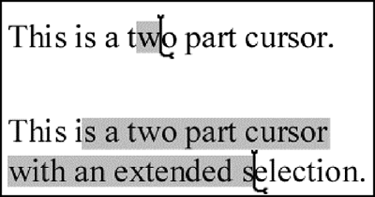
Moving a cursor to a target with a GID is an iterative process; the user visually acquires the target first and then moves the cursor toward the target. If she does not remember where the cursor is, she may have to search visually to find it as well. She then reacquires the target, and so on, until both target and cursor are in the same, approximately 5 degree, foveal field of vision. This amounts to several time-consuming processes the human must undertake in cursor moves using a GID. Nonetheless, a GID is required for pointing to graphical objects or when working in a totally graphic environment. The sloth of the GID in text pointing is exacerbated in the case of having to point to off-page locations. In these cases, exclusive use of a GID forces you to use scroll bars, page number selectors, or other mechanisms to view the content to which you wish to point. Each of these methods has to be learned, and many of them are slow. LEAP offers the user the cognitive advantage of not having to choose, depending on the remoteness of the target, between different strategies (Alzofon et al. 1987). Having both LEAP and a GID does mean that there are two basic cursor-moving methods; however, instead of choosing your method depending on the distance between the cursor and your target, you choose your method depending on the content of the target. As is usually the case, the content is your locus of attention, which makes a LEAP/GID split cognitively simpler. LEAP is useful in voice-controlled systems and for users with motor impairments or repetitive stress injuries, for whom the minimization of keystrokes is of especial value. A button, perhaps placed on the microphone, establishes the LEAP quasimode. The target of a LEAP is always a particular character in the text, and that character whether the user is seeing it or thinking about it is usually the locus of attention during the LEAP. Unlike using a GID, the user does not have to visually find the target before being able to move the cursor to it. This property is so strong that LEAP can be effectively used by the blind. This was tested at the Veteran's Administration Hospital in Palo Alto (unpublished). What is most important, however, is that LEAP is used so widely in systems designed around it that its use soon becomes automatic, and there is nothing in the design of LEAP that prevents beneficial habit formation or that causes problems after habitual use is established. For LEAP to work properly, it must be fast, always finding the next instance of the current pattern within human reaction time, thus not giving the user any motivation or time to act during the search. The necessary speed can be achieved by the methods discussed in Section 5-4. A GOMS keystroke-level analysis can be used to compare GID and LEAP timings. Where the user's hands start on the keyboard, using a GID to point to a letter in text requires operations H P K. By the rules for placing the M operator, we obtain H M P K, or 0.4 + 1.35 + 1.1 + 0.2 = 3.05 seconds. The time to perform a LEAP depends on the number of characters you have to type to reach your target. Testing showed that the average number of characters used in LEAPing was about 3.5 for operators tested during their first week of use of the Canon Cat. The operations required to move the cursor to a particular target are pressing the LEAP key and then typing 3.5 characters. An average LEAP thus consists of typing 4.5 characters. Adding the M operator gives, according to the rules, a time of 1.35 + (4.5 * 0.2) = 2.25 seconds. A timed experiment, with experienced users as subjects, compared the mouse with LEAP. The cursor had to be moved between two randomly chosen characters on a display 25 lines by 80 characters and where the timing did not start until the mouse began to move or the LEAP key was pressed. The measured average times were about 3.5 seconds for the mouse and 1.5 seconds for LEAP. The longer-than-calculated times for the mouse are probably due to the small size of the targets, which were individual characters: a Fitts' law effect. The unexpectedly short times for LEAP are probably due to the small size of the text, which allowed an average pattern length of about 2 characters. The subjects were given unlimited time for planning their actions before using the mouse or LEAP. Very often, you can complete a cursor move with LEAP faster than you can move your hands from keyboard to mouse. |


