11.3 Leveraging XForms Accessibility Features
| This section details how various aspects of the XForms architecture can be leveraged in meeting the accessibility design principles covered in Section 11.2. 11.3.1 XForms Creates Accessible Content The separation of model from view that is inherent in the XForms architecture is a key enabler with respect to creating accessible content. In addition, all XForms controls and user interface constructs have been designed to encapsulate relevant metadata such as The XForms vocabulary has been designed to encourage intent-based authoring and provides the constructs needed to express the logical grouping of user interface elements. Constructs 11.3.2 Accessibility in StyleCSS plays a key role in creating accessible XForms user interfaces. HTML 4 failed to encapsulate key items of metadata as part of its user interface markup because visual designers relied exclusively on tables to position user interface controls correctly with respect to their labels. For the XForms design of encapsulating such metadata within each user interface control to gain wide-spread adoption, Web designers need to be assured of being able to style user interfaces created using the XForms vocabulary to the same degree as when using explicit HTML tables. A new CSS feature ”CSS pseudoelements ”is a key enabler in styling XForms controls (see CSS3 UI [3] for the complete details). Using this feature, style sheet authors can specify that user interface controls and their labels should be displayed as if they were authored using an HTML table.
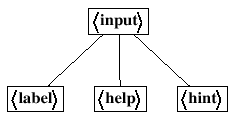
We demonstrate this use in Figure 11.3. This feature of CSS is named pseudo- elements because the style sheet author is able to refer to pseudo nodes in the markup tree. As an example, the markup tree for control Figure 11.1. Markup tree corresponding to control |

 ,
, 
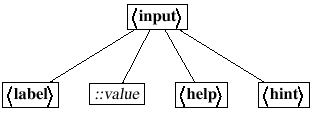
| | Element |
| | Element |
| ::value | Pseudoelement ::value for control |
| | Element |
The result is to achieve the same visual effect as when using HTML tables; however, the content markup remains independent of layout constructs.
11.3.3 Accessibility through Eventing
The accessibility design principles outlined in the previous section can be classified as pertaining to content, presentation, or interaction. All of the interaction- related design principles are met by XForms' use of XML Events as summarized in Table 11.2.
Table 11.1. CSS3 Pseudoelements for Styling XForms User Interfaces
| Element | Description |
|---|---|
| ::value | Represents the active area of a user interface control excluding its label |
| ::repeat-item | Represents a single item from a repeating sequence |
| ::repeat-index | Represents the current item of a repeating sequence |
Table 11.2. XForms Eventing Enhances Accessibility
| Principle | XForms Solution |
|---|---|
| Events |
|
| Predictable |
|
| Late Binding |
|
| Notifications |
|
| Hooks |
|
| Declarative |
|
11.3.4 User Agent Guidelines for Leveraging XForms Accessibility
User agents that implement XForms play a key role in ensuring that the accessibility features present in the XForms design benefit the end user. XForms user agents can provide direct support for accessibility; as an example, XForms user agents can directly augment the end-user experience by providing spoken feedback during user interaction. Implementing such spoken feedback is relatively straightforward, given a fully compliant XForms client. Since the XForms processing model and the underlying eventing framework expose all the needed hooks, augmenting the interface with custom behaviors that match a user's special needs only requires authoring event handlers and attaching them at the right points within the XForms client.
XForms user agents that do not directly implement such augmented behavior should expose all aspects of the XForms processing model and eventing framework. This is essential to enable the creation of add-ons that augment an XForms browser with the specific behaviors needed by a particular user community.
11.3.5 Accessing XForms Features from Adaptive Technologies
When an XForms client does not directly implement the desired specialized behavior, it may be necessary to extend the client with an appropriate piece of adaptive technology. Such adaptive technologies will need to implement the DOM2 eventing framework and be capable of hooking into Web browsers that are fully DOM2 events compliant.
XForms content can also be augmented with special behaviors before the content is delivered to the client. Such server-side augmentation is likely to be a rich area of future investigation as we try to develop accessibility solutions that are usable on a variety of nondesktop information appliances.
