5.2 CSM planning, installation and configuration
| < Day Day Up > |
| In this section, we discuss planning a CSM cluster, installing and configuring CSM on management server, and configuring CSM to add and install managed nodes. More specifically , we discuss how and what to plan for a CSM cluster, describe supporting hardware, software, and network, give tips on installing and configuring the management server, and how to add and install managed nodes in the cluster. At a high level, planning for setting up a CSM cluster involves:
Each of these topics are discussed in detail in the next few sections. 5.2.1 Planning hardwareThe following hardware requirements must be met to support CSM on the management server, nodes in the cluster and hardware control. Management server requirements
Managed nodes requirements
Hardware control requirementsAs explained in the previous section, CSM hardware control provides remote hardware functions such as powering on/off, querying power status, and remote console from the management server to managed nodes. Following are some guidelines and requirements to utilize this feature:
Important To enable hardware control, HMC open firmware/driver version must be version 3.4 or greater and HMC build level 20030410. More information about hardware control requirements can be found in CSM for Linux: Hardware Control Guide . 5.2.2 Planning softwareCSM has requirements for both IBM and non-IBM-developed software. On a pSeries Linux cluster, including the management server and all managed nodes, SuSE Linux Enterprise Server (SLES) 8 (8.1) is mandatory. The management server must have Linux installed prior to installing CSM. Other software requirements are summarized as follows for IBM and non-IBM vendors IBM softwareCSM for pSeries Linux version 1.3.2 is shipped on CSM for pSeries Linux CD-ROMs. It can also be downloaded from the following site: http://techsupport.services.ibm.com/server/cluster/fixes/csmfixhome.html Following is a list of the IBM software packaged with the CSM CD-ROM:
Non-IBM softwareSuSE Linux Enterprise Server 8 (8.1). The following non-IBM software prerequisites for CSM are shipped on the base SLES CD-ROM:
Important On the management server, kernel-ppc64-2.4.19-228.ppc.rpm or greater is required. You can copy the kernel rpm from: </csminstall/Linux/SLES/8.1/ppc64/updates/kernel/kernel***.rpm> For updates, visit: http://support.suse.de/psdb Other required non-IBM softwareThe following lists other non-IBM software required to install CSM:
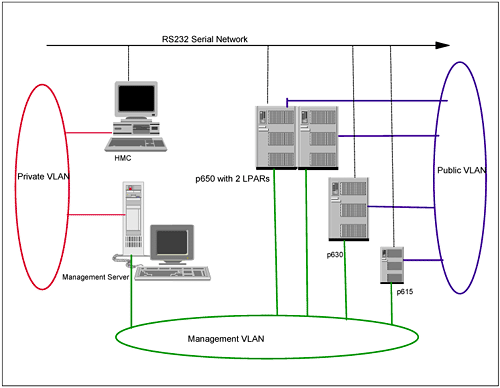
5.2.3 Planning networkCSM requires a management server connected to HMC, and managed nodes on network virtual local area networks (VLANs), either on the same subnet, or on a separate subnet. But to have a secure cluster, we recommend that you have a management server connected to the HMC and managed nodes on two different VLANs. That way, the management server can maintain a secure connection with HMC on a private VLAN. We also recommend that you have all managed nodes use a separate public VLAN for internode communications, so that the Management VLAN is used exclusively for management server-to-managed node traffic only, for functions such as node updates, monitoring, and so on. Figure 5-5 shows a recommended secure CSM cluster network. Figure 5-5. Secure CSM cluster network As shown in the figure, all pSeries managed nodes are connected to HMC on an RS232 serial network. 5.2.4 Planning securityAs discussed in "CSM security" on page 220, this includes shell security, architecture, and authentication. Shell security and authentication are performed by default using ssh and host-based authentication. The system adiministrator can switch to rsh and enable rhosts-based security, but ssh is more secure than rsh. Network security should be planned to isolate networks and protect clusters. Authorizations can be planned to determine which user can have which access to resource classes. 5.2.5 Installing CSM on the management serverThis section discusses installing CSM on the management server. Linux must be installed on the management server prior to performing CSM install. The CSM install involves the following major steps:
Installing SuSE Linux and Linux pre-requisitesInstall the designated management server with SuSE Linux 8.1. The Enterprise server install option installs most of the CSM requisite packages. Update the server with the latest service pack updates from SuSE. This upgrades the kernel to latest version (which was v2.4-21-83, at the time of writing). Installing csm.coreNow that the management server is installed and upgraded to the latest kernel and packages, CSM install can be started. csm.core is the first package to install, as this contains the executable files required for all cluster nodes, and it installs the scripts required for further installation and setting up the environment. This can be done either by using the CSM CD-ROM directly, or by installing it from packages copied to local disk. The CSM packages can be copied from CD-ROM if you ordered and received the media, or you can download the software from the Internet. The license file must be ordered from IBM separately and is shipped in a CD-ROM. The CSM package can be downloaded from the following Internet site: http://techsupport.service.ibm.com/servers/cluster/fixes/clusterfixhome.html Copy and unpack the contents to a temporary directory(/tmp/csm): # cd /tmp/csm; gzip -dc csm-linux-1.3.2.0.ppc64.tar.gz tar -xvf - The ls command on /tmp/csm is shown in Example 5-6. Example 5-6. ls -l command output in /tmp/csmtotal 49047 drwxr-xr-x 3 root root 584 Oct 23 15:39 . drwxr-xr-x 3 root root 200 Oct 23 15:39 .. -rw-r--r-- 1 root root 7360 Sep 23 10:19 README -rwxr--r-- 1 root root 34140929 Oct 23 15:32 csm-linux-1.3.2.0.ppc64.tar.gz -rw-r--r-- 1 root root 496702 Sep 23 10:19 csm.client-1.3.2.0-26.ppc.rpm -rw-r--r-- 1 root root 352444 Sep 23 10:19 csm.core-1.3.2.0-26.ppc.rpm -rw-r--r-- 1 root root 67982 Sep 23 10:19 csm.diagnostics-1.3.2.0-26.ppc.rpm -rw-r--r-- 1 root root 67605 Sep 23 10:19 csm.dsh-1.3.2.0-26.ppc.rpm -rw-r--r-- 1 root root 4261877 Sep 23 10:19 csm.server-1.3.2.0-26.ppc.rpm drwxr-xr-x 2 root root 272 Oct 23 15:39 reqs -rw-r--r-- 1 root root 3786767 Sep 23 10:19 rsct.basic-2.3.1.3-0.ppc.rpm -rw-r--r-- 1 root root 5550757 Sep 23 10:19 rsct.core-2.3.1.3-0.ppc.rpm -rw-r--r-- 1 root root 950877 Sep 23 10:19 rsct.core.utils-2.3.1.3-0.ppc.rpm -rw-r--r-- 1 root root 465261 Sep 23 10:19 src-1.2.0.3-0.ppc.rpm Copy the two following requisite packages and place them in the /tmp/csm/reqs subdirectory:
The ls command on /tmp/csm/reqs subdirectory is shown in Example 5-7. Example 5-7. ls -l command output in /tmp/csm/reqs directory-rw-r--r-- 1 root root 332141 Sep 23 10:19 tftp-hpa-0.34.tgz -rw-r--r-- 1 root root 106386 Sep 23 10:19 tftp-hpa-0.34-1.ppc64.rpm -rw-r--r-- 1 root root 168690 Sep 23 10:19 conserver-7.2.4.tar.gz -rw-r--r-- 1 root root 94586 Sep 23 10:19 conserver-7.2.4-3.ppc64.rpm -rw-r--r-- 1 root root 17750534 Sep 23 10:19 IBMJava2-JRE-1.3.1-3.0.ppc.rpm drwxr-xr-x 3 root root 536 Oct 9 14:46 .. -rwxr--r-- 1 root root 92381 Oct 13 10:30 autoupdate-5.2.6-1.noarch.rpm -rwxr--r-- 1 root root 403858 Oct 17 14:02 openCIMOM-0.7-4.noarch.rpm drwxr-xr-x 2 root root 368 Oct 17 15:29 . Install the csm.core package as follows: # rpm -i /tmp/csm/csm.core-* Or, if installing directly from CD-ROM: # mount /dev/cdrom /mnt/cdrom; rpm -i /mnt/cdrom/csm.core-* csm.core install creates and installs binaries and files in the /opt/csm directory Create /csminstall partitionWe recommend that you create a separate /csminstall partition either on LVM or on your local disk. This partition holds all necessary CSM directories and files required to manage the cluster. We created the partition on an LVM and the method is explained below.
Running installms to install the CSM server and prerequisitesNow that the csm.core package is installed, the remaining CSM packages are installed using installms script. The following steps are required before running installms:
Update PATH and MANPATHThe csm.core package installs executable files in /opt/csm/bin and csm man pages in /opt/csm/man. In order to have CSM binaries executed from anywhere , update root's .profile to include these two directories for PATH and MANPATH variables , respectively. Update the bash_profile file in root's home directory and edit or add the following two lines as shown in Example 5-8: Example 5-8. PATH and MANPATH variablesexport PATH=$PATH:/opt/csm/bin export MANPATH=$MANPATH:/opt/csm/man Log out and relogin or re-execute root's .profile to force the two new variables. Verify that the variables are updated by using both of these commands: # echo $PATH # echo $MANPATH Copy the contents of the SuSE CD-ROM to local diskinstallms requires you to access SuSE base images to build /csminstall build. This is required while installing nodes using CSM and autoyast. The CD images can either be copied or specified while running installms. The images are copied to local disk first and the directory is given as THE input path while running installms. To copy THE SuSE CD image onto a local disk: # mount /dev/cdrom/mnt/cdrom;cd cdrom; tar cvf- (cd /install/sles;tar xvpf -) Note Make sure you have sufficient disk space in the root (/) file system before copying the SuSE CD images. Running installmsThe remaining CSM installation is carried out by the installms script. The installms usage is shown in Example 5-9. Example 5-9. installms usage Usage: installms {-p <pkg_path> -x} [-c] [-f] [-v -V] [-h] [Attr=value [Attr=value...]] -p <pkg_path> List of directories containing packages (p1:p2:p3) -c Force copy from the path -f Force install -x Do not copy packages. -v -V Verbose mode -h Display usage information Valid attributes (see the installms man page for details): RemoteShell SetupRemoteShell Start the installation: # /opt/csm/bin/installms -v -p /tmp/csm:/install/sles If the SuSE CD-ROM is not copied to local disk and CSM is copied to /tmp/csm, run installms as follow: # /opt/csm/bin/installms -p /tmp/csm:/media/cdrom installms prompts you to swap CD1 and 2 or the Supplementary CD1 as necessary during the install. Example 5-10 shows the output of the installms command run with both CSM and all requisites copied to local disk. Example 5-10. Example installms console outputOutput log for installms is being written to /var/log/csm/installms.log. Logging started ./installms -v -p /tmp/csm:/install/sles Detected Linux distribution SLES 8.1. Detected CSM distribution "CSM1.3.2". Creating the required directories for CSM. Searching for CSM, RSCT and Director rpms. Searching for Open Source rpms. Installing LINUX OS PRE REQUISITIES RPMs. dhcp-base is already installed. rsh-server is already installed. perl is already installed. dhcp-server is already installed. pdksh is already installed. rsync is already installed. nfs-utils is already installed. rdist is already installed. tcl is already installed. tk is already installed. Installing expect-5.34-154.ppc.rpm RPMs. Installing termcap-2.0.8-513.ppc.rpm RPMs. Installing perl-XML-RegExp-0.03-295.ppc.rpm RPMs. Installing OPEN SOURCE PRE REQUISITIES RPMs. Installing conserver ******************************************************************************* * CSM has detected that the following tftp rpm is installed: tftp-0.29-44 CSM ships with tftp-hpa-0.34-1 by default. The above tftp rpms may conflict with tftp-hpa-0.34-1. You have several options at this point: 1. Remove the above tftp rpms and install tftp-hpa-0.34-1 2. Install tftp-hpa-0.34-1 without removing already installed rpms (note: There may be conflicting files with this option, and tftp-hpa-0.34-1 may not install correctly.) 3. Keep the above tftp rpms. Continue without installing tftp-hpa-0.34-1 4. Quit Please choose 1, 2, 3, or 4: 1 Uninstalling tftp-0.29-44. Installing tftp-hpa-0.34-1.ppc64.rpm RPMs. IBMJava2-JRE is already installed. Installing openCIMOM-0.7-4.aix5.1.noarch.rpm RPMs. Installing RSCT RPMs. Installing src-1.2.0.3-0.ppc.rpm RPMs. Installing rsct.core.utils-2.3.1.3-0.ppc.rpm RPMs. Installing rsct.core-2.3.1.3-0.ppc.rpm RPMs. Installing CSM RPMs. csm.core is already installed. Installing csm.dsh-1.3.2.0-26.ppc.rpm RPMs. Installing csm.server-1.3.2.0-26.ppc.rpm RPMs. Installing csm.diagnostics-1.3.2.0-26.ppc.rpm RPMs. Creating default tftpd user for the tftp server. Creating default tftpd group for the tftp server. About to copy CSM command binaries. Securing file permissions in the /tftpboot directory and all subdirectories... Installation of CSM has successfully completed! Logging stopped The complete installms log is written to the /var/log/csm/installms.log file. 5.2.6 Installing the CSM licenseThe CSM license is available in two options: a 60-day try and buy license available with the CSM products package, and a full production license and key shipped in a CD-ROM when purchased. Once installms installation is complete, the try and buy license is accepted by running: # csmconfig -L The status and Expiration date can be checked with the csmconfig command. The Expiration date attribute (ExpDate) is populated only if it is a try and buy license. Example 5-11 on page 234 shows csmconfig command output. Example 5-11. csmconfig command output AddUnrecognizedNodes = 0 (no) ClusterSNum = ClusterTM = 9078-160 ExpDate = Mon Dec 15 18:59:59 2003 HeartbeatFrequency = 12 HeartbeatSensitivity = 8 MaxNumNodesInDomain = -1 (unlimited) RegSyncDelay = 1 RemoteShell = /usr/bin/ssh SetupRemoteShell = 1 (yes) If a full production license is purchased, it is accepted by running: # csmconfig -L /mnt/cdrom/csmlum.full At the prompt, follow the directions to accept the license. Again, the csmconfig command shows the status of the license and the ExpDate Attribute shows blank. 5.2.7 Install verificationEnsure that the management server is installed correctly and is ready for use before starting any configuration. Check the following to verify installation:
5.2.8 CSM management server configurationThe management server requires very minimal configuration after the installation and is basically ready for use once installms and the install verification steps outlined in 5.2.7, "Install verification" on page 234 are successfully completed. To display current configuration and modify any attributes, enter the csmconfig command; the output is shown in Example 5-15. Example 5-15. csmconfig command outputAddUnrecognizedNodes = 0 (no) ClusterSNum = ClusterTM = 9078-160 ExpDate = Mon Dec 15 18:59:59 2003 HeartbeatFrequency = 12 HeartbeatSensitivity = 8 MaxNumNodesInDomain = -1 (unlimited) RegSyncDelay = 1 RemoteShell = /usr/bin/ssh SetupRemoteShell = 1 (yes) The attributes are briefly explained in this section: AddUnrecognizedNodesA default value of -0- (no) indicates that the management server should not accept requests from unrecognized nodes to manage them and add them to cluster. ClusterSNumThe Cluster Serial number attribute is used for service. ClusterTMThe Cluster type and model is used for service and is in the form of: ####-###. ExpDateThis is the Expiration date for the try and buy license. This is blank when a Full license is accepted with the -L option. HeartbeatFrequencyThis refers to the number of seconds between heartbeat messages sent to a node from the management server. The valid value range is 1 to 900, and the default is 12. RMC is responsible for monitoring heartbeats using the node hostname. HeartbeatSensitivityThis is the number of missed heartbeat messages sent to a node to declare the node unreachable. The valid value range is 2 to 100, and the default is 8. The Node status attribute is changed from 1 to 0 when the node is unreachable. MaxNumNodesInDomainThis is the maximum number of nodes allowed in the CSM cluster. This is determined by license key. RegSyncDelayThis refers to the delay in seconds from when cluster data is updated in memory to when it is written on disk. RemoteShellThis is the path of the remote shell that CSM uses to communicate with nodes. The default is ssh. SetupRemoteShellThis indicates whether CSM can set remote shell security automatically on remote node at installtime. The default is 1 (yes). Adding Cluster SerialNumberModify the cluster serial number by entering: # csmconfig -s abc1000 5.2.9 Defining/adding nodes to the CSM clusterIn this section, we describe how to define and add cluster-managed nodes to the CSM database, and what attributes are stored for each node. Managed nodes can be either installed with CSM (which installs the operating system (Linux) and all required CSM packages), or the operating system can be pre-installed and CSM used exclusively to install CSM packages only. We will discuss both these options. Defining and adding nodes includes these tasks :
Defining a Hardware Control PointFor pSeries standalone servers and LPARs managed by the Hardware Management Console (HMC), CSM communicates directly with the HMC by using an attribute called the Hardware Control Point. Prior to using any hardware control, the IP address of the HMC, userid and valid password are defined using command systemid . The command basic syntax and result are displayed in Example 5-16. Example 5-16. Example of systemid# systemid hmc_hostname hscroot Password: ****** Verifying, please re-enter password:****** systemid: Entry updated. Wherein hmc_hostname is the resolvable hostname of HMC and hscroot is the userid to connect to the HMC. The userid and encrypted password are stored in the /etc/opt/system_config directory on the management server. For further information, refer to the man page of systemid. Updating /etc/hosts or name resolutionA standard hostname resolution must be implemented before attempting to define nodes. This can be either /etc/hosts for local, or /etc/resolv.conf for Domain Name Server (DNS) resolution. All the managed nodes, hardware control point and management server are resolvable for an internal cluster and managed VLANs as applicable . If planning a DNS named implementation, refer to Chapter 3, "System administration" on page 95, for detailed information. Generating node information - creating a node definitions fileNode information can be generated for HMC-attached nodes automatically. This data can be used to create a node definition file for multiple nodes very easily. Note : For non-HMC-attached nodes, the file has to be created manually. Here, we discuss HMC-attached nodes. Node information is gathered using the command lshwinfo . Sample command and output are shown in Example 5-17. Example 5-17. lshwinfo output# lshwinfo -p hmc -c hmc_hostname -o /tmp/nodes.dat #Hostname::PowerMethod::HWControlPoint::NodeId::LParId::HWType::HWModel::HWSeri alNum no_hostname::hmc::hmc_hostname::lpar1::002::7038::6M2::10197CA no_hostname::hmc::hmc_hostname::lpar2::002::7038::6M2::10197BA The first column indicates no_hostname, as these nodes are not being defined in the CSM database yet. Edit and replace no_hostname with the proper hostname of each LPAR. The updated /tmp/nodes.dat file resembles Example 5-18. Example 5-18. Updated nodes.dat# Hostname::PowerMethod::HWControlPoint::NodeId::LParId::HWType::HWModel::HWSeria lNum node1::hmc::hmc_hostname::lpar1::002::7038::6M2::10197CA node2::hmc::hmc_hostname::lpar2::002::7038::6M2::10197BA All the node hostnames in the file, such as node1 and node2, must be resolvable either in local hosts file or on DNS. For more information about the lshwinfo command, refer to its man page. Important Make sure the HMC is properly connected to the LPAR frame using an RS232 serial adapter, and ensure that the management server communicates with the HMC before running lshwinfo . This command fails if proper network connectivity does not exist. Once the datafile is generated, it is used to create a node definitions file by using the definenode command. Important node attributes are added using definenode and a definition file is created in the right format to populate the CSM database. Example 5-19 shows the creation of a node definition file. Example 5-19. Example definenode# definenode -s -M /tmp/nodes.dat >/tmp/nodes.def # cat /tmp/nodes.def node1 : ConsoleMethod=hmc ConsoleSerialDevice=ttyS0 ConsoleServerName=hmc_hostname HWControlNodeId=lpar1 HWControlPoint=ms_hostname HWModel=6M2 HWSerialNum=10197AA HWType=7038 InstallCSMVersion=1.3.2 InstallDistributionName=SLES InstallDistributionVersion=8.1 InstallOSName=Linux InstallPkgArchitecture=ppc64 LParID=001 ManagementServer=p630sles PowerMethod=hmc node2 : ConsoleMethod=hmc ConsoleSerialDevice=ttyS0 ConsoleServerName=hmc_hostname HWControlNodeId=lpar2 HWControlPoint=ms_hostname HWModel=6M2 HWSerialNum=10197AA HWType=7038 InstallCSMVersion=1.3.2 InstallDistributionName=SLES InstallDistributionVersion=8.1 InstallOSName=Linux InstallPkgArchitecture=ppc64 LParID=002 ManagementServer=p630sles PowerMethod=hmc The -s option in definenode redirects the output to standard out, and the -M option reads from the mapping data file. For non-HMC-managed nodes, the same definition file can be manually created with similar attribute values. Refer to IBM Cluster System Management Planning and Installation Guide , SA22-7853 for detailed explanations of which attributes are required for manual node definition creation. Once the definition file is created, the CSM database is populated with the node definitions. This is done using the following command: # definenode -f /tmp/nodes.def Verify the CSM database using lsnode and lsnode -l commands. Note definenode simply appends the definitions to the CSM database. If you have a typo and/or if you ran definenode -f multiple times, the same node definitions are added multiple times and this can fail the node install. To avoid this, verify by using the lsnode command that node definitions are accurate before progressing to the next step. If duplicate entries are found, clean up the CSM database by using the rmnode command to delete duplicate node entries. Modifying node attributesNode attributes added using definenode can be modified by using the chnode command. This command changes node attributes defined in the CSM database. 5.2.10 Preparing for node installationThe target install nodes defined and added in the CSM database are prepared using the csmsetupyast command. This command collects all configuration information from sources such as the SuSE CD-ROM and the default yast config file, and sets up the AutoYast configuration file to install the Linux nodes. However, you should first update the kernel for node installation before you run the csmsetupyast command (because some models will experience problems with the original kernel in SLES). Then you need to copy the new kernel rpm to /csminstall/Linux/SLES/8.1/ppc64/updates/kernel/. csmsetupyast will get the kernel image from the latest RPM by the number of the RPM name. The csmsetupyast command does the following:
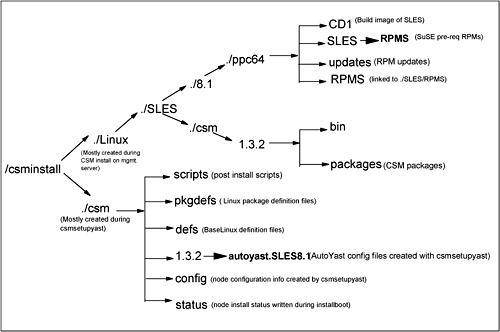
The usage of the csmsetupyast command is illustrated in Example 5-20. Example 5-20. csmsetupyast usageUsage: csmsetupyast [-h] csmsetupyast [-v -V] [-p pkg_path -x] [-k yastcfg_file] [-P -a [-N node_groups] [-n node_list]] [Attr=value [Attr=value...]] -a Setup AutoYaST for all nodes. This cannot be used with the -n, -N or -P flags. -h Writes usage information to standard output -n node_list Provide a comma-separated list of nodes and node ranges to set up AutoYaST for. (See the noderange man page for information on node ranges.) This option cannot be used with the -a or -P options. -N node_groups Provide a comma-separated list of node groups to set up AutoYaST for. This cannot be used with the -a or -P flags. -p pkg_path Specifies one or more directories, separated by colons, that contain copies of the SuSE/SLES CD-ROMs. The default is /media/cdrom. This cannot be used with the -x flag. -P Setup AutoYaST for all nodes whose Mode attribute is "PreManaged". This cannot be used with the -a, -n or -N flags. -v -V Writes the verbose messages of the command to standard output. -x Specifies to not copy SuSE/SLES disks. This cannot be used with the -p flag. -k yastcfg_file Specifies a AutoYaST control file. The default is /opt/csm/install/yastcfg.SLES<version>.xml. Valid attributes (see the csmsetupyast man page for details): Netmask Gateway Nameserver Nameservers Detailed information on each of the options can be found in the csmsetupyast man page Populating /csminstallThe /csminstall directory contains all the necessary information to install nodes such as configuration information, updated RPM packages, and the prerequisites required. Figure 5-6 shows the contents of /csminstall mainly populated during CSM installation on the management server and while running the csmsetupyast command. Figure 5-6. /csminstall directory tree Host names and getadaptersHost names defined in the CSM database are mapped to IP addresses from local hosts file or DNS, and some network adapter information such as MAC addresses, adapter speed, duplex setting are obtained from target install nodes. The CSM command getadapters collects network MAC addresses of the first adapter installed on target nodes, and it can be run separately before running csmsetupyast . The getadapters command will issue dsh to the node to get the MAC address ”if the node is on and has a running operating system. Otherwise, it will power-on the node and get the MAC address from the openFirmware by performing a passing ping test of the adapter. Network information such as MAC address, adapter type, speed, and duplex setting can also be specified in a file and passed to getadapters instead of powering off/on the nodes. The same information is written to the CSM database by using the -w option. Network attributes obtained in any other way are also be used to modify the CSM database by using the chnode command. csmsetupyast parses the node attributes database and if any network information is found, it skips running getadapters and proceeds to next step. Example 5-21 shows common network attributes acquired and added to the CSM node attributes database. Example 5-21. CSM node network attributesInstallAdapterDuplex = half InstallAdapterGateway = InstallAdapterMacaddr = 00:02:55:3A:06:8C InstallAdapterNetmask = InstallAdapterSpeed = 100 InstallAdapterType = ent DHCP configurationThe management server is configured as a DHCP server to assign IPs to target nodes during netboot. All the information required is obtained during csmsetupyast and a default dhcpd.conf file is written and the dhcpd daemon is started. Refer to Chapter 3, "System administration" on page 95 for more information about DHCPD. Example 5-22 shows a sample dhcpd.conf file written for node lpar1. Example 5-22. /etc/dhcpd.conf file # This file has been automatically generated by IBM CSM # Please do not modify or erase lines that contain "# CSM" # such as the following line: # CSM VERSION 1.3.2.0 (Please do not remove this line) ddns-update-style none; shared-network CSM { option routers 192.168.100.60; subnet 192.168.100.0 netmask 255.255.255.0 { # CSM RANGE 192.168.100.0 (Please do not remove this line) default-lease-time -1; filename "/pxelinux.0"; next-server 192.168.100.110; } } group { ### CSM STATIC ENTRIES (Please do not remove this line) host lpar1 { hardware ethernet 00:02:55:3A:06:8C; fixed-address 192.168.100.77; filename "/csm/yast8.1-ppc64-zImage.initrd"; option root-path "/csminstall/Linux/SLES/8.1/ppc64/CD1"; } /tftpboot updatesCSM updates the /tftpboot directory during csmsetupyast processing with the kernel and boot loader information collected from initrd and boot images. This image is used to boot the target nodes during the netboot node condition. AutoYast XML config fileThe default Yastconfig file is located at /opt/csm/install/yastcfg.SLES<version>.xml. It contains the following information:
This information can be modified and passed as an argument by using the -k option to csmsetupyast . If the -k option is not selected, a default XML file is used as input. This information is used to generate an AutoYast config file and is written to the /csminstall/csm/csm_version/autoyast.version/ directory for each target node with a node IP or hostname prefix. Tips
Use the following tips if you are planning to modify default partition information:
Other node attributesOther node attributes, such as InstallMethod, are modified during the csmsetupyast run. These attributes are referred during installing target nodes. Tip For error-free updates, check the following before running csmsetupyast :
Issue the following command to activate csmsetupyast on nodes lpar1 and lpar3: # /opt/csm/bin/csmsetupyast -v -k working.xml -p /install/sles -n lpar1,lpar3 Verify the /var/log/csm/csmsetupyast.log and lsnode -l node_name to make sure no errors are reported and that the node information is defined accurately. 5.2.11 Installing managed nodesOnce csmsetupyast is successfully completed and all the node information is defined in the CSM database, the target nodes are ready to have the operating system and CSM installed, using the installnode command. Installnode performs the following actions:
When a node is defined in the database but not yet installed, the Mode attribute is set to "PreManaged". Once a node is successfully installed using CSM, this attribute is changed to "Managed", at which time CSM considers this as a managed node. If the mode is set to "MinManaged", then it remains as MinManaged even after the installation. If the installation fails for any reason, the attribute either remains as "PreManaged"or is changed to "Installing", depending at which stage the installation failed. The Mode attribute must be either "PreManaged" or "MinManaged" in order to have installnode started. Tip If installation fails in the middle for any reason and another run of installnode fails immediately, check the Mode attribute for the node and run this command if it is set to "Installing": #chnode Mode=PreManaged -n node_name The usage of installnode is shown in Example 5-23: Example 5-23. installnode usageUsage: installnode [-h] installnode [-v -V] [ -P -a [-N node_groups] [[-n] node_list][--file filename] ] -a install all nodes whose InstallMethod attribute is kickstart. This flag cannot be used with the -P or -N flags or the node_list. -h Display this usage information. [-n] node_list Space or comma separated list of nodes and node ranges. (See the noderange man page for information on node ranges.) This option cannot be used with the -a or -P options. Node names may be specified as positional arguments or preceded by the -n flag. -N node_groups Comma-separated list of node groups to install. This flag cannot be used with the -a or -P flags. --file filename specifies a file that contains a list of nodes names. If the file name "-", then the list is read from stdin. The file can contain multiple lines and each line can have one or node names, separated by spaces. -P install all nodes whose Mode attribute is PreManaged and whose InstallMethod attribute is kickstart. This flag cannot be used with the -a or -N flags or the node_list. -v -V Verbose mode Note Before running installnode, make sure to have dhcpd, nfs and tftp daemons started. If not, they can be started as:
Issue the installnode command to start the install on all PreManaged nodes: # installnode -v -P Note The installnode command also runs smsupdatenode and cfmupdatenode at the end of the install to push software maintenance packages and distribute shared common CFM files. If you do not want this to happen during installnode processing, do not populate the /cfmroot and /csminstall/Linux/OS/version/architecture/updates directory. Example 5-24 shows the standard output of installnode . Example 5-24. installnode output #installnode -n lpar3 Resolving names in the specified node list... Running cmd: /usr/bin/lsrsrc-api -D '::' -i -s IBM.ManagedNode::"Hostname IN ('lpar3')"::Name::Hostname::ManagementServer::Install1 Output log for installnode is being written to /var/log/csm/installnode.log. Loading /opt/csm/install/pkgdefs/Linux-SLES8.1.pm. Status of nodes before the install: Running cmd: /opt/csm/bin/monitorinstall 2>&1 Node Mode Status -------------------------------------------------------------------------- lpar1 Managed Installed lpar3 PreManaged AutoYaST Post-Install Complete Nodes to install: lpar3 Running cmd: /usr/bin/lsrsrc-api -i -s IBM.DmsCtrl::::SetupRemoteShell 2>&1 Running cmd: /usr/bin/lsrsrc-api -i -s IBM.DmsCtrl::::RemoteShell 2>&1 Running cmd: /opt/csm/csmbin/remoteshell.expect -k 2>&1 Copying OpenSSH public keys to target nodes. Running cmd: /bin/cp /root/.ssh/identity.pub /csminstall/csm/con- fig/.ssh/authorized_keys Running cmd: /bin/cp /root/.ssh/id_rsa.pub /csminstall/csm/con- fig/.ssh/authorized_keys2 Running cmd: /bin/cat /root/.ssh/id_dsa.pub >> /csminstall/csm/con- fig/.ssh/authorized_keys2 CSM_FANOUT = 16, CSM_FANOUT_DELAY = 1200 . Rebooting Node for full install: lpar3 spawn /opt/csm/bin/rconsole -t -f -n lpar3 [Enter `^Ec?' for help] .. 1 = SMS Menu 5 = Default Boot List 6 = Stored Boot List 8 = Open Firmware Prompt memory keyboard network scsi speaker ok 0 > dev / ok 0 > ls 000000d9adf0: /ethernet@1 ok 0 > " local-mac-address" 000000d8f788 get-package-property ok 3 > . 0 ok 2 > dump 000000d9aac0: 00 02 55 3a 06 19 :..U:..: ok 0 > boot /pci@400000000111/pci@2,2/ether- net@1:speed=100,duplex=half,bootp,192.168.100.110,,192.168.100.79,0.0.0.0 auto- yast=nfs://19 BOOTP: chosen-network-type = ethernet,Status of nodes after the install: Running cmd: /opt/csm/bin/monitorinstall 2>&1 Node Mode Status -------------------------------------------------------------------------- lpar1 Managed Installed lpar3 Installing Rebooting and Installing Node. # Note installnode runs /opt/csm/csmbin/hmc_nodecond, an expect script that passes SMS menu arguments while netbooting in firmware mode. Add the following two lines to the script to run in debug mode to capture more information. log_user 1 exp_interval 1 Node installation is monitored in several ways:
Check the man page of rconsole for a list of detailed options. This command is used only for HMC-attached pSeries servers. Making pre-installed nodes into managed nodesFor nodes that have Linux pre-installed, and you only want to install CSM and make them managed nodes after you complete defining/adding nodes, the CSM updatenode command is used instead of installnode. This command installs CSM only on PreManaged nodes and exchanges ssh public keys with the node. It runs makenode to mount CSM package directories NFSmounted to the target node, and installs CSM client packages. Once complete, the public keys are exchanged and the status of the node is changed from PreManaged to Managed. Tips
5.2.12 Node install verificationVerify successful node installation as follows:
Example 5-26. lsnode to find out RMC response #lsnode -H -l lpar1 Name = lpar1 ActiveMgtScopes = 1 Architecture = ppc64 DistributionName = SLES DistributionVersion = 8.1 KernelVersion = 2.4.21-83-pseries64 LoadAverage = {0,0,0} NodeNameList = {lpar1} NumProcessors = 2 NumUsers = 1 OSName = Linux PctRealMemFree = 95 PctTotalPgSpFree = 100 PctTotalPgSpUsed = 0 PctTotalTimeIdle = 99.8824 PctTotalTimeKernel = 0.071471 PctTotalTimeUser = 0.0461264 PctTotalTimeWait = 0 RealMemSize = 4190330880 TotalPgSpFree = 524284 TotalPgSpSize = 524284 UpTime = 1067381449 VMPgInRate = 16 VMPgOutRate = 74 VMPgSpInRate = 0 VMPgSpOutRate = 0 |
| < Day Day Up > |

EAN: N/A
Pages: 108
- Using SQL Data Definition Language (DDL) to Create Data Tables and Other Database Objects
- Using SQL Data Manipulation Language (DML) to Insert and Manipulate Data Within SQL Tables
- Using Data Control Language (DCL) to Setup Database Security
- Using Keys and Constraints to Maintain Database Integrity
- Writing Advanced Queries and Subqueries