|
Prefactoring Authors: Pugh K. Published year: 2005 Pages: 29-31/175 |
| < Day Day Up > |
2.7. Prototypes Are Worth a Thousand WordsIt is often said that a picture is worth a thousand words. A prototype is like a picture. A user interface described in text is often harder for the customer to visualize than the same interface described with a diagram or picture. Use cases can provide excellent textual descriptions. A prototype (or screen mockup ) gives a more concrete perspective on a program's intended operation. The prototype can spark feedback from the client in both the program's operation and in missing requirements. One of the dangers of making a perfect-looking GUI for a prototype is that the interface represents the program to the user. If the interface is complete, the user might expect that the system is almost complete. Some user interface experts suggest that interfaces be designed using whiteboards or Post-it notes. If you are programming in Java, you can use the Napkin Look and Feel (http://napkinlaf. sourceforge .net/). Tim and I created a rough-draft prototype of the screens for the uses cases we worked on with Sam (Figure 2-1). We went over it with Sam. The cases are simple, so he had no changes in its interface. He did note that the buttons should use a large font so that he could read them without his glasses . Figure 2-1. Rental screens
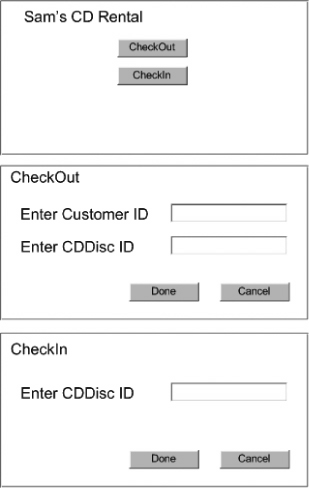
could read them without his glasses.
|
| < Day Day Up > |
| < Day Day Up > |
Chapter Three. General Development IssuesBEFORE WE ANALYZE SAM'S SYSTEM IN DETAIL , we look at some general system development issues. These issues relate to all forms of software development, not just object-oriented design. We examine the big picture , interface contracts, communicating with code, simplicity, dealing with errors, and the spreadsheet conundrum . |
| < Day Day Up > |
| < Day Day Up > |
3.1. Start with the Big PictureThe big picture refers to the broad perspective of a system in development. The big picture includes the system's overall architecture and business purpose. Most successful systems have a single vision of the architecture. The vision can come from group consensus or from a single respected individual. Design decisions within a system should be consistent with that architecture. [*]
As Tim and I develop Sam's system, we will keep in mind that its ultimate goal is to function as a multistore system. As the individual pieces of the initial system are developed, the choice between the various design approaches will be affected by that business purpose. Sam's system is being created in an entirely new environment. Any components that we create (classes, display widgets, etc.) are going to be used in that context. If we attempt to develop components in a vacuum (e.g., without reference to their use), we might have a lot of vacuuming to do when we are finished. For example, we are developing a new Customer class. Its purpose and interface are driven by its representation as someone to whom Sam rents a CD. An attempt to make the class more general (e.g., so that it can represent a purchaser of CDDiscs ) not only would be unnecessary, but also would complicate its required purpose. On the other hand, much software development occurs within an existing environment, which represents the even "bigger picture." The environment might consist of the entire enterprise, a single division, or a single department. Gaining knowledge of that environment before creating your own system helps save development time. The environment might have components that you can use in your system. It might have established frameworks that will make your system structure consistent with other systems in the environment. [*]
For example, the bigger picture might already contain a Customer class. If that class represents the concept that you want to use in the new system, to create another would be unnecessary duplication. This "bigger picture" also determines how you can develop components. If there were no existing Customer class, taking the effort to make your class more reusable might make sense.
|
| < Day Day Up > |
|
Prefactoring Authors: Pugh K. Published year: 2005 Pages: 29-31/175 |
![]() Clean Code: A Handbook of Agile Software Craftsmanship | ![]() The Pragmatic Programmer: From Journeyman to Master | ![]() Agile Testing: A Practical Guide for Testers and Agile Teams |