Developing Your Own Web Service
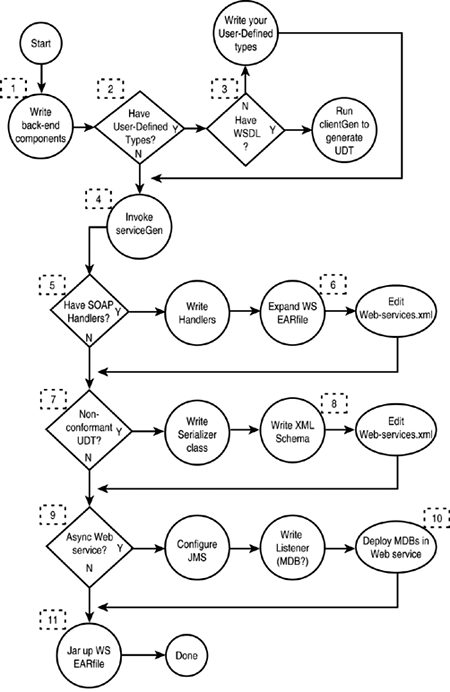
| Having decided on the issues described in the preceding sections and knowing what back-end methods to expose as Web service operations, you are now ready to use the tools and mechanisms provided by WebLogic Server to assemble your components into Web services. Figure 30.7 guides you through this process. Figure 30.7. Follow these steps to create your WebLogic Web service. The following list corresponds to the numbered points on Figure 30.7:
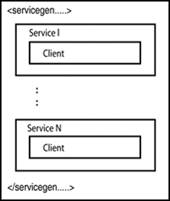
WLS 7.0 Service Pack 1 offers more helpful tools for developing Web services. See "New Features in WLS 7.0 Service Packs" in this chapter for details. WebLogic Ant TasksAs shown in Figure 30.1, WebLogic provides two main Ant tasks for assembling Web services: ServiceGen and ClientGen . They are meant to be invoked from within an Ant build file, as part of building the components that constitute your Web service. ServiceGenA Web service provider uses the ServiceGen task to automatically assemble various components and resources into a WebLogic Web service. Figure 30.8 shows a schematic of the ServiceGen task. Figure 30.8. The make-up of the ServiceGen task. As you can see, it is possible to define more than one Web service in a single deployable Web service EAR. This topic is discussed in more detail later, in "Understanding Web Service Packaging Considerations." Each service box represents the creation of a new Web service. A client subelement in a service directs the creation of a client JAR file for that service. Listing 30.1 shows the ServiceGen invocation for the TraderService example discussed previously. Listing 30.1 Ant Build Code Snippet for Invoking ServiceGen1 <taskdef name ="servicegen" classname="weblogic.ant.taskdefs. webservices .servicegen.ServiceGenTask"/> <target name="build-ear"> <servicegen 2 destEar=" trader .ear" 3 warName="trader_service.war" 4 contextURI="webservice"> 5 <service ejbJar="traderBean.jar" targetNamespace="http://www.bea.com/examples/Trader" serviceName="TraderService" serviceURI="/TraderService" generateTypes="True" expandMethods="True" > 6 <client packageName="examples.webservices.complex.statelessSession" clientJarName="traderService_client.jar" /> </service> </servicegen> </target> First, you define a task called servicegen mapped to the WebLogic servicegen class (1). Actually, the first line of Listing 30.1 is unnecessary if you are using the Ant that is bundled with WLS. You then define an Ant target called build-ear requesting that it create an EAR file called trader.ear (2) and a WAR file called trader_service.war . If you do not specify a file extension here, servicegen will interpret these names as file folders where an expanded EAR and expanded WAR will be created. The next attribute, contextURI , defines the first part of the Web service URL, called the context root of this enterprise application. The URL of this service is defined as http://<host>:<port>/<contextURI>/<serviceURI> Line 5 starts a Web service definition, using traderBean.jar for back-end EJBs and TraderService as the Web service name in its WSDL file. The attribute serviceURI defines the last part of the preceding URL for this Web service. In WebLogic, each Web service is deployed as a Web application, so serviceURI is actually the Web application's web-uri. Because the back-end EJB TraderBean uses the user-defined type TradeResult , you can specify generateTypes="True" so that ServiceGen will autotype and generate the serializer and deserializer class for it. Line 6 requests that ServiceGen also generate the client JAR file and store it in the Web service EAR, which must be done if you want the client JAR to be downloadable from the Web service home page (and also not rename the client JAR, but assume its default name). See the next section, " ClientGen ," for details on clientgen parameters. The only difference between this <client> element of <service> and the ClientGen task is that with <client> you cannot specify a folder location for the destination client JAR; it must be a filename. Another difference is that <client> uses the deployment descriptor and back-end component interface when generating the client JAR, whereas ClientGen can take a WSDL file to generate the client JAR. ClientGen As Figure 30.1 shows, ClientGen can take a service description in the form of a WSDL file or an actual Web service EAR file and generate a client JAR file that contains everything a client needs to invoke the Web service. Listing 30.2 shows a simple ClientGen invocation. Listing 30.2 Sample ClientGen Invocation<taskdef name="clientgen" classname="weblogic.ant.taskdefs.webservices.clientgen.ClientGenTask"/> <target name="gen_clientjar" > <clientgen wsdl="http://localhost:7001/webservice/TraderService?WSDL" packageName="examples.wlbook.web.services" typePackageName="examples.wlbook.udt" autotype="True" clientJar=".\test-client.jar" /> </target> This scriptlet obtains the WSDL of the TraderService example we've been discussing and then parses it to detect uses of any non “built-in types so it can generate Java source files for them. It also generates serializer and deserializer classes for each non “built-in type it finds (because you specified autotype="True" ). Of course, the client proxies for this service are also generated into the client JAR. The output JAR file is also named. Tip When ClientGen generates the client proxies, what package should they reside in? ClientGen has no idea, so you must tell it using the packageName attribute. Similarly for generated non “built-in types and serializers, you specify their package name using the typePackageName attribute. Letting ClientGen Generate UDTs for YouIn one use case, WebLogic can generate user-defined types (also known as non “built in types) for you: when you invoke ClientGen with an input WSDL description and the service operations use complex types. In this case, ClientGen will generate the actual Java source files that correspond to each complex type. It will even generate serializers and deserializers for those objects. The only effort on your part is to obtain or author the WSDL file. Command-Line UtilitiesWebLogic also provides command-line versions of ServiceGen and ClientGen , for use in non-Ant build environments. In this case, the invocation attributes are specified as command-line options, named to match (more or less) with the Ant task interface. |

EAN: 2147483647
Pages: 360