CLR Initialization and Startup
|
| As described, CorBindToRuntimeEx is the API you'll call to initialize the CLR. I briefly describe the API in this section, and then we'll dig into the details in Chapter 3. There are four configuration settings you can specify when calling CorBindToRuntimeEx:
Here's a sample call to CorBindToRuntimeEx that demonstrates how you'd specify these configuration settings. In this call, I've specified that I want to run with only version 2.0.40103 of the CLR. In addition, I'd like to always run the workstation build with the garbage collector in the concurrent mode. ICLRRuntimeHost *pCLRHost = NULL; HRESULT hr = CorBindToRuntimeEx( L"v2.0.40103", L"wks", STARTUP_CONCURRENT_GC, CLSID_CLRRuntimeHost, IID_ICLRRuntimeHost, (PVOID*) &pCLRHost); CorBindToRuntimeEx is implemented in mscoree.dll. mscoree.dll does not contain the implementation of the CLR engine, but rather is a shim whose primary job is to find and load the requested version of the CLR engine. As such, you'll often hear mscoree.dll referred to as the CLR startup shim. The startup shim is required to support the side-by-side architecture of the CLR and the .NET Framework. Side-by-side refers to the ability to have multiple versions of the core CLR and the .NET Framework assemblies installed on a machine at the same time. As we see in Chapter 3, this architecture helps solve the "DLL hell" problems associated with platforms such as Win32 and COM. To keep multiple installations separate, each version of the CLR is installed into its own subdirectory under %windir%\microsoft.net\framework. (Some files are also stored in the global assembly cache.) The startup shim ties the multiple versions of the CLR together. Specifically, the shim tracks which versions are installed and is capable of finding the location on disk of a specific version of the CLR. Because of its role as arbitrator, the shim is not installed side by side. Each machine has only one copy of mscoree.dll installed in %windir%\system32. All requests to load the CLR come through the startup shim, which then directs each request to the requested version of the CLR. Figure 2-2 shows the side-by-side architecture of the CLR and the .NET Framework. We cover this topic in much greater detail in Chapter 3. Figure 2-2. The side-by-side architecture of the CLR and the .NET Framework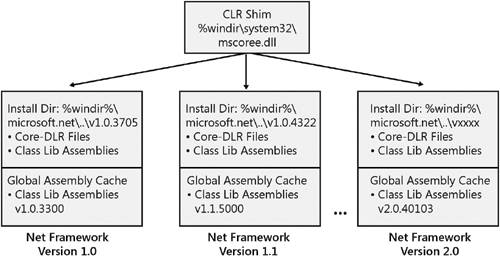 A call to CorBindToRuntimeEx sets the version, garbage collection, build type, and domain-neutral parameters, but it does not actually start the CLR running in a process. My definition of start is that the version-specific CLR DLLs are loaded into the process and managed code is then ready to run. Starting the CLR occurs when the host calls the Start method on the ICLRRuntimeHost interface. You'll notice in the preceding code that CorBindToRuntimeEx returns an interface pointer of type ICLRRuntimeHost as its last parameter as I discussed earlier. In this way, CorBindToRuntimeEx serves two roles as far as a host is concerned: it initializes the CLR and returns an interface pointer from which all interaction between the host and the CLR begins. The combination of CorBindToRuntimeEx and ICLRRuntimeHost::Start gives you explicit control over several aspects of the CLR including some basic settings and the exact time at which the CLR is loaded. However, calling these functions isn't strictly required to load the CLR into a process. If explicit calls to CorBindToRuntimeEx and Start are not made, the CLR will be loaded implicitly in certain scenarios. Although this can be convenient in some cases, implicit loading of the CLR removes your ability to configure it in the way I've been describing. One scenario in which the CLR is often started implicitly is when a managed type is created in a process through COM interoperability. If the CLR has not been initialized and started explicitly, the COM interoperability layer starts the runtime automatically to load and run the type. There might also be cases when you don't want to load the CLR when the process starts, but you still want to configure some of the startup options. For example, you might want to lazily load the CLR to avoid having to pay the cost of starting the CLR when your process starts. You can use the hosting API LockClrVersion to register a callback that the CLR will call at the times when it would have loaded itself implicitly. This callback gives you the chance to call CorBindToRuntimeEx to initialize the CLR as you see fit. See Chapter 3 for a sample that uses LockClrVersion. As we've seen, gaining control over CLR startup is easyit takes just a few lines of code. Controlling startup in this way is just one small but useful example of the type of control you obtain through the hosting API with relatively little investment. Chapter 3 covers the use of CorBindToRuntimeEx and LockClrVersion in much more detail. |
|

EAN: N/A
Pages: 119