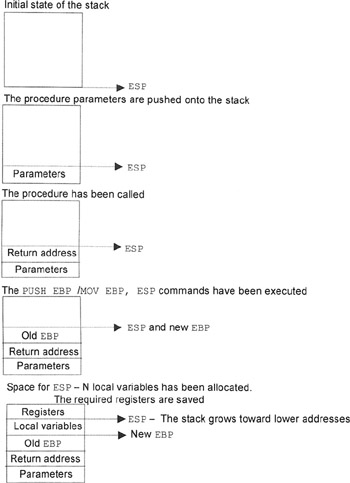
Fig. 2.2
demonstrates
the standard entry to the procedure used in high-level programming languages such as C and Pascal. When entering the procedure, the following standard sequence of commands is executed:
PUSH EBP
MOV EBP, ESP
SUB ESP, N ; N --- Number of bytes for local variables
The address of the first parameter is defined as
[EBP+8h],
which you have used several times. The address of the first local variable, if it is reserved, is defined as [ebp - 4] (with the dword variable in mind). When programming in Assembly language, local variables are not
convenient
; therefore, do not reserve space for them (see Chapters 11 and 12). At the end of the procedure, the following commands can be found:
MOV ESP, EBP
POP EBP
RET M
Here, m is the stack volume taken for passing parameters.
The same result can be achieved using the
ENTER N
,
O
(
PUSH EBP\MOV EBP, ESP\SUB ESP
) command at the starting point of the procedure and the
LEAVE
(
MOV ESP, EBP\POP EBP
) at its end. These commands Were first introduced for Intel's 286 processor. They gave the possibility of optimizing the translated code,
especially
when dealing with large modules developed using high-level programming languages.
It is necessary to mention another aspect
related
to the structure of the procedure and the
methods
used for calling it. There are two main approaches to passing parameters, also called parameter passing agreements. The first approach is conventionally called the C approach, and the second one is the Pascal approach. The first approach assumes that the procedure doesn't know how many parameters are placed into the stack. In this case, parameters must be popped from the stack after the procedure has been called. This can be achieved using the pop command or the add esp, n commands (where n stands for the number of bytes required for parameters). The second approach is based on the fact that the number of parameters is fixed; therefore, the stack can be popped within the procedure. This is achieved by executing the ret n command (where n stands for the number of bytes required for parameters). As you have probably guessed, the calls to API functions are carried out according to the second method. Nevertheless, there are exceptions from this rule, which will be
considered
later (see Chapter 7).
|
|
|
|
|
|
|
|
|
|
Chapter 3:
Simple Programs Written in Assembly Language
This chapter is dedicated to simple examples intended to
demonstrate
the techniques of creating
windows
and their elements, a topic covered in Chapter 2.
Principles of Building Windowing Applications
I'll
formulate
several general statements that later will help you to easily manipulate windows and create powerful, flexible, and high-performance applications.
-
The properties of a specific window are set when calling the
CreateWindow
function by setting the
Style
parameters. The constants specifying the window properties are set in special files, which are included at the compile time. Since function properties are defined by the value of the specific bit of the constant, the combination of properties is nothing but the sum of bit constants (obtained using the
or
command). In contrast to recommendations for software developers, most constants are defined directly in programs. Among other aspects, this ensures your psychological
comfort
because your program will be self-sufficient.
-
The window is created on the basis of the registered class. It can contain various controls, such as command buttons, edit fields, lists, and scroll bars. All these elements can be created as windows characterized by predefined properties (e.g., for
buttons
, this might be the button class; for edit fields, this might be the edit class; and for the lists, this might be the listbox class).
-
The system communicates with the windowand, consequently, with the applicationby exchanging messages. These messages must be
processed
by the window procedure. Windows programming in many respects represents the programming of message processing. Messages are also generated by the system if some visual events take place in respect to the window or some of its controls.
[i]
The list of such events might include moving a window, changing its
size
, clicking a button, selecting some of the list elements, and moving the mouse cursor. All these events are obvious, since the program must
react
to such events anyway.
-
The message has its assigned code (
designate
it as
MES
in your program) and two parameters (
WPARAM
and
LPARAM
). For each message code, there is a macro
name
, although it is just an integer value. The
WM_CREATE
message arrives only once, when the window is created;
WM_PAINT
is sent to the window when it has to be redrawn;
[ii]
WM_RBUTTONDOWN
is generated if you right-click the mouse when placing the cursor somewhere in the window area; etc. Message parameters can play some role intended to clarify their sense, or they may not play a role. For example, the
WM_COMMAND
message is generated if something happens to the window controls. In this case, parameter values allow you to detect the window element and what
happened
to it. (
LPARAM
is the element descriptor; the most significant word of
WPARAM
specifies the event; and the least significant
WPARAM
word usually stands for the resource identifier. See Part II.) Thus, it is possible to say that the
WM_COMMAND
message is the message from a window element.
-
The message can be generated both by the system and by the program. For example, it is possible to send the command message to some of the window controls (to add an element to the list, to pass a string to the edit field, and so on). Sometimes, messages are sent to implement some programming technique. For example, it is possible to construct custom messages so that the program carries out specific operations when receiving such messages. Naturally, such messages must be handled either in the window procedure of some window or in the
message-processing
loop. This approach is
convenient
because it allows you to execute looping algorithms so that possible changes to the window would be displayed immediately at execution.
[i]
It is possible to classify all window elements as controls (e.g., buttons or checkboxes) or controllable elements (e.g., edit fields). However, all window elements
generally
are called controls.
[ii]
Although the window procedure is called with the appropriate values of its parameters, now and further on I will say that the message is sent to the window.