Section 2.7. Interfaces
2.7. InterfacesAn interface is a classifier that has declarations of properties and methods but no implementations. You can use interfaces to group common elements between classifiers and provide a contract a classifier that provides an implementation of an interface must obey. For example, you can create an interface named Sortable that has one operation named comesBefore(...). Any class that realizes the Sortable interface must provide an implementation of comesBefore(...). Some modern languages, such as C++, don't support the concept of interfaces; UML interfaces are typically represented as pure abstract classes. Other languages, such as Java, do support interfaces but don't allow them to have properties. The moral is that you should be aware of how your model is going to be implemented when modeling your system. There are two representations for an interface; which one you should use depends on what you're trying to show. The first representation is the standard UML classifier notation with the stereotype «interface». Figure 2-31 shows the Sortable interface. Figure 2-31. The Sortable interface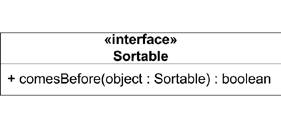 The second representation of an interface is the ball-and-socket notation. This representation shows less detail for the interface but is more convenient for showing relationships to classes. The interface is simply shown as a ball with the name of the interface written below it. Classes dependent on this interface are shown attached to a socket matching the interface. Figure 2-32 shows the Sortable interface using the ball-and-socket notation. Figure 2-32. Examples of providing and requiring interfaces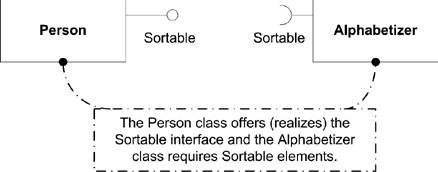 Because an interface specifies the contract only for a set of features, you can't instantiate an interface directly. Instead, a class is said to realize an interface if it provides an implementation for the operations and properties. You show realization using a dashed line starting at the realizing classifier and leading to the interface, with a closed arrowhead at the end. Classes that are dependent on the interface are shown using a dashed line with an open arrow (dependency). Figure 2-33 shows a class that realizes the Sortable interface and a class that is dependent on it. Figure 2-33. Person realizes the Sortable interface and Alphabetizer depends on it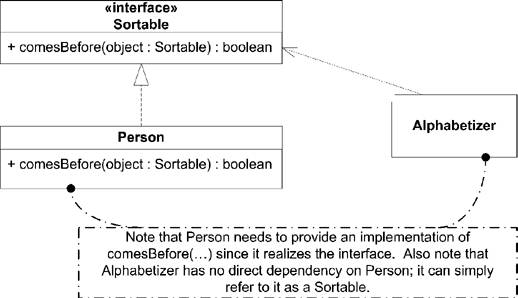 Providing an implementation of an operation is straightforward. You must provide an implementation on a realizing classifier with the same signature as the operation on the interface. Typically there are semantic constraints associated with an operation that must be honored by any implementation. Realizing a property is more subtle. A property on an interface states that any class that realizes the interface must store the data specified by the property in some way. A property on an interface doesn't necessarily mean there will be an associated property on a realizing classifier. However, the classifier must be able to store the data represented by the property and provide a means to manipulate it. |

EAN: 2147483647
Pages: 132