Hash Element Access
5.2 Hash Element Access
To access an element of a hash, use syntax that looks like this:
$hash{$some_key} This is similar to what we used for array access, but here we use curly braces instead of square brackets around the subscript (key).[6] And that key expression is now a string, rather than a number:
[6] Here's a peek into the mind of Larry Wall: Larry says that we use curly braces instead of square brackets because we're doing something fancier than ordinary array access, so we should use fancier punctuation.
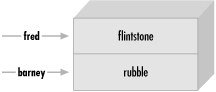
$family_name{"fred"} = "flintstone";$family_name{"barney"} = "rubble"; Figure 5-2 shows how the resulting hash keys are assigned.
Figure 5-2. Assigned hash keys
This lets us use code like this:
foreach $person (qw< barney fred >) { print "I've heard of $person $family_name{$person}.\n";}
The name of the hash is like any other Perl identifier (letters, digits, and underscores, but can't start with a digit). And it's from a separate namespace; that is, there's no connection between the hash element $family_name{"fred"} and a subroutine &family_name, for example. Of course, there's no reason to confuse everyone by giving everything the same name. But Perl won't mind if you also have a scalar called $family_name and array elements like $family_name[5]. We humans will have to do as Perl does; that is, we'll have to look to see what punctuation appears before and after the identifier to see what it means. When there is a dollar sign in front of the name and curly braces afterwards, it's a hash element that's being accessed.
When choosing the name of a hash, it's often nice to think of the word "of" between the name of the hash and the key. As in, "the family_name of fred is flintstone". So the hash is named family_name. Then it becomes clear what the relationship is between the keys and their values.
Of course, the hash key may be any expression, not just the literal strings and simple scalar variables that we're showing here:
$foo = "bar";
print $family_name{ $foo . "ney" }; # prints "rubble" When you store something into an existing hash element, that overwrites the previous value:
$family_name{"fred"} = "astaire"; # gives new value to existing element$bedrock = $family_name{"fred"}; # gets "astaire"; old value is lost That's analogous to what happens with arrays and scalars; if you store something new into $pebbles[17] or $dino, the old value is replaced. If you store something new into $family_name{"fred"}, the old value is replaced as well.
Hash elements will spring into existence by assignment:
$family_name{"wilma"} = "flintstone"; # adds a new key (and value)$family_name{"betty"} .= $family_name{"barney"}; # creates the element if needed That's also just like what happens with arrays and scalars; if you didn't have $pebbles[17] or $dino before, you will have it after you assign to it. If you didn't have $family_name{"betty"} before, you do now.
And accessing outside the hash gives undef:
$granite = $family_name{"larry"}; # No larry here: undef Once again, this is just like what happens with arrays and scalars; if there's nothing yet stored in $pebbles[17] or $dino, accessing them will yield undef. If there's nothing yet stored in $family_name{"larry"}, accessing it will yield undef.
5.2.1 The Hash as a Whole
To refer to the entire hash, use the percent sign ("%") as a prefix. So, the hash we've been using for the last few pages is actually called %family_name.
For convenience, a hash may be converted into a list, and back again. Assigning to a hash (in this case, the one from Figure 5-1) is a list-context assignment, where the list is made of key-value pairs:[7]
[7] Although any list expression may be used, it must have an even number of elements, because the hash is made of key-value pairs. An odd element will likely do something unreliable, although it's a warnable offense.
%some_hash = ("foo", 35, "bar", 12.4, 2.5, "hello","wilma", 1.72e30, "betty", "bye\n");
The value of the hash (in a list context) is a simple list of key-value pairs:
@any_array = %some_hash;
We call this unwinding the hash; turning it back into a list of key-value pairs. Of course, the pairs won't necessarily be in the same order as the original list:
print "@any_array\n";
# might give something like this:
# betty bye (and a newline) wilma 1.72e+30 foo 35 2.5 hello bar 12.4
The order is jumbled because Perl keeps the key-value pairs in an order that's convenient for Perl, so that it can look up any item quickly. So you'd normally use a hash either when you don't care what order the items are in, or when you have an easy way to put them into the order you want.
Of course, even though the order of the key-value pairs is jumbled, each key "sticks" with its corresponding value in the resulting list. So, even though we don't know where the key foo will appear in the list, we know that its value, 35, will be right after it.
5.2.2 Hash Assignment
It's rare to do so, but a hash may be copied using the obvious syntax:
%new_hash = %old_hash;
This is actually more work for Perl than meets the eye. Unlike what happens in languages like Pascal or C, where such an operation would be a simple matter of copying a block of memory, Perl's data structures are more complex. So, that line of code tells Perl to unwind the %old_hash into a list of key-value pairs, then assign those to %new_hash, building it up one key-value pair at a time.
It's more common to transform the hash in some way, though. For example, we could make an inverse hash:
%inverse_hash = reverse %any_hash;
This takes %any_hash and unwinds it into a list of key-value pairs, making a list like (key, value, key, value, key, value, ...). Then reverse turns that list end-for-end, making a list like (value, key, value, key, value, key, ...). Now the keys are where the values used to be, and the values are where the keys used to be. When that's stored into %inverse_hash, we'll be able to look up a string that was a value in %any_hash it's now a key of %inverse_hash. And the value we'll find is one that was one of the keys from %any_hash. So, we have a way to look up a "value" (now a key), and find a "key" (now a value).
Of course, you might guess (or determine from scientific principles, if you're clever) that this will work properly only if the values in the original hash were unique otherwise we'd have duplicate keys in the new hash, and keys are always unique. Here's the rule that Perl uses: the last one in wins. That is, the later items in the list overwrite any earlier ones. Of course, we don't know what order the key-value pairs will have in this list, so there's no telling which ones would win. You'd use this technique only if you know there are no duplicates among the original values.[8] But that's the case for the IP address and host name examples given earlier:
[8] Or if you don't care that there are duplicates. For example, we could invert the %family_name hash (in which the keys are people's given names and values are their family names) to make it easy to determine whether there is or is not anyone with a given family name in the group. Thus, in the inverted hash, if there's no key of slate, we'd know that there's no one with that name in the original hash.
%ip_address = reverse %host_name;
Now we can look up a host name or IP address with equal ease, to find the corresponding IP address or host name.
5.2.3 The Big Arrow
When assigning a list to a hash, sometimes it's not obvious which elements are keys and which are values. For example, in this assignment (which we saw earlier), we humans have to count through the list, saying, "key, value, key, value...", in order to determine whether 2.5 is a key or a value:
%some_hash = ("foo", 35, "bar", 12.4, 2.5, "hello", "wilma", 1.72e30, "betty", "bye\n"); Wouldn't it be nice if Perl gave us a way to pair up keys and values in that kind of a list, so that it would be easy to see which ones were which? Larry thought so, too, which is why he invented the big arrow, (=>).[9] To Perl, it's just a different way to "spell" a comma. That is, in the Perl grammar, any time that you need a comma ( , ), you can use the big arrow instead; it's all the same to Perl.[10] So here's another way to set up the hash of last names:
[9] Yes, there's also a little arrow, (->). It's used with references, which are an advanced topic; see the perlreftutand perlrefmanpage when you're ready for that.
[10] Well, there's one technical difference: any bareword (a sequence of nothing but letters, digits, and underscores not starting with a digit) to the left of the big arrow is implicitly quoted. So you can leave off the quote marks on a bareword to the left of the big arrow. You may also omit the quote marks if there's nothing but a bareword as a key inside the curly braces of a hash.
my %last_name = ( # a hash may be a lexical variable "fred" => "flintstone", "dino" => undef, "barney" => "rubble", "betty" => "rubble",); Here, it's easy (or perhaps at least easier) to see whose name pairs with which value, even if we end up putting many pairs on one line. And notice that there's an extra comma at the end of the list. As we saw earlier, this is harmless, but convenient; if we need to add additional people to this hash, we'll simply make sure that each line has a key-value pair and a trailing comma. Perl will see that there is a comma between each item and the next, and one extra (harmless) comma at the end of the list.

EAN: 2147483647
Pages: 205