11.5. XML and ADO.NET
| < Day Day Up > |
| Just as relational data has a schema that defines its tables, columns, and relationships, XML uses a Schema Definition language (XSD) to define the layout of an XML document. Its main use is to validate the content of XML data. See Section 10.1, "Working with XML," for a discussion of XML Schema. The XML classes reside in the System.Xml namespace hierarchy and are not part of ADO.NET. However, the ADO.NET DataSet class provides a bridge between the two with a set of methods that interacts with XML data and schemas:
We'll first look at examples that show how to write XML from a DataSet. This XML output is then used as input in subsequent examples that create a DataSet from XML. Using a DataSet to Create XML Data and Schema FilesWhen working with XML, the DataSet is used as an intermediary to convert between XML and relational data. For this to work, the XML data should be structured so that it can be represented by the relationships and row-column layout that characterizes relational data. The following code segment illustrates how easy it is to create an XML data file and schema from a DataSet's contents. A DataAdapter is used to populate a DataSet with a subset of the movies table. The WriteXml and WriteXmlSchema methods are then used to translate this to XML output. DataSet ds = new DataSet("films"); DataTable dt = ds.Tables.Add("movies"); string sql = "SELECT * FROM movies WHERE bestPicture='Y'"; SqlDataAdapter da = new SqlDataAdapter(sql, conn); da.Fill(dt); // Write Schema representing DataTable to a file ds.WriteXmlSchema("c:\\oscars.xsd"); // create schema // Write Table data to an XML file ds.WriteXml("c:\\oscarwinners.xml"); // data in xml format /* To place schema inline with XML data in same file: ds.WriteXml(("c:\\oscarwinners.xml", XmlWriteMode.WriteSchema); */ The schema output shown in Listing 11-7 defines the permissible content of an XML document (file). If you compare this with Figure 11-3 on page 502, you can get a general feel for how it works. For example, each field in the movies table is represented by an element containing the permissible field name and type. Listing 11-7. XML Schema from Movies Table oscars.xsd<?xml version="1.0" encoding="utf-16"?> <xs:schema xmlns="" xmlns:xs="http://www.w3.org/2001/XMLSchema" xmlns:msdata="urn:schemas-microsoft-com:xml-msdata"> <xs:element name="films" msdata:IsDataSet="true"> <xs:complexType> <xs:choice minOccurs="0" maxOccurs="unbounded"> <xs:element name="movies"> <xs:complexType> <xs:sequence> <xs:element name="movie_ID" type="xs:int" minOccurs="0" /> <xs:element name="movie_Title" type="xs:string" minOccurs="0" /> <xs:element name="movie_Year" type="xs:int" minOccurs="0" /> <xs:element name="movie_DirectorID" type="xs:int" minOccurs="0" /> <xs:element name="AFIRank" type="xs:int" minOccurs="0" /> <xs:element name="bestPicture" type="xs:string" minOccurs="0" /> </xs:sequence> </xs:complexType> </xs:element> </xs:choice> </xs:complexType> </xs:element> </xs:schema> Listing 11-8 displays an abridged listing of the XML version of the relational data. The name of the DataSet is the root element. Each row in the table is represented by a child element (movies) containing elements that correspond to the columns in the data table. Listing 11-8. Movies Data as an XML Document oscarwinners.xml<?xml version="1.0" encoding="utf-16"?> <?xml version="1.0" standalone="yes"?> <films> <movies> <movie_ID>5</movie_ID> <movie_Title>Citizen Kane </movie_Title> <movie_Year>1941</movie_Year> <movie_DirectorID>1</movie_Director> <AFIRank>1</AFIRank> <bestPicture>Y</bestPicture> </movies> <movies> <movie_ID>6</movie_ID> <movie_Title>Casablanca </movie_Title> <movie_Year>1942</movie_Year> <movie_DirectorID>2</movie_Director> <AFIRank>2</AFIRank> <bestPicture>Y</bestPicture> </movies> ... </films> Creating a DataSet Schema from XMLEach ADO.NET DataSet has a schema that defines the tables, table columns, and table relationships that comprise the DataSet. As we saw in the preceding example, this schema can be translated into an XML schema using the WriteXmlSchema method. ReadXmlSchema mirrors the process adding tables and relationships to a DataSet. In this example, the XML schema for the movies table (refer to Listing 11-7) is used to create a DataSet schema: DataSet ds = new DataSet(); ds.ReadXmlSchema("c:\\oscars.xsd"); DataTable tb = ds.Tables[0]; // List Columns for table string colList = tb.TableName +": "; for (int i = 0; i < tb.Columns.Count; i++) { colList += tb.Columns[i].Caption + " "; } Console.WriteLine(colList); /* output is: movies: movie_ID movie_Title movie_Year movie_DirectorID bestpicture AFIRank */ It is also possible to create a schema by inferring its structure from the XML data or using a DataAdapter to configure the schema: // (1) Create schema by inferring it from XML data ds.Tables.Clear(); // Remove tables from DataSet ds.InferXmlSchema("c:\\oscarwinners.xml",null); // (2) Create schema using Data Adapter ds.Tables.Clear(); string sql = "SELECT * FROM movies"; SqlDataAdapter da = new SqlDataAdapter(sql, connStr); // Creates DataTable named "movies" da.FillSchema(ds, SchemaType.Source, "movies"); Core Note
Reading XML Data into a DataSetThe DataSet.ReadXml method provides a way to read either data only or both the data and schema into a DataSet. The method has several overloads that determine whether a schema is also created. The two overloads used with files are XmlReadMode ReadXml(string XMLfilename); XmlReadMode ReadXml(string XMLfilename, XmlReadMode mode); Parameters:
The XmlReadMode parameter merits special attention. Its value specifies how a schema is derived for the table(s) in a DataSet. It can specify three sources for the schema: from a schema contained (inline) in the XML file, from the schema already associated with the DataSet, or by inferring a schema from the contents of the XML file. Table 11-6 summarizes how selected enumeration members specify the schema source. The numbers in the table indicate the order in which a schema is selected. For example, ReadSchema specifies that the inline schema is the first choice; if it does not exist, the schema associated with the DataSet is used; if neither exists, a data table is not built.
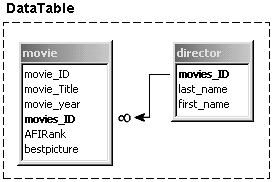
The code segment in Listing 11-9 loads an XML file into a DataSet and then calls a method to display the contents of each row in the table created. Because the DataSet does not have a predefined schema, and the file does not include an inline schema, ReadXml infers it from the contents of the file. Listing 11-9. Using ReadXml to Load XML Data into a DataSet // Load XML data into dataset and create schema if one does // not exist DataSet ds = new DataSet(); ds.ReadXml("c:\\oscarwinners.xml"); // Save source of data in dataset ds.ExtendedProperties.Add("source", "c:\\oscarwinners.xml"); ShowTable(ds.Tables[0]); // Display each row in table private void ShowTable(DataTable t) { foreach(DataRow dr in t.Rows) { StringBuilder sb = new StringBuilder("Table: "); sb.Append(t.TableName).Append("\n"); foreach(DataColumn c in t.Columns) { sb.Append(c.Caption).Append(": "); sb.Append(dr[c.ColumnName].ToString()).Append("\n"); } Console.WriteLine(sb.ToString()); } Note the use of ExtendedProperties to store the name of the data source in the data set. Because this collection of custom properties is implemented as a Hashtable, it is accessed using that syntax: string src = (string)ds.ExtendedProperties["source"]; ds.ExtendedProperties.Clear(); // clear hash table Using ReadXml with Nested XML DataThe XML file used in the preceding example has a simple structure that is easily transformed into a single table: The <movies> tag (refer to Listing 11-8) represents a row in a table, and the elements contained within it become column values. Most XML is more complex than this example and requires multiple tables to represent it. Although ReadXml has limitations (it cannot handle attributes), it can recognize nested XML and render multiple tables from it. As an example, let's alter the oscarwinners.xml file to include a <director> tag within each <movies> block. <films> <movies> <movie_ID>5</movie_ID> <movie_Title>Citizen Kane </movie_Title> <movie_Year>1941</movie_Year> <director> <first_name>Orson</first_name> <last_name>Welles</last_name> </director> <bestPicture>Y</bestPicture> <AFIRank>1</AFIRank> </movies> ... more movies here </films> Next, run this code to display the contents of the table(s) created: DataSet ds = new DataSet(); ds.ReadXml("c:\\oscarwinnersv2.xml"); foreach (DataTable dt in ds.Tables) ShowTable(dt); Figure 11-7 depicts the DataSet tables created from reading the XML file. It creates two tables, automatically generates a movies_ID key for each table, and assigns values to this key, which link a row in the movies table to an associated row in the director table. Figure 11-7. DataSet tables and relationship created from XML
| ||||||||||||||||||||||||||||||||||||

| < Day Day Up > |
