Flylib.com

Books Software


Making Estimated Tax Payments


Making Estimated Tax Payments

Typically, each of your quarterly estimated payments will be equal to at least 25% of the lesser of 100% of the estimated income tax for the current year or 100% of the tax shown on the corporation's tax return for the preceding year (unless no tax return was filed in the preceding year, or if that tax return was for fewer than 12 months). Use Form 8109, available from the IRS (call 1-800-TAX-FORM or contact your local IRS office) to accompany your tax deposits. Note: Some corporations are required to use the Electronic Federal Tax Payment System to make tax deposits electronically . Contact the IRS or your accountant for more information on how to make deposits.

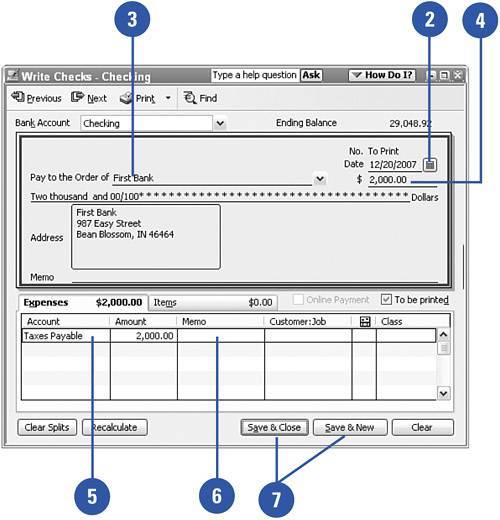
Click the Write Checks icon on the Home page to open a new check.

TIMESAVER

Pressing Ctrl+W will also take you to the Write Checks window.

Enter the date of the payment.

Enter the payee. This will probably be the name of your bank. Check with your accountant for instructions on how your tax payments should be presented.

Enter the amount.

Enter the account name where the payment will be recorded (see the previous sidebar "Accounting for Income Taxes").

Enter a description.

Save and print the payment.

See Also

See "Scheduling Recurring Transactions" on page 186 for information on how you can save time by scheduling and automating your quarterly tax payments.


Did You Know?

Choose either your income tax liability or your income tax expense account for recording the tax payment . If the tax liability has already been recorded, this payment should be assigned to the liability account. If you haven't recorded the tax liability, record the payment to the income tax expense account.


Did You Know?

Different estimated tax payment rules apply depending on the type of business . The information presented in this task describes estimated tax information for taxable corporations. Different rules apply for individuals and other types of organizations. Check with your tax professional to ensure you are paying the correct amount of estimated tax.


Creating a Tax Return

When you have all the information necessary for the creation of your tax return, you can find all the tax forms you need on the Internet. The IRS provides all the tax forms and accompanying instructions on its website, available for downloading; all the state revenue agencies provide their tax forms online as well. Determine which tax forms you need. The easiest way to do this is to look at last year's tax return. If this is the first year for your company's tax return, start with the main tax form for your company as described earlier in this chapter. As you follow along and read the instructions, you will find out which other tax forms you need.

Download Federal Tax Forms

Go to the IRS website at http://www.irs.gov.

Click More Forms And Publications.

Click Forms And Instructions.

Scroll down until you see the forms section. Then scroll until you find the form(s) you want to download.

Click the form you want; if you want to select more than one form, hold down the Ctrl key while clicking other forms.

Click the Review Selected Files button.

Click the name of a form you want to view. The form you selected appears.

You can view the form onscreen, print it, and save it.

Download State Tax Forms

Go to the Fun with Taxes website at http://www.funwithtaxes.com.

Click the State Tax Forms link.

Click the state for which you need tax forms. The website for that state's revenue agency will appear in a separate window.

Did You Know?

Each state has its own website . You can use an Internet search engine to find the revenue agency for your state. Or you can go to a website that provides links to all state revenue agencies. A site like this is especially handy if you need to file tax returns in more than one state.