Component Versioning
One of COM's most powerful features is that it lets you revise a binary component in the production environment without having to touch any of the existing clients. When you revise your DLLs and EXEs, you can replace the previous versions in the field without breaking anything. The client applications in production can benefit from the performance enhancements and bug fixes that you have made to the methods that they are already calling.
In addition to improving the implementations of existing methods, you can extend the behavior of your objects by adding new methods. Existing clients can't take advantage of this new behavior unless you do something exotic such as anticipate support for some future interface with the TypeOf operator. However, new clients can fully benefit from any new methods that you have added to a later version of an object.
The question then becomes, "How do you strike a balance between maximum object extensibility and backward compatibility?" Understanding the rules of COM versioning is critical. Clients that use custom vTable binding expect every method in every interface to remain the same from build to build. Every interface is a contract, and if you break the contract, a vTable-bound client might take an action that you don't particularly like. Automation clients are more relaxed about what they expect from your objects, but you still have to meet their expectations.
The best way to approach COM versioning is to think through the expectations that each preexisting client has of your server. A client application expects that the things it knows about will not change across builds. Once you understand what the client knows about the server, you can determine what you can change and what you can't. It's a simple matter of determining what dependencies have been built into the client applications.
Binary Component Versioning
When it comes to versioning components, there are two main classifications of clients: those that use custom vTable binding and those that use IDispatch. Versioning against IDispatch clients is much easier and will be covered after we tackle the tougher problem of versioning clients that use vTable binding.
What does a vTable-bound client application know about? It knows about each CLSID and IID defined in the type library of your server. It also knows the method signatures defined within each interface. You can revise a COM server used by custom vTable-bound clients if you don't change any of these things.
You should understand all aspects of version control. You must also consider two points of view when it comes to extending an object. The creators of COM promote a specific technique for extending an object: When you want to add a new method to an object, you must create and implement a new user-defined interface. The Visual Basic team has devised a technique that makes it possible to add new methods to a class without creating a new user-defined interface. What's really great is that the Visual Basic team has done this without violating any of the rules of COM versioning at the physical level.
The Visual Basic documentation and the Visual Basic IDE recognize three levels of compatibility when you rebuild a component: version identical, version compatible, and version incompatible. When a later release of a component serves up its interfaces in a version-identical manner, this means that the physical vTables and the calling syntax for each method remain the same. This is consistent with the vision of the COM architects. If an interface is held constant, a versioning system can be properly maintained. The COM specification reinforces this by stating that an interface is immutable. When a client successfully calls QueryInterface, an object makes a promise to fulfill a contract.
According to the COM specification, to extend your object by adding new methods, you must create a new interface. Chapter 2 demonstrated this technique in Visual Basic using two interfaces, IDog and IDog2. The new object is responsible for implementing both the old interface and the new interface. Old clients use the original interface, and new clients use the extended interface. With this versioning scheme, you can continue to extend your objects over time by creating other interfaces such as IDog3, IDog4, and IDog5.
Unfortunately, the COM purists and the Visual Basic team disagree when it comes to the proper mechanism for extending an object. The Visual Basic team thinks that the rules can be relaxed as long as the server continues to meet the expectations of each client. They believe that it sometimes makes sense to break the most fundamental rule of traditional COM: Don't ever change an interface once it's in use. As you will see, you can modify an interface definition in Visual Basic without breaking existing clients if you do it correctly.
Here's how it works. You can safely extend an interface by adding new methods if you don't change the signatures of any existing method. Adding methods to a preexisting interface means extending the physical layout of the vTable by adding new entries at the end. An extended vTable defines the same method signatures as before, and it adds one or more new methods below. This type of vTable is version compatible. Old clients are oblivious to the new entries in the vTable. They can use a version-compatible vTable in the same way they use the original. New clients, on the other hand, can take advantage of the new methods added to the second version. This means that you can extend the functionality of an object without explicitly creating a new interface.
This versioning technique is important to Visual Basic programmers who don't use user-defined interfaces. As you know, when a programmer compiles a creatable class with public members, Visual Basic automatically creates a default interface behind the scenes. Visual Basic can thus let programmers participate in COM programming without explicitly dealing with a user-defined interface. Without relaxing the rules of object extensibility in the COM specification, Visual Basic programmers would be forced to deal with user-defined interfaces to extend their objects in later versions. The Visual Basic team managed to find a way to keep the COM purists happy without forcing Visual Basic programmers to work in terms of user-defined interfaces. This was a remarkable achievement.
So what's the problem with a version-compatible interface? Why does the idea make COM purists sick to their stomachs? The problem has to do with a scenario in which a new client comes in contact with an older version of the object. For instance, suppose an object's default interface had 5 methods in the first version and was then extended to contain 10 methods in a subsequent release. If a client that is compiled against a later version of the interface somehow activates an earlier version of the object, it will expect the vTable to be twice as long as it really is. What happens when the client attempts to use the sixth or seventh entry in the vTable? The client will be reading random values from memory when it expects to find a valid function pointer. You can see the problem. When a client tries to invoke a method using an invalid function pointer, bad things happen.
From the COM purist's point of view, an interface (as specified by an IID) is a contract that can never change. Adding methods to the end of the vTable makes the contract invalid. The Visual Basic team believes that it is acceptable to add methods to the end of the vTable as long as you ensure that a new client never activates an older version of the object. If a new client were to activate an older version of the object, it would expect methods that are absent in the original interface. As you will see, Visual Basic generates a trappable run-time error whenever a new client tries to activate an object from an earlier, incompatible, version of the server.
Version-Compatible Interfaces
Visual Basic uses a mechanism known as IID forwarding to make interface compatibility work in a production environment. As you'll see in the next section, when you add new public methods to a class between the first and second builds of a server, you can ask Visual Basic to create the new build in a version-compatible manner. This means that clients that were compiled against the first version of the type library will continue to work as before. Newer clients that are compiled against the new version of the type library can take advantage of the new methods.
Whenever a new interface is either explicitly or implicitly created in your server, Visual Basic automatically generates a new IID for it. When you create a version-compatible interface by adding new methods in a subsequent release, Visual Basic generates a second IID for it. (This means that Visual Basic is adhering to the rules of interface immutability at the physical level.) Client applications can activate and communicate with your Visual Basic object through either the old IID or the new IID. The implementation behind QueryInterface will know about both IIDs. When a client asks for a reference to either IID, the object simply hands out a reference to the extended interface. A version-compatible interface always satisfies the client.
The old version of the object doesn't know anything about the new IID. When a new client calls QueryInterface on the old object and attempts to bind using the new IID, the call fails. And this is the behavior you would expect from any COM object. If an object doesn't support the behavior behind an IID, it should fail the call to QueryInterface and put the responsibility on the client to degrade gracefully and decide what to do next.
Visual Basic also builds the self-registration code into the second version of the server to add entries for both the original IID and the new IID. It modifies the original IID by adding a special Forward Registry key, as shown in Figure 5-3. The universal marshaler uses this key to locate the type library for the original IID on the local machine to generate a proxy and a stub. When the universal marshaler tries to find the original interface definition, it is redirected to the newer, version-compatible, IID. As you can see, although this involves a bit of trickery, it does make it fairly easy to extend Visual Basic classes and interfaces in a production environment.
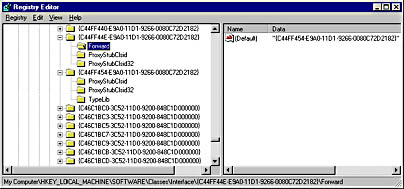
Figure 5-3. Visual Basic uses interface forwarding to make version-compatible interfaces work in the production environment. The universal marshaler can use the definition of either the original interface or a version-compatible interface when it builds a proxy or a stub.
Project Compatibility Settings
Figure 5-4 shows the Component tab of the Project Properties dialog box. When you build or rebuild a server, you must assign to the project one of the three version compatibility modes: No Compatibility, Project Compatibility, or Binary Compatibility. The default setting for a new project is Project Compatibility, but you should be aware of which compatibility setting is in use when you rebuild your server. If you don't watch out, Visual Basic will change your GUIDs every time you rebuild your server. This can lead to broken compiled client applications and can confuse application developers who work with your server.
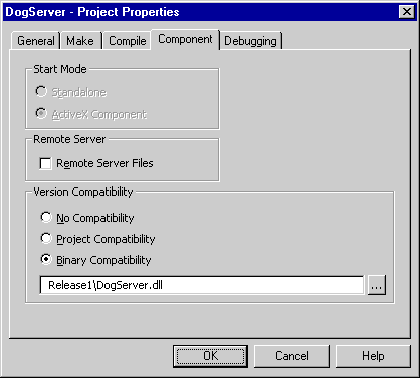
Figure 5-4. A project's version compatibility setting determines the level of compatibility built into a server when you choose the Make command from the File menu.
No Compatibility mode always generates a new set of GUIDs. A new GUID is created for each IID and CLSID in the server as well as for the server's type library. Precompiled client applications can't use subsequent builds when you select this mode. Also, because the GUID of the type library is changed on every build, application developers who use your server in the Visual Basic IDE will find that your server reference is missing when they try to use your new build. The developer must fix this by rereferencing the type library in the References dialog box (which you open from the Project menu).
You should use Project Compatibility mode when you define the methods in your classes and interfaces. This mode assumes that none of your work is cast in stone and that you don't yet expect client applications to be compiled against your server. When you work in this mode, Visual Basic 5 creates a new set of CLSIDs and IIDs every time you rebuild your project. When you overwrite a server in this mode, Visual Basic unregisters it before it's overwritten. This is important. If Visual Basic didn't unregister your server, your Registry would fill up with invalid IIDs and CLSIDs. Note also that you should always unregister a server before deleting it manually. Using discipline with server registration and unregistration will keep the Registry of your development workstation as clean as possible.
The only GUID that is held constant during a project-compatible build is the GUID for the type library. In the early stages of component prototyping, this is quite useful because other Visual Basic projects for client applications can retain a logical pointer to your server's type library. When you create a new build, any other programmer can use it from within the Visual Basic IDE. Because client application developers always see the newest version of your type library, they see the latest definitions of your coclasses, interfaces, and methods.
The main limitation of project compatibility is that a compiled client application can't use the next build of your server. This is because new CLSIDs and IIDs are generated for each build. Visual Basic 6 improves project compatibility by holding CLSIDs constant across builds. However, both the CLSIDs and IIDs must remain constant to honor dependencies built into compiled client applications. If you want compiled client applications to work properly across builds of your server, you must work exclusively in Binary Compatibility mode once client applications are in production.
You can put your project into Binary Compatibility mode by selecting the appropriate option on the Components tab of the project's Properties dialog box. You must also point to a compiled server file that will serve as a reference. One way to do this is to create an initial build of your server in a subdirectory named \Release1. After you point the Visual Basic IDE to a reference, you can rebuild your server in Binary Compatibility mode. In this mode, you can't overwrite the server that's being used as a reference. You should keep track of each server binary that's released into the production environment. Many developers create a set of directories for this purpose named Release1, Release2, Release3, and so forth.
Binary Compatibility mode does more than just retain your CLSIDs and IIDs. It also compares the server being built against the reference server. Visual Basic conducts a method-by-method check on each interface to make sure that it is identical to or compatible with those defined in the previous version. In Binary Compatibility mode, the Visual Basic IDE warns you when you try to compile an interface that's incompatible. The Visual Basic IDE gives you the option of ignoring the warnings and building an incompatible version of the server. However, to create a server that is compatible with the previous release, you must make the appropriate changes to restore existing methods to their previous form. When you do this correctly, you will be able to rebuild your server without receiving any warning messages. If you choose to build an incompatible version of the server, Visual Basic changes all the GUIDs in the new build to prevent any confusion.
Extending Objects in Binary-Compatible Servers
In Binary Compatibility mode, you can't alter an existing method signature. This means you can't change the name of any method, the type of the return value, or the type of any parameter. You also can't add optional arguments to the end of a method signature. You might think you can add an optional argument because it doesn't require a change in the client's calling syntax, but this requires physical changes to the stack frame during method execution. Therefore, adding an optional parameter to an existing method makes the entire interface incompatible.
You can safely change any existing method implementations in Binary Compatibility mode. When you think about it, this is what COM is all about. You should always be able to change an implementation as long as you don't change the physical nature of the calling syntax. Visual Basic lets you go one step further and add new methods to your classes and interfaces. When you add methods to an interface in a second version of your server, Visual Basic creates a new interface that is version compatible with the original.
When you add new methods to the default interface of a class in a Visual Basic project in Binary Compatibility mode, some interesting things happen when the server is rebuilt. For example, suppose you are working on a server with a class named CDog that defines eight public methods. The first time you build the server, Visual Basic automatically creates an interface named _CDog with an IID that defines these eight methods. If you add four new methods to this class and rebuild the server in Binary Compatibility mode, Visual Basic creates a new IID for the new interface that contains all 12 methods. Visual Basic also provides support in the new object and server to deal with clients using either IID.
The implementation of QueryInterface behind the CDog object hands out a reference for the new IID when a client asks for either the new IID or the old one. Clients built against the original version of the server get a reference to the new IID, but they will know about only the first 8 of the 12 methods defined in the vTable. Because the new interface is version compatible with the old one, it meets the expectations of the client and things work fine. Remember that version-compatible servers also contain registration code. Each server must add a Forward key for each backward-compatible IID. This allows the universal marshaler to locate the type library when it needs to generate a proxy or a stub.
Visual Basic lets you build version upon version of compatible servers. For instance, version 4 can be compatible with version 3, which can be compatible with version 2, which can be compatible with the original version. A client that knows about only the original version of the interface might be forwarded across many compatible IIDs before it reaches one that is supported by a server installed on the host computer.
Starting from Scratch
At some point, you might need to change your server so much that it doesn't make sense to worry about compatibility with clients already in production. This can happen if you have many method signatures that need to be overhauled or if you have a long line of version-compatible servers that are causing havoc. Either situation might lead you to create a server that is version incompatible with the previous version. No existing clients will be able to use the new server. This can be accurately labeled the "start again" approach.
To create a build that is version incompatible, you change your projectwide compatibility setting to No Compatibility. When you rebuild your server in this mode, Visual Basic changes all the GUIDs, including the one for the type library. It also ignores any compatibility support for earlier interfaces defined in earlier versions of the server. After you create a build in No Compatibility mode, you should set the project back to one of the other compatibility modes.
After this build, no existing client can use the new server. Any references to your type library will also be invalid. If you plan to leave earlier client applications in production using an older version of the server, you should change the project name and the project description to avoid confusion. For instance, you should name the new server DogServer2.dll so that all the client applications using DogServer.dll can continue to run in the production environment without encountering a naming conflict.
Version Compatibility for Automation Clients
Compared with vTable clients, automation clients aren't very knowledgeable about your server. They don't know about any GUIDs or the physical layout of any custom vTable. Instead, they know the ProgID and the names of the methods and properties that they will attempt to bind to at run time. They need some knowledge of the parameters that must be passed during method invocation, but automation clients can be more relaxed than vTable-bound clients because everything is passed as a variant. Automation is costly in terms of overhead, but it is certainly flexible and tolerant when it comes to versioning.
When dealing with automation clients, you can use any of the compatibility modes because automation clients use ProgIDs, not CLSIDs and IIDs. Moreover, automation clients don't require any custom vTable binding. The only concern you have is that method signatures must be compatible with any dependencies that automation clients have built. You certainly have a lot more flexibility when method signatures only have to be compatible as opposed to identical. For instance, you can change an integer parameter to a different type, such as a long or a double. Or you can add optional parameters to the end of a method signature. As you can see, if you can assume that your server will be used only by automation clients, your versioning concerns become far less complex.

EAN: 2147483647
Pages: 72
- Measuring and Managing E-Business Initiatives Through the Balanced Scorecard
- A View on Knowledge Management: Utilizing a Balanced Scorecard Methodology for Analyzing Knowledge Metrics
- Measuring ROI in E-Commerce Applications: Analysis to Action
- Managing IT Functions
- The Evolution of IT Governance at NB Power