Flylib.com
18. Complete IO in C
Previous page
Table of content
Next page
Chapter 2 - A Quick Start Using the IDE
Visual C++ 6: The Complete Reference
Chris H. Pappas and William H. Murray, III
Copyright 1998 The McGraw-Hill Companies
Starting the Visual C++ IDE
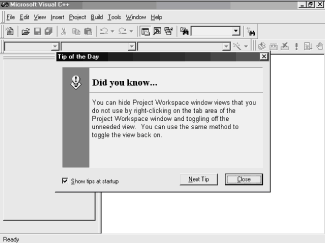
Launching the Visual C++ IDE is easy. If you are using a mouse, you can double-click on the Visual C++ icon, which is found in the Microsoft Visual C++ group. Figure 2-1 shows the initial screen for the Visual C++ IDE.
Figure 2-1:
Initial Visual C++ IDE screen
Books24x7.com, Inc 2000 –
Previous page
Table of content
Next page
Visual Studio 6: The Complete Reference
ISBN: B00007FYGA
EAN: N/A
Year: 1998
Pages: 207
Authors:
John Paul Mueller
BUY ON AMAZON
High-Speed Signal Propagation[c] Advanced Black Magic
DC Resistance
Normalizing the Output of an FFT Routine
Pcb Noise and Interference
The Future of On-Chip Interconnections
150- W STP-A: Comparison with UTP
WebLogic: The Definitive Guide
Configuring WebLogics HTTP Server
Web Server Plug-ins
Building CMP Entity Beans
Performance, Monitoring, and Tuning
SNMP Proxies
101 Microsoft Visual Basic .NET Applications
Building Windows Forms User Interfaces
Interacting with the Operating System
Working with the .NET Framework
Visual Studio .NET
Coding Conventions
Mapping Hacks: Tips & Tools for Electronic Cartography
Hack 13. Add Maps to Excel Spreadsheets with MapPoint
Hack 56. Animate Your Tracklogs
Hack 68. Convert Geospatial Data Between Different Formats
Hack 84. Build a Free World Gazetteer
Hacks 93-100
Mastering Delphi 7
Delphi 7 and Its IDE
Visual Controls
Libraries and Packages
Client/Server with dbExpress
Delphi for .NET Preview: The Language and the RTL
User Interfaces in C#: Windows Forms and Custom Controls
Designing with Classes and Tiers
Forms
Design-Time Support for Custom Controls
GDI+ Controls
Help and Application-Embedded Support
flylib.com © 2008-2017.
If you may any questions please contact us: flylib@qtcs.net
Privacy policy
This website uses cookies. Click
here
to find out more.
Accept cookies