Running Oracle Discoverer on the Web
 | ||
| |
Oracle Discoverer is unique in the sense that Oracle Application Server 10 g not only provides an environment to view Oracle Discoverer workbooks and worksheets via the Web (discussed here), but also provides an environment to develop Oracle Discoverer workbooks and worksheets (discussed in Chapter 5). This makes it extremely attractive for organizations looking to reduce their total cost of ownership (TCO): there is much less work configuring developer s machines and less licensing costs (as it is no longer necessary to install Discoverer Desktop on all developer and power- user s machines).
Another significant benefit to this architecture is the reduction in time spent moving Discoverer objects to the Web. Because Discoverer Plus and Discoverer Viewer are fully integrated with Oracle Application Server 10 g , there is a significant reduction in time and effort needed to configure your environment when displaying Oracle Discoverer workbooks and worksheets. And given Oracle Discoverer workbooks and worksheets are stored within the database, there is no need for any type of conversion or recoding. Of the three development tools discussed in this chapter, Oracle Discoverer is the easiest to integrate with the Web.
Discoverer Connections
Some of this material was covered earlier, but is repeated here for those readers who are only interested in running Discoverer workbooks and worksheets on the Web and have skipped Chapter 5 and are comfortable creating and maintaining Discoverer connections, you can safely skip this section.
Oracle Discoverer requires its own connection information, as it is possible for a user to connect to different End-User Layers (EULs).
| Note | An End-User Layer is a set of tables and views that maintains metadata (data about data) about the data in your database. The EUL allows users to create sophisticated Discoverer Reports without knowing the advanced features of SQL and insulates them from the complexity usually associated with databases. It provides an intuitive, business-focused view of the database using terms that Discoverer end users are familiar with and can easily understand. This enables Discoverer end users to focus on business issues instead of data access issues. The EUL contains the metadata that defines one or more business areas. A business area is a conceptual grouping of tables and/or views that apply to a user s specific data requirements. Business areas can be set up to reflect the needs of the user or group of users accessing the EUL. |
A Discoverer connection can be created in one of two ways:
-
By having an administrator create a Discoverer connection via the Oracle Enterprise Manager web site.
-
By allowing users to create their own connections in Discoverer Viewer (this feature can be disabled).
Creating a Discoverer Connection in the Enterprise Manager Web Site
This is the preferred way to set up connections and the way most administrators will configure their systems. In the Enterprise Manager Web Application Server Control web site for your middle tier , select the Discoverer component (see Figure 6-13). Select Public Connections. Click the Create Connections button. You ll be presented with a page similar to Figure 6-14.
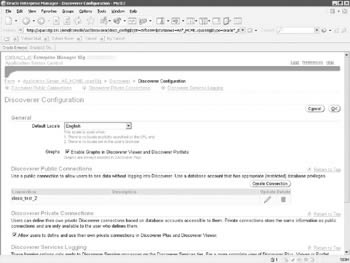
Figure 6-13: The Discoverer properties page in the Enterprise Manager Application Server web page
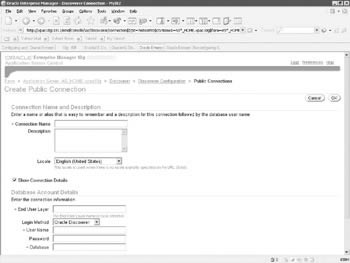
Figure 6-14: The Create Public Connection Screen for Discoverer
On this page, you ll name your connection, select the End-User Layer you wish to connect to, and enter the username/password/connection string information. Asterisks denote required fields and you ll notice that there is no asterisk next to the Password field under Database Account Details; this allows the administrator to create connections that prompt a user for a password before connecting to the database.
The hint on this page states that the End-User Layer is case sensitive, but this can be misleading. We used the following code to create a user named disco that was going to hold my End-User layer tables and views:
SQL> create user disco identified by disco default tablespace disco; User created.
Although it looks like the username is in lowercase, it s stored in the data dictionary as uppercase. Attempting to access it in Discoverer Viewer with an End-User Layer entered with lowercase letters (or anything, for that matter not in all CAPS) will result in a page similar to Figure 6-15.
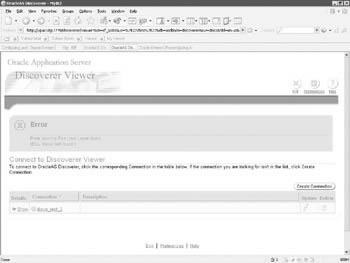
Figure 6-15: An error when trying to access an EUL in lowercase
Allowing Users to Create their Own Discoverer Connections
If we return to Figure 6-13, you ll notice that in the middle of the page, there is a check box next to a line that says Allow users to define and use their own private connections in Discoverer Plus and Discoverer Viewer. By default, this check box is selected, allowing end users to create their own Discoverer connections. This is generally a bad idea as it is possible for an end user to connect to a wrong database. It also further introduces security risks by having end users know username/password/connection string information. It s a good idea to disable this feature by deselecting this option, but if you determine that this functionality is worth the risks, leave the default. Users will see a Create Connection button on the top-right part of the screen (as in Figure 6-15). If this feature is disabled, the button will not appear. Any connections created using this method are valid for as long as the browser is open .
Affecting Discoverer Plus/Viewer Behavior
In the $ORACLE_HOME/discoverer/util directory is a file that affects the behavior of Oracle Discoverer Plus/Viewer. This file, pref.txt, is known as the Discoverer Server Preferences File. Unlike many of the other parameter files included with Oracle Application Server 10 g , pref.txt is fairly well commented and does not need an in-depth discussion here. Some of the parameters of most interest to administrators and developers in this file are listed in Table 6-7.
| Parameter | Default Value | Description |
|---|---|---|
| Timeout | 1800 | Time out in seconds if there is no client activity. Minimum allowed time is 180 seconds. |
| RowsPerHTML | 25 | # Number of rows to display per HTML page. Min. value = 1. Max. value = 999. |
| PrintHeadersOnce |
| # turns off Print Column headers in each page (0 = Off , 1 = On) |
| ExcelVersion | Excel95 | # ex Excel95,Excel97 |
| CacheFlushPercentage | 25 | Percent of cache flushed if the cache is full. Valid values: 0 - 100%. |
| MaxVirtualDiskMem | 1024000000 | # Maximum amount of disk memory allowed for the data cache. Should be greater than or equal to MaxVirtualHeapMem. |
| MaxVirtualHeapMem | 5120000 | Maximum amount of heap memory allowed for the data cache. |
| QueryBehavior |
| Action to take after opening a workbook (0 = Run Query Automatically, 1 = Don t Run Query, 2 = Ask for Confirmation) |
| AxisLabelBehavior | 1 | Controls the behavior of when axis labels are displayed; valid values are: 1 -> Always show axis labels 2 -> Never show axis labels 3 -> Show or hide axis labels as set in Discoverer Desktop. |
| NullValue | NULL | |
| ExcelExportWithMacros | 1 | If this is made 0, the exported Excel file won t have any macros and hence no formatting. |
| ItemClassDelay | 15 | Time out in seconds for LOV retrieval. |
| PredictionThresholdSeconds | 60 | Warn the user if the predicted query time exceeds the following value (seconds). Min. value = 1. Max. value = N.A. (see description at the beginning of file for range of valid values). |
| PredictionThreshold SecondsEnabled | 1 | Query prediction threshold disabled (0) or enabled (1). |
| QueryTimeLimit | 1800 | Limit on query time in seconds. Min. value = 1. Max. value = N.A. (see description at the beginning of file for range of valid values). |
| QueryTimeLimitEnabled | 1 | Query time limit disabled (0) or enabled (1). |
| RowFetchLimit | 10000 | Max rows fetched . Min. value = 1. Max. value = N.A. (see description at the beginning of file for range of valid values). |
| RowFetchLimitEnabled | 1 | Row fetch Limit disabled (0) or enabled (1). |
| MaxRowsPerFetch | 250 | Maximum permissible value for Incremental fetch. Min. value = 1. Max. value = 10,000. |
| RowsPerFetch | 250 | Incremental Fetch. Min. value = 1. Max. value = 10,000. |
| DefaultEUL | VIDEO5 | Default EUL to connect to. |
Invoking Discoverer Plus
Displaying an Oracle Discoverer Worksheet on the Web is as simple as invoking Discoverer Plus from your web browser. The URL will be in the format similar to:
http://<server name>:<port number>/discoverer/viewer
For the examples in this chapter, we have been referencing a server named xpas10g:
http://xpas10g:7778/discoverer/viewer
The first screen you will see is similar to Figure 6-16. This screen allows you to select which predefined Discoverer connection the end user wants to use to view Discoverer data. Upon selecting a connection, you are presented with the workbooks available for that user.
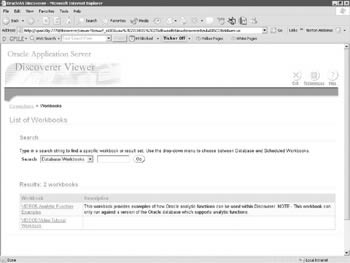
Figure 6-16: Discoverer workbooks available
You now have the full functionality of the Discoverer product to view and run Discoverer Reports that was described in Chapter 5.
| | ||
| |

EAN: 2147483647
Pages: 192