Flylib.com

Books Software


2.4 A Day in the Life of a Page


2.4 A Day in the Life of a Page

The analogy between the desktop control model and Web Forms is not complete. Although the fundamental elements behave similarly, such as rendering of state and event propagation, the Web Forms model has an imposed sequencing on the rendering process that does not exist in the desktop model. It is critical for Web developers using ASP.NET to understand this sequencing in order to use the model effectively.

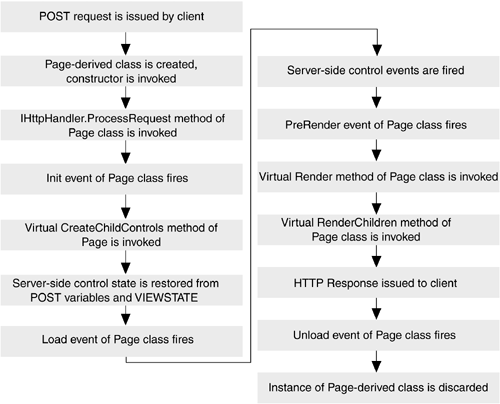
Pages are short-lived objects, as are all the elements they contain. A page is created for the sole purpose of processing a request, and once that request processing has completed, the page is discarded. This means that each request to a page is processed by a new instance of that Page class. Moreover, an explicit, deterministic sequence of events takes place after the page is created to service a request. This sequence of events is something that every ASP.NET developer should be aware of, because your pages will not behave the way you expect if you perform things in the wrong order. For example, consider the page shown in Listing 2-9.

Listing 2-9 Sample Page with Incorrect Control State Manipulation
<! File: sample.aspx >
<%@ Page Language="C#" %>

<html>

<body>
  <form runat=server>

    <h2>ASP.NET sample page</h2>
    <h3>Page type: <span id=_message runat=server/></h3>
    <%
      // Error - modifying a property of a server-side
      // control within a script block like this can lead
      // to inconsistencies
      _message.InnerText = this.GetType().ToString();
    %>
  </form>
</body>
</html>

As noted in the comments, the assignment to the InnerText property of the server-side span element has no effect because it falls within a server-side block of code delineated with <%%> tags that is placed after the control that is modified. All server-side code within <%%> tags is added to a Render method of the Page class, as discussed in Chapter 1. By this time, the server-side span has already rendered itself into the response buffer with its inner text set to an empty string, and the assignment has no effect on the output of the page. This is in contrast to a traditional desktop control model, where any modifications made to a control at any time are saved and reflected in that control's rendering.

Figure 2-5 shows the events that occur during a page's lifetime. As a page developer, you have hooks into most of these events, either by defining event handlers for a particular event or by providing overridden versions of virtual functions defined in the Page base class. Most of the programmatic manipulation of server-side controls should occur either in the Load event handler for a page or within a server-side control event handler. The Load event fires after the all the server-side controls have been created and had their state restored from the POST body of the request. This gives you an opportunity to both view the values submitted by the client, as well as a chance to populate controls with values you want the client to see in the response to this request.

Figure 2-5. Page Event Sequence

graphics/02fig05.gif


2.5 Web Forms and Code-Behind

Perhaps the most appealing aspect of the Web Forms model is that in combination with code-behind, it enables true separation of page logic from page layout and rendering. For example, recall the page shown in Listing 2-1, where the input and select elements were marked with the runat =server attribute, enabling state retention and server-side manipulation of those elements. Although this was helpful, our .aspx page was more than pure layout. It included server-side script to print a message, and we statically populated the options of the select element. Using code-behind with Web forms, we can very often remove all code from our .aspx pages, creating a clean partitioning of form logic and form layout. Listing 2-10 demonstrates this technique by showing the same page displayed in Listing 2-1 but now rewritten with a code-behind file, which is shown in Listing 2-11.

Listing 2-10 Sample Page with Server-Side Controls and Code-Behind
<! WebFormPage2.aspx >
<%@ Page Language="C#"
         Inherits="EssentialAspDotNet.WebForms.Page2"
         src="Page2.cs" AutoEventWireUp="false" %>

<html>

<body>
  <form runat=server>
    <h3>Enter name:
        <input type=text id=_name runat=server/></h3>
    <h3>Personality:
        <select id=_personality runat=server /></h3>
     <input type=button id=_enterButton
             value="Enter" runat=server/>
    <p runat=server id=_messageParagraph />
  </form>
</body>
</html>
Listing 2-11 Code-Behind File for Sample Page
// Page2.cs

using System;
using System.Web;
using System.Web.UI;
using System.Web.UI.HtmlControls;
using System.Web.UI.WebControls;

namespace EssentialAspDotNet.WebForms
{

public class Page2 : Page
{
  protected HtmlSelect         _personality;
  protected HtmlInputText      _name;
  protected HtmlInputButton    _enterButton;
  protected HtmlGenericControl _messageParagraph;

  override protected void OnInit(EventArgs e)
  {
    // Wire up handler to ServerClick event of button
    _enterButton.ServerClick += new EventHandler(OnEnter);
  }

  override protected void OnLoad(EventArgs e)
  {
    // On initial access, populate select with items
    if (!IsPostBack)
    {
      _personality.Items.Add(new ListItem("extraverted"));
      _personality.Items.Add(new ListItem("introverted"));
      _personality.Items.Add(new ListItem("in-between"));
    }
  }

  protected void OnEnter(object src, EventArgs e)
  {
    // When the user presses enter, print a message
    string msg = string.Format("Hi {0}, you selected {1}",
                      _name.Value, _personality.Value);
    _messageParagraph.InnerText = msg;
  }
}

}

Note that we were able to manipulate server-side controls on the form from fields declared in our code-behind class. In fact, looking just at the code-behind file, it appears that we are manipulating uninitialized fields in our class, because the _personality , _name , _enterButton , and _messageParagraph fields are never explicitly created but are definitely used. If you look closely, you will notice that these field names match exactly the identifiers of their corresponding server-side controls in the .aspx file. This is an important relationship that you will use almost anytime you work with Web forms and code-behind classes. When you declare a field, either protected or public, with the same name as the identifier of a server-side control in your form, that field is initialized with a reference to that server-side control when the class is created. It is also crucial that the field be of the correct type ”in our case we were mapping to four different HTML control types and had to carefully declare each field with the correct type, matching it to the element on the form to which it corresponds. We discuss this mapping of server-side HTML elements to classes in more detail in the upcoming HtmlControls section.

This process of associating server-side controls with fields in a Page -derived class occurs during the parsing of the .aspx page. The parser must be careful not to redefine fields in the class that is generated from the .aspx file, because this would mask any fields declared with the same name in the code-behind base class. Instead, the parser uses reflection to query the code-behind base class during the parsing of the .aspx file. If there is a public or protected field declared in the code-behind base class whose name matches the identifier of the server-side control, it will not generate a field for that control in the generated class. If there is no such field in the code-behind base class, it will create a field in the newly generated class. This guarantees that all server-side controls have a corresponding field in the generated class, either inherited from the code-behind base class or declared directly in the generated class. This is also why the code-behind base class must declare these fields as either public or protected, so that the derived class can access them and assign the newly created control references to them.

Figure 2-6 shows this field binding. In this example, the Test.aspx file contains three server-side controls: the form, which has no explicit identifier, the server-side span element named _foo , and the server-side input element named _bar . The code-behind class, BasePage , contains a single protected field named _foo of type HtmlGenericControl , which is what a span element maps to. Thus, when the parser generates the class from the Test.aspx file, it adds two fields to the derived class: one for the form control with an artificially generated identifier ( _ctl0 ) and the other using the _bar identifier assigned in the page.

Figure 2-6. Binding Fields to Server-Side Controls

graphics/02fig06.gif