Flylib.com

Books Software


Why Use HTML and CSS on eBay?


Why Use HTML and CSS on eBay?

When it comes to listing items for sale on eBay, you may wonder how HTML and CSS even enter the picture. eBay is simply an auction site, and it certainly has nothing directly to do with creating your own web pages. That's only because you've probably gotten comfortable thinking in terms of your web pages being created entirely by you. In fact, it is possible to create a portion of a page within someone else's web page, which is exactly what takes place on eBay.

By the Way

If you have no experience at all with eBay, I encourage you to visit the eBay web site at http://www.ebay.com/ and spend some time exploring it. If you want more of a guided tour of how eBay works and how to use it, check out eBay's Learning Center at http://pages.ebay.com/education/.


When you list an item for sale on eBay, you have a great deal of control over the description, which is the portion of the auction listing that describes your item. Every eBay auction listing has standard boilerplate information that appears on the page before the description, as shown in Figure 20.1.

Figure 20.1. Every eBay item page begins with boilerplate auction information that cannot be directly modified.
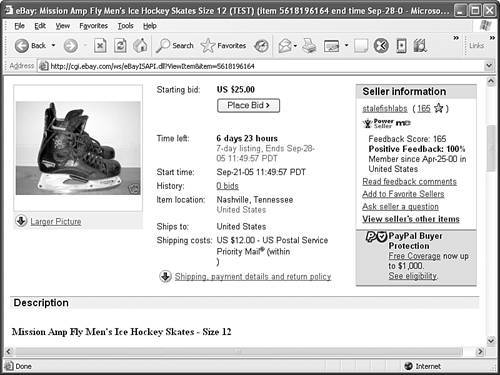

The information at the beginning of an eBay item page is gathered when you first list the item, and cannot be edited or modified via HTML or CSS. HTML and CSS enter the picture with the item description, which appears just below the standard auction information (see Figure 20.2).

Figure 20.2. The item description is where you get an opportunity to jazz things up with HTML and CSS.
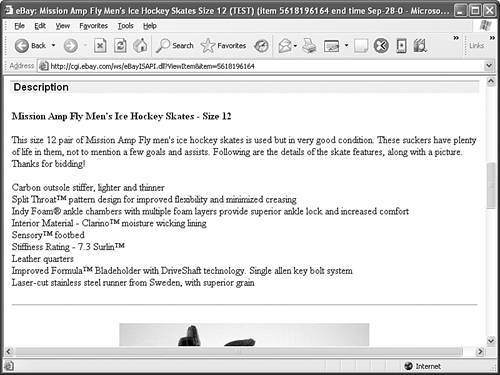

In this example, you see perhaps the most boring item description possible, consisting solely of a bold heading and unstyled text. An image does appear below the description, but it doesn't include a caption or border to help dress it up.

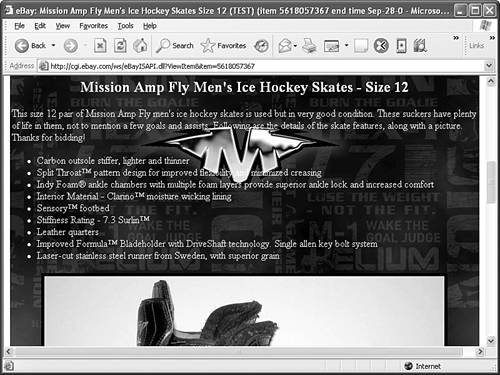
Now flip ahead to Figure 20.6 to see how HTML and CSS can liven up an item listing to give it a bit more marketing appeal . This is the same auction listing with the careful addition of HTML and CSS code to make it more exciting. You build the item listing in Figure 20.6 as you progress through this lesson.

Figure 20.6. Dynamically setting a background image for an auction item page can have a dramatic effect.


Understanding How HTML Fits into eBay

When you're creating a new item listing on eBay using HTML and CSS, it's important to understand what you can and cannot do. The good news is that you have pretty much the entire arsenal of HTML and CSS tags, attributes, and styles at your disposal for creating slicked-out item pages. However, there are a few things you must know when it comes to writing HTML code that ultimately won't reside on your web site.

First off, understand that any code you write will live within the body of the item page on eBay and nowhere else. This means you can't use <meta> tags or any other tags that can appear only in the head of a web page. This also means that you're limited to using inline styles, as opposed to internal style sheets, because the <style> tag can be placed only in the head of a web page.

By the Way

Some web browsers will allow you to get away with placing an internal style sheet directly in the body of a web page, but I don't recommend doing it.


Because the item page will be hosted on eBay's web servers, not yours, you must always use full URLs when referencing images or pages of your own. For example, any item images that are stored on your web server must be given full URLs (starting with http://) in the src attribute of any <img /> tags. If you plan on linking to any other pages for additional product information, be sure to include the full URLs in the HRef attribute of the <a> tag.

Because eBay pages are designed as frameless web pages, you can't use frames . This makes sense when you consider that the <frameset> tag effectively replaces the <body> tag in pages that use frames. In an eBay item listing, you have the ability to make changes only between the <body> and </body> tags, so frames clearly aren't an option. Frames are covered in Hour 16, "Multipage Layout with Frames."

Speaking of limitations associated with the <body> tag, because you don't have access to the <body> tag itself, it can be challenging making page-wide style changes to item pages. For example, the background of a page is typically set using the background- color and/or background-image style properties with the <body> tag. Because this approach isn't an option, you have to consider other ways of getting the same effect. You'll learn how to pull off this feat with JavaScript later in this hour, in the section "Altering the Background of an Item Page." For a refresher on how JavaScript is used in web pages, check out Hour 17, "Web Page Scripting for Nonprogrammers."