Official Red Hat Linux Administrator's Guide
Authors: N
Published year: 2002
Pages: 105-106/278
Buy this book on amazon.com >>

Device Aliases

Device aliases are virtual devices associated with the same physical hardware, but they can be activated at the same time to have different IP addresses. They are commonly represented as the device name followed by a colon and a number (for example, eth0:1 ). They are useful if you want to have more than one IP address for a system but the system has only one network card.

If you have configured a device such as eth0 , click the Add button in the Network Administration Tool to create an alias for the device. Select the network device and configure the network settings. The alias will appear in the device list with a device name followed by a colon and the alias number.

Warning 

If you are configuring an Ethernet device to have an alias, neither the device nor the alias can be configured to use DHCP. You must configure the IP addresses manually.

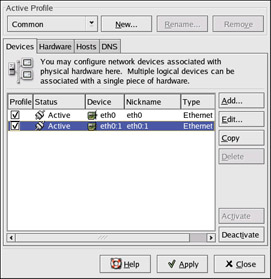
Figure 13-19 shows an example of one alias for the eth0 device. Notice the eth0:1 device — the first alias for eth0 . The second alias for eth0 would have the device name eth0:2 , and so on. To modify the settings for the device alias, such as whether to activate it at boot time and the alias number, select it from the list and click the Edit button.
click to expand
Figure 13-19: Network device alias example

Select the alias and click the Activate button to activate the alias. If you have configured multiple profiles, select which profiles in which to include it. To verify that the alias has been activated, use the command /sbin/ifconfig . The output should show the device and the device alias with different IP address:

eth0 Link encap:Ethernet HWaddr 00:A0:CC:60:B7:G4 inet addr:192.168.100.5 Bcast:192.168.100.255 Mask:255.255.255.0 UP BROADCAST RUNNING MULTICAST MTU:1500 Metric:1 RX packets:161930 errors:1 dropped:0 overruns:0 frame:0 TX packets:244570 errors:0 dropped:0 overruns:0 carrier:0

collisions:475 txqueuelen:100 RX bytes:55075551 (52.5 Mb) TX bytes:178108895 (169.8 Mb) Interrupt:10 Base address:0x9000 eth0:1 Link encap:Ethernet HWaddr 00:A0:CC:60:B7:G4 inet addr:192.168.100.42 Bcast:192.168.100.255 Mask:255.255.255.0 UP BROADCAST RUNNING MULTICAST MTU:1500 Metric:1 Interrupt:10 Base address:0x9000 lo Link encap:Local Loopback inet addr:127.0.0.1 Mask:255.0.0.0 UP LOOPBACK RUNNING MTU:16436 Metric:1 RX packets:5998 errors:0 dropped:0 overruns:0 frame:0 TX packets:5998 errors:0 dropped:0 overruns:0 carrier:0 collisions:0 txqueuelen:0 RX bytes:1627579 (1.5 Mb) TX bytes:1627579 (1.5 Mb)


Chapter 14: Network Scripts

Using Red Hat Linux, all network communications occur between configured interfaces and physical networking devices connected to the system. The different types of interfaces that exist are as varied as the physical devices they support. The configuration files for network interfaces and the scripts to activate and deactivate them are located in the /etc/sysconfig/network-scripts/ directory. While the existence of interface files can differ from system to system, the three different types of files that exist in this directory — interface configuration files, interface control scripts, and network function files — work together to enable Red Hat Linux to use various network devices. This chapter explores the relationship between these files and how they are used.

Network Configuration Files

Before we review the interface configuration files themselves , let us itemize the primary configuration files used by Red Hat Linux to configure networking. Understanding the role these files play in setting up the network stack can be helpful when customizing your system. The primary network configuration files are as follows .

/etc/ hosts

The main purpose of this file is to resolve hostnames that cannot be resolved any other way. It can also be used to resolve hostnames on small networks with no DNS server. Regardless of the type of network the computer is on, this file should contain a line specifying the IP address of the loopback device (127.0.0.1) as localhost.localdomain . For more information, see the hosts man page.

/etc/resolv.conf

This file specifies the IP addresses of DNS servers and the search domain. Unless configured to do otherwise , the network initialization scripts populate this file. For more information on this file, see the resolv.conf man page.

/etc/sysconfig/network

Specifies routing and host information for all network interfaces.

/etc/sysconfig/network-scripts/ifcfg- interface- name

For each network interface on a Red Hat Linux system, there is a corresponding interface configuration script. Each of these files provides information specific to a particular network interface. See the “Interface Configuration Files” section of this chapter for more information on this type of file and what directives it accepts.

Warning 

The /etc/sysconfig/networking/ directory is used by the Network Administration Tool ( redhat-config-network ), and its contents should not be edited manually. For more information about configuring network interfaces using the Network Administration Tool, see Chapter 13.


Official Red Hat Linux Administrator's Guide
Authors: N
Published year: 2002
Pages: 105-106/278
Buy this book on amazon.com >>

Similar books on Amazon