|
Computer Networking first-step Authors: Odom W Published year: 2004 Pages: 80-81/173 |
Painting Road Signs and Other Long-Lasting DirectionsIt takes a long time to build a highway and even longer to build a new town or city. But whenever a new road is finally finished, some old road signs might need to be updated because there might be a better way to drive to some nearby town. Thankfully, because it takes a long time to build a road, the road signs do not have to be repainted very often. With routers, the network engineer can do the equivalent of painting the road signs. To do so, the engineer can configure a static IP route , which is configuration for a router that tells the router to add a particular entry to its routing table. For instance, in Figure 12-2, R1 didn't have a route to subnet 150.1.3.0, meaning it couldn't forward a packet that was destined for IP address 150.1.3.3. In Figure 12-3, the engineer solved the problem by configuring a static route on R1 for subnet 150.1.3.0, with outgoing interface Ethernet2, and next -hop router of 150.1.2.2. Figure 12-3. Painting a Routing Table with a Static Route
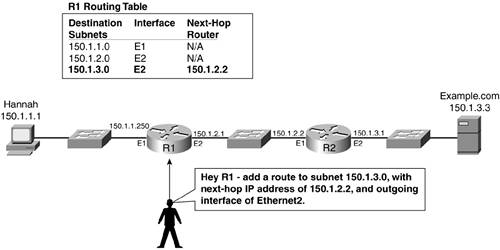
Before adding the static route, R1 did not know how to forward packets whose destinations were in subnet 150.1.3.0. Now R1 knows to forward those packets to R2 next. Static routes work, but they can be a pain in the neck to maintain. Network topologies tend to change a lot more frequently than roads do, and static routes make it difficult to use all the possible routes to the same part of the network when you have multiple possible physical paths. As a result, most companies do not use static routes throughout their networks; instead, they use routing protocols, as described in the next section. |
Dynamically Learning and Changing Routing TablesIn most cities, there are multiple ways to drive to some other part of town. During rush hour , you might listen to the radio for traffic updates or watch for electronic signs by the road that show the latest information about road congestion. For instance, a reporter might be flying over roadways in a helicopter or observing traffic through cameras installed beside the major roadways . The reporter passes the information on to a radio announcer or to someone who types in a warning to appear on an electronic sign by the road. Then you might pass the sign or hear on the radio that the road you're on is closed 8 miles ahead due to an accident , and you decide to try an alternate road. A similar (but not identical) concept happens in networking. The most typical way a router learns all the rest of the routes in an internetwork, beyond just its directly connected routes, is by using a routing protocol. Routing protocols define messages by which routers can exchange route information with other routers. A router can tell other routers about the routes that it knows , and that same router can listen for messages from neighboring routers about the routes that they know. If all the routers participate, all routers should have routes for all subnets or networks in an IP internetwork. In Figure 12-2, R1 and R2 knew about their directly connected subnets, but no others. The example shown in Figure 12-4 begins like Figure 12-2, but in this case, R1 uses a routing protocol to tell R2 about its routes. Figure 12-4. R2 Learning Routes from R1
Figure 12-4 shows several steps that occur over time, as follows :
Also notice the outgoing interface and next-hop router of this new route. R2 uses its own Ethernet1 interface as the outgoing interface. From Figure 12-4, it seems that R2 would use its interface E1 to forward packets to subnet 150.1.1.0, but R2 chooses to put that interface into the route because that's the interface in which it received the routing update. R2 also puts R1's IP address of 150.1.2.1 as the next-hop router because that's the IP address of the router that sent the routing update. From Figure 12-4, you can see that this route's next -hop router IP address should be R1's IP address 150.1.2.1. Notice that although R2 learned a route based on getting the routing update from R1, R1 has not learned any routes yet. Routers learn routes with routing protocols when they receive routing updates from other routers; routers send routing updates so that other routers can learn from them. For R1 to learn routes, another router needs to tell it about other routes with a routing update. Figure 12-5 shows R2 advertising its routes, with R1 learning a route to subnet 150.1.3.0. Figure 12-5. R1 Learning by Listening for Routing Updates
Figure 12-5 shows several steps that occur over time, with R1 learning routes from R2, as follows:
Now both R1 and R2 have routes to all three subnets in the figure, with both routers learning the rest of the routes by receiving and processing incoming routing updates. |
|
Computer Networking first-step Authors: Odom W Published year: 2004 Pages: 80-81/173 |
![]() Networking All-in-One For Dummies | ![]() TCP/IP First-Step | ![]() Routing First-Step | ![]() Network Know-How: An Essential Guide for the Accidental Admin |
![]() Networking All-in-One For Dummies | ![]() TCP/IP First-Step |
![]() Routing First-Step | ![]() Network Know-How: An Essential Guide for the Accidental Admin |