| For private assembly deployment, the assembly is copied to the same directory as the client program that references it. No registration is needed, and no fancy installation program is required. When the component is removed, no registry cleanup is needed, and no uninstall program is required. Just delete it from the hard drive. [4] [4] Of course, this process does not put any icons on the desktop or entries on the Start menu. Of course, no self-respecting programmer would ever provide a commercial component that required the end user to manually copy or delete any files in this way, even if it is remarkably simple to do. Users have become accustomed to using a formal installation program, so it should be provided, even if its work is trivial. However, manually copying and deleting an assembly is an ideal way to quickly and painlessly manage deployment issues for developing, debugging, or testing purposes. Recall that the deployment of COM components was never this simple, requiring at a minimum a registry script file. Gone are the days when you have to configure the registry on installation, and then later carefully clean out the registry information when you want to discard the component. To privately deploy our componentized Hotel Administrator Case Study, create a directory on your hard drive. Copy to that directory the AcmeGui.exe file in the CaseStudy\bin directory and the files Customer.dll and Hotel.dll in the CaseStudy directory. Note that we are shifting our focus back to the unsigned CaseStudy example now. Then run AcmeGui.exe . It will run. It is really just that simple! If you view the AcmeGui manifest in ILDASM, you will see the following dependency entries: .assembly extern Customer { .ver 1:0:756:21093 } ... .assembly extern Hotel { .ver 1:0:756:21094 } Here are the corresponding assembly definitions in the components: .assembly Customer { .hash algorithm 0x00008004 .ver 1:0:756:21093 } .assembly Hotel { ... .hash algorithm 0x00008004 .ver 1:0:756:21094 } From this you can see that the client program was built with Customer assembly version 1:0:756:21093 and Hotel assembly version 1:0:756:21094. Since neither assembly has a strong name , however, the versions are not checked. If you were to build a Customer assembly with a different version and replace the one that AcmeGui was built with, AcmeGui would still run. It does not matter whether you change the major build number or the revision number. If you were to use an incorrect version of the Customer component with a strong name, you will get a runtime exception (System.IO.FileLoadException) because the located assembly's manifest definition does not match the assembly reference. If the AcmeGui client program was built with an assembly that had a strong name, the CLR will only bind to an assembly that matches exactly with the strong name and version. Even a different revision number will cause the load to fail. The details on binding failures can be seen in the Assembly Binding Log Viewer (FUSLOGVW.exe) . Figure 9-14 has a sample log that resulted from an attempt to resolve AcmeGui's reference to a Customer assembly that had a strong name when it was built with a version of the assembly that did not have a strong name: Figure 9-14. Assembly Binding Log for Customer Load Failure. 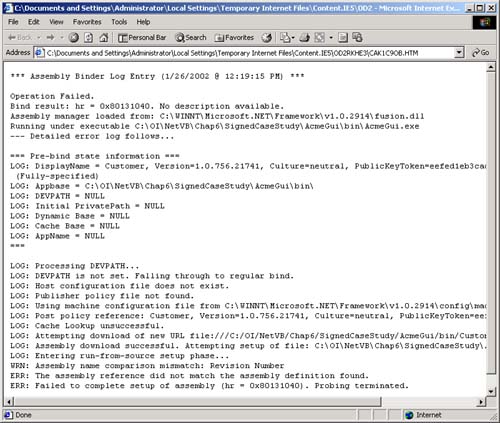 | 


