Section 1.7. Java and the Web
1.7. Java and the WebThe application-level safety features of Java make it possible to develop new kinds of applications that were not feasible before. A web browser that uses the Java runtime system can incorporate Java applets as executable content inside documents. This means that web pages can contain not only static textual information but also full-fledged interactive applications. The added potential for use of the Web is enormous. A user can retrieve and use software simply by navigating with a web browser. Formerly static information can be paired with portable software for interpreting and using the information. Instead of just providing some data for a spreadsheet, for example, a web document might contain a fully functional spreadsheet application embedded within it that allows users to view and manipulate the information. In recent years, some of this has started to happen, but the full potential has not yet been realized. In addition to applets, a more recent model for Internet downloadable application content is Java Web Start. The Web Start API allows your web browser to install applications locally, with security still enforced by the Java runtime system. This system can also automatically update the software when it is used. We'll discuss this more in Chapter 23. 1.7.1. AppletsThe term "applet" is used to mean a small, subordinate, or embeddable application. By "embeddable," we mean it's designed to be run and used within the context of a larger system. In that sense, most programs are embedded within a computer's operating system. An operating system manages its native applications in a variety of ways: it starts, stops, suspends, and synchronizes applications; it provides them with certain standard resources; and it protects them from one another by partitioning their environments. As far as the web browser model is concerned, an applet is just another type of object to display; it's embedded into an HTML page with a special tag. Java-enabled web browsers can execute applets directly, in the context of a particular document, as shown in Figure 1-4. Browsers can also implement this feature using Sun's Java Plug-in, which runs Java just like other browser plug-ins display other kinds of content. A Java applet is a compiled Java program, composed of classes just like any Java program. While a simple applet may consist of only a single class, most large applets consist of many classes. Classes may be stored in separate files on the server, allowing them to be retrieved as needed, but more generally they are packaged together into archives. Java defines a standard archive formatthe JAR filewhich is built on the common ZIP archive format. An applet has a four-part life cycle. When an applet is initially loaded by a web browser, it's asked to initialize itself. The applet is then informed each time it's displayed and each time it's no longer visible to the user. Finally, the applet is told when it's no longer needed, so that it can clean up after itself. During its lifetime, an applet Figure 1-4. Applets in a web document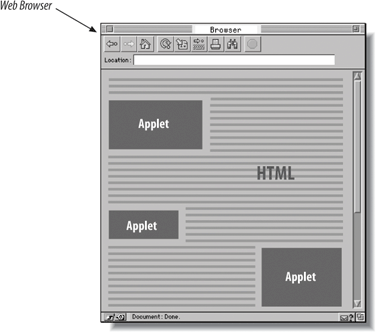 may start and suspend itself, do work, communicate with other applications, and interact with the web browser. Applets are autonomous programs, but they are confined within the walls of a web browser or applet viewer and have to play by its rules. We'll be discussing the details of what applets can and can't do as we explore features of the Java language. However, under the most conservative security policies, an applet can interact only with the user and can communicate over the network only with the host from which it originated. Other types of activities, such as accessing files or interacting directly with outside applications, are typically prevented by the security manager that is part of the web browser or applet viewer. But aside from these restrictions, there is no fundamental difference between a Java applet and a standalone Java application. 1.7.2. New Kinds of MediaWhen it was first released, Java quickly achieved a reputation for multimedia capabilities. Frankly, this wasn't really deserved. At that point, Java provided facilities for doing simple animations and playing audio (which was leaps and bounds beyond static web pages). You could animate and play audio simultaneously, though you couldn't synchronize the two. Still, this was a significant advance for the Web, and people thought it was pretty impressive. Java's multimedia capabilities have now taken shape. Java now has CD-quality sound, 3D animation, media players that synchronize audio and video, speech synthesis and recognition, and more. The Java Media Framework now supports most common audio and video file formats; the Java Sound API (part of the core classes) can record sound from a computer's microphone and play or record MIDI for musical instruments. 1.7.3. New Software Development ModelsFor many years, people have been using integrated development environments (IDEs) to create user interfaces. Some of these environments let you generate applications by moving components around on the screen, connecting components to each other, and so on. In short, designing a part of an application becomes a lot more like drawing a picture than like writing code. (Usually these tools also help you write code in the more traditional sense as well.) For visual development environments to work well, you need to be able to create reusable software components. That's what the JavaBeans architecture is all about: it defines a way to package software as reusable building blocks. A graphical development tool can figure out a component's capabilities, customize the component, and connect it to other components to build applications. In theory, JavaBeans extends the idea of graphical development a step further. JavaBeans components, called beans, aren't limited to visible, user interface components: you can have beans that are entirely invisible and whose job is purely computational. For example, you can have a bean that does database access; you can connect this to a bean that lets the user request information from the database; and you can use another bean to display the result. You can also have a set of beans that implement the functions in a mathematical library; you can then do numerical analysis by connecting different functions to each other. In either case, the idea is that you can create programs without writing a great deal of code using beans from a variety of sources. While this style of visual programming hasn't proven itself much outside of GUI development yet, elements of JavaBeans are seen throughout the Java libraries, especially in Swing. The JavaBeans APIs are a set of naming and design patterns that work with other Java capabilitiesreflection and serialization to allow tools to discover the capabilities of components and hook them together. The JavaBeans standard also specifies ways for individual beans to provide explicit information for these builder tools, including user-friendly names and appearance information, which allows for the more visual applications. In this book, we'll take a look at the NetBeans open source IDE (http://www.netbeans.org) and see how to put together our own Java beans for use in its GUI builder. We also cover the popular Eclipse IDE (http://eclipse.org) later in the book. In addition to GUI building tools, both of these IDEs offer many advanced application building and testing features for Java. There has been a lot of evolution in the area of Java IDEs in recent years and in many ways IDEs are enhancing the productivity of Java programmers more than language innovations are. |

EAN: 2147483647
Pages: 262