print photos
|
|

| Use the Print command to print your favorite photos to any printer that's connected to your PC or available on your network.
Note: Although you can print multiple pictures simultaneously, all selected images will use the same print settings.
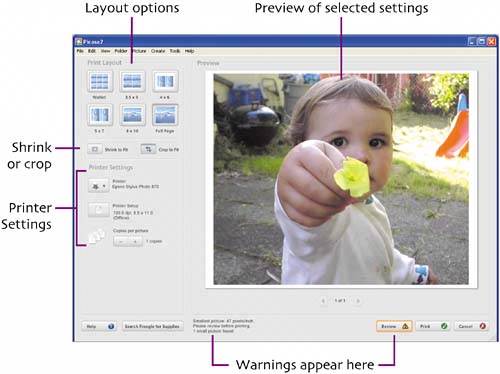 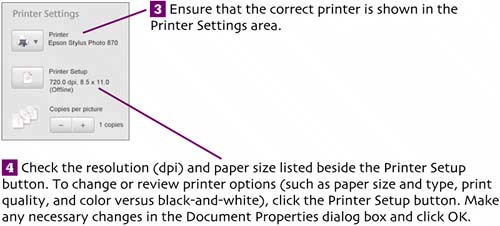 To switch printers, click the Printer button and select a printer name from the list of installed printers. (Note that non-printing devices, such as screen capture programs and fax modems, may also be listed.) 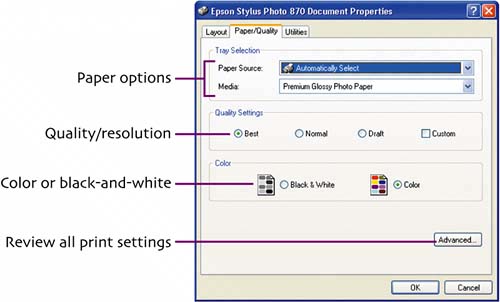 Note: Click the Advanced button to set a specific print quality, such as 1440 dpi. 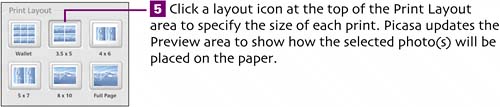
 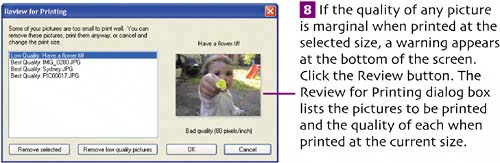 You can remove any problem pictures by selecting each one and clicking Remove selected. To simultaneously remove all low-quality images, click Remove low quality pictures. Click OK to close the dialog box. When only Best Quality images remain, the caution icon is removed from the Review button.
|
 Select the picture(s) you want to print. (To print pictures from multiple folders, select photos from the first folder, click the Hold button, select photos from another folder, click Hold, and so on.) Thumbnails of the selected pictures appear in the Picture Tray.
 Click the Print button, choose File > Print, or press
  . The Preview/Print Layout screen appears.
 The Shrink to Fit and Crop to Fit buttons determine how the selected images are fitted on the page. (
 Ensure that the printer is on and ready to print. Click Print to start printing.
|
|

EAN: 2147483647
Pages: 116