Functions and Modularization
In some languages, the modules of a program may be called subroutines, procedures or functions. For this topic, C++ uses functions to implement sections of code that are a part of the main program i.e. they are modules. These functions may be contained in a system header file like iostream, a non-system/programmer header file like tools.h or the functions may be contained in the program's file itself.
Functions are an important tool in C++. They are used to:
-
enable structured programming
-
reduce code size (but this slows the program's speed)
-
capture objectives of the program into modules
-
create useable and reusable code
-
increase a programmer's productivity.
Therefore functions should
-
have a clear cut objective,
-
be at most one page of printed code,
-
have a name suggestive of its objective.
In order for a C++ programmer to use a function, the following must be done in the program. That is the program must:
-
define the function,
-
declare the function,
-
execute/call the function.
In C++, if a function is:
-
called (executed), it must have been declared above the call in the program,
-
declared, it must have been defined within the program (either the same file, in a header file or another file compiled with the program),
-
defined, it must have been defined outside all functions (either the same file, in a header file or another file compiled with the program).
The Function Definition
The construct of the functional definition is:
 |
outputTypeName functionName(signature) { statement(s); return outputTypeValue; } |
Notice that there is no semicolon after the functional block end. There are some blocks in C++ that must end in a semicolon but this is not one of them.
The outputTpeName may be any system or programmer data type including void. If no output data type is listed, then a compiling error should occur. The outputTypeValue must be of same data type as that of outputTypeName. The outputTypeValue that follows the return can not be an array nor a function (but of course there is a way to get around this restriction). The literal or value of the expression outputTypeValue must follow the keyword return. The value of outputTypeValue is stored in a part of memory called the stack to be retrieved by the calling function. When the return statement is encountered, the function will terminate. While it is possible to code several returns within your functions, it is recommended that you use only one to conform to the principles of structured programming. However when the program encounters a return, the function ends. While C++ syntax would permit it, there should be no return if there is no value being returned. In the case where there is no return value, then void would be outputTypeName.
The functionName may be any C++ legal variable name (meaning it should not be too long, it should not be a keyword and it should start with a letter of the alphabet or underscore while the remaining characters can be letters of the alphabet, digits or the underscore.) Further the name should be suggestive of the function's objective. If the functionName is only one word, then it is recommended that it be in lower case. If it is two or more words, then it is recommended that the second or additional words should have the first letter of the words after the first one in caps and the remaining letters in lower case.
The signature of the function's definition is composed of
-
a list of variables (also called arguments, parameters or formal arguments but they can not be functions)
-
the respective data type names of the variables
-
the order in which they appear from left to right
The variables and their data types are a unit of the signature and each of these units are separated from the others by commas.
The functionName and the signature uniquely define the function while the outputType plays no part in this uniqueness. Two C++ functions with different signatures may have the same name. Functions that have the same name but with different signatures are called overloaded functions. The concept of overloading of functions is an important tool that can increase the productivity of the programmer.
The variables defined within the functional block are not visible outside the block (i.e. they are not accessible outside of the block) and are called local variables. These variables are stored in a part of memory called the stack memory and they are created each time the function is called.
The signature may consist of no data types and therefore the function has no arguments. In this case either nothing is listed between the parentheses or the keyword void can be listed.
Variables in C++ that are defined outside of all functions and all blocks are called global variables. Global variables are stored in a part of memory that is called the heap. They may be accessed within any function without being a part of the signature or without the programmer using any explicit coding. Because global variables may be accessed within any function, it is recommended that they NEVER be used in properly coded programs that adhere to structured programming principles. The major reason is that someone may do maintenance on the program and not be aware of how or where a global variable is used or defined and as a result either initialize, remove or modify them and thereby introduce a bug into the program.
The Function Prototype
The top line of the function definition is called the function header. The functional block (braces and the code between the braces) is called the body of the function. When the function header is listed by itself and is followed by a semicolon, then this construct is called the functional prototype.
The construct of the prototype is:
|
outputTypeName functionName(signature);
|
The outputTypeName and the functionName must match those of the function's definition.
The prototype's signature may be either the same as the signature of the definition or it may be just the data types alone without the arguments (i.e. only the data types are required). However, the data types must be in the same order as in the definition's signature and there must be the same number of data types. Since the arguments of the prototype are formal arguments, they do not have to have the same names as those used in the definition.
The Functional Arguments
When a C++ program is compiled, the functional definition is translated into machine language. Machine language jumps are created so that when the function is called, the program will be diverted to these instructions. All of the functional instructions are stored in memory when the program is loaded but neither the arguments, the outputvalue nor the variables defined within the function's body are stored into memory. These variables do not exist until the function is called and then they are in the stack memory associate with that particular call of the function. This type of construct permits multiple concurrent calls to the same function within the program and as a result, the values of these variables in multiple calls are stored into the stack so that they do not get mixed up.
When a C++ function is called, the argument values are placed in variables in stack memory. In the programming language Pascal, the arguments are placed on the stack from left to right. However, in C++ the arguments are placed on the stack from right to left. The Pascal method executes faster and is the method used as the basis in Windows to define functions that Windows calls. The C++ method is important because it permits functions to be defined that require a right to left storage. (This fact will be of no importance in these lectures.)
Comment: In C++ there are three types of functional arguments.
-
There are those arguments that pass their values to the stack but the variables themselves are not accessible to the body of the program. This type is called passing by value. In addition the variables that are the arguments in a call can not have their value changed by the body of the function.
-
There are those arguments that pass their memory location to the body of the function. Since the body of the function knows where in memory these variables are located, the values of the arguments may be changed (this approach uses something called pointers i.e. variables that contain memory locations of other variables). This type of function arguments is called passing by pointer or passing by address. In order to implement passing by pointer, the argument in the functional definition and in prototype are preceded by the pointer definition operator: *.
-
There are those functions that create another name for the argument and pass the new name into the body of the function and thereby providing an opportunity to get access to the argument and to change its value as well. (This approach uses what are called references i.e. another name for a place in memory.) Sometimes this type of function use is called passing by reference. In order to implement passing by reference the argument in the functional definition and in the prototype are preceded by the reference definition operator: &.
By using arguments of type 2 or type 3 above, it is therefore possible to output values from the function in addition to that which is returned by the outputTypeValue. For example:
-
Using a pointer:
void cashTransaction(double *ptrAmount, double *ptrDeposit, double *ptrWithdrawal);
-
Using a reference:
void cashProcessing(double &amount, double &deposit, double &withdrawal);
The above highlighted statements are prototypes of functions that use the pointer operator and the reference operator respectively. In the first case the arguments ptrAmount, ptrDeposit and ptrWithdrawal contain the address of variables. These addresses are then passed into the function. In this way the body of the function knows where the respective variables are and therefore can change them. In the second case the arguments amount, deposit and withdrawal are effectively transferring the variable itself to the body of the program by providing a new name for the arguments in the body of the function. In this way the body of the program can change the value stored in the variable and then make this new value available to the calling function. As a result of either of these methods of defining functions, it is possible to overrule the mathematical approach that says only one value may be changed by a function. With either of these methods, it is possible to change the values of as many variables as desired.
The Function Declaration
A function must be declared to the compiler in order for the compiler to perform strong type checking between the function call and the function declaration. The compiler's linker will then match the declaration of the function with the definition. A function may be declared using one of the following:
-
by listing the definition above all calls
-
by listing the functional prototype above all calls.
Providing for a declaration may also be accomplished by placing it within a header file like tools.h that is then placed in the program above main( ).
The purpose of the declaration is to ensure strong type checking. That is the compiler will check the arguments in the signature and outputtype of the call with those of the declaration to ensure that they agree. The function's prototype does not occupy separate memory only the function's definition's instructions do.
Note: Some authors use the word declaration for definition and visa versa. Be aware of these differences.
The Function Call
If a function is to be used, it must be called (or executed). The construct of a function call is:
|
functionName(signature)
|
Notice that no outputType is listed in the function call. However if there is output, the compiler will ensure that the data type of the output used agrees with the declaration's outputType if any. The signature of the function call consists of values, variables or expressions but no data type names. These arguments may have variable names different from those of the declaration or definition but they must agree in data type with those in the signature of the declaration.
A Function's Definition, Declaration and Call: An Example
The following is an example of the definition of a function:
|
double salary(double hoursWorked, double hourlyRate) { double grossPay; grossPay = hoursWorked * hourlyRate; return grossPay; } |
The functional prototype could be (notice that no variables need to be listed):
|
double salary(double, double);
|
A call of the function could be like the following:
|
weeklyPay = salary(40, 35.95);
|
This call would transfer the values 40 and 35.95 to stack memory where the instructions of the function would take these values into the body of the function. The instructions of the function would be carried out and the return value would be transferred from the variable grossPay on the stack to the memory defined by weeklyPay. If weeklyPay is defined in a block (e.g. in a function) then it would also be on the stack for that code. See salary.cpp.
See EXAMPL2A.CPP. Notice the use of functional prototypes for the declarations, the use of function calls and the functional definitions in this program. (Also notice the internal documentation within the program.) Copy this file to your compiler, compile and run it.
As discussed in the previous sections, to represent the relationship between the program and its modules a graphic is used. This graphic is called a structure chart (sometimes called hierarchy charts or visual table of contents). For example a structure chart of the EXAMPL2A.CPP listed above is the following:
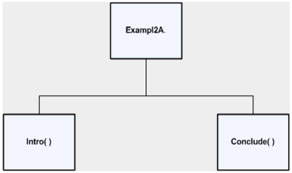
In a structure chart, the program name is listed on top and each of the functions/modules of the program is listed below in their own block. If Intro() or Conclude() also call other functions, then these additional functions would be represented by additional blocks listed below Intro() and Conclude(). Examples of this will be given below. Since values are not passed to the sub modules or from the called modules to the main program, there are no arrows in this structure chart indicating data transfer.
A flowchart for Exampl2A.CPP is the following:
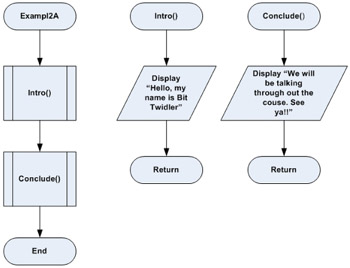
Notice in the flowchart above the two Predefined-Process symbols in the main flowchart and that each of the modules has its own flowchart.
Functions in Header Files
In the last example, the definitions and the declarations were in the program itself. But as stated previously, it is possible to place the functions in a header file. For example: EXAMPL2B.CPP is the same program except the functional definitions are placed in the header file: tools.h. Link to each of these files and observe the code. Create a C++ program and copy EXAMPL2B.CPP into the C++ program part of the project. Next do a right mouse on the program selection under the Solution Explorer on the right hand side of the compiler. Notice that there is an option to Add Item. One of the choices instead of a C++ source file is a header file. Make this selection. When asked for the name of the header file, use: tools.h. After you have done this, copy the code from the example above into the header file window in the compiler. Now compile and run the program. Notice that this program's output is the same as EXAMPL2A.CPP discussed above. The goal of a programmer should be to develop libraries of functions like those in tools.h and then use them in other programs that you develop.
One of the differences between the flowchart of EXAMPL2A.CPP and that of EXAMPL2B.CPP is that the actual commands within the functions Intro( ) and Conclude( ) may not be known by either the designer or the coder. The header file: tools.h may have been a purchased header that does not permit the code to be read. Therefore the flowchart listed above needs to reflect this fact. The following is an example:
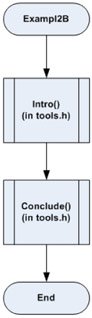
Notice that the process symbol for Intro( ) and Conclude( ) contains the name of the header to indicate they are called from that header file. However, their individual flowcharts are not listed.
Static and External Functions
Some C++ projects may consist of more than one C++ program file. This is especially needed when the project is very large. In those cases it may be desirable to permit or to restrict access to functions as is done with global and local variables. One way is to use what are called static functions and external functions.
By default, all non-static functions are external. External functions may be shared between C++ program files within the project. By this is meant that if an external function is defined in one C++ program file of the project, it may be called in another C++ program file of the same project.
While this is true of external functions, static functions are only accessible within the C++ program file where they are defined. To make a function static, the keyword static must be included in the header of the function as in the following:
|
static outputType functionName(signature) { .... return outputTypeVariable; } |
While static functions are introduced in this section, this concept is only informational. They will not be used in these lectures but they may be used in some of your future uses of C++.
String Modification
Sometimes there is a problem with file I/O working with strings which have spaces. One way that this can be overcome is to convert a string from one that has spaces to one that does not have spaces. The string without spaces could then be saved to the file. When it is time to bring the string back into the program, the spaces could be placed back into the string as it is brought back into the program. To see how such a process could work, check out the following program: stringconversion.cpp.

EAN: N/A
Pages: 142