| < Day Day Up > |
In this chapter we provide problem descriptions and determinations materials that we gathered through our troubleshooting efforts.
In this section we have the PDDs for deployment problems.
The message, PDD001D - MSG - WP00027E Creation of conversation failed , is described here.
This message may be found in the held output for job WPACONF when deploying portlets added from the Portal Server browser administrative place.
Additional messages:
BB0N3199E Method create failed
BB0N3109E Corba system exception
An example of the job log output is shown in Figure 8-1 on page 321.
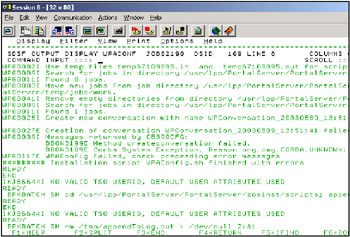
Figure 8-1:
WPACONF failure Create Conversation failed
Delete some old and unnecessary conversations using SMEUI.
The message, PDD002D - MSG - IRX0043I Error running WPAConfig, line 524: Routine not found , is described here.
This message will be seen on the UNIX telnet console after running shell script WPAConfig when deploying portlets added from the Portal Server browser administrative place.
An example of the telnet console is shown in Figure 8-2 on page 322.
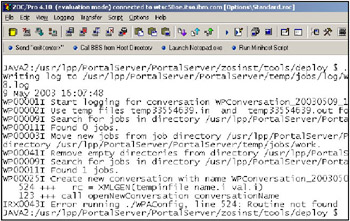
Figure 8-2:
WPACONF failure Create Conversation failed
This error of not able to add/deploy new portlets was caused by insufficient DB2 table space. We first got around the problem by temporarily deleted some old and unneeded conversations under SMEUI. The real solution is to add additional extents, increase the
| < Day Day Up > |
| < Day Day Up > |
In this section we have the PDDs for administration problems.
The message, PDD003I - MSG - BBON0579E Cannot activate conversation , is described here.
This message will show as a pop up error window from SMEUI when trying to Activate a
The most likely cause of this error is that another conversation has been created, committed and activated since this one was created. In the case of WebSphere Portal Server on z/OS this may happen if a portlet is deployed using job WPACONF to execute script WPConfig since the time the conversation on SMEUI was created. Your only course of action is to delete the conversation created on SMEUI and re-create it.
Figure 8-3:
SMEUI error BBON0579E
Remember to coordinate administration/deployment efforts. One conversation at a time.
| < Day Day Up > |
| < Day Day Up > |
The Portal server environment variables should be set up and agreed upon prior to the actual installation process. Table A-1 shows the variables that were being set for the redbook project's environment, in bold .
|
Variable
|
Description |
Required |
Sample Value |
|---|---|---|---|
|
WPS_CONVNAME |
Name of the conversation used for installation of WebSphere Portal |
No |
WebSphere Portal 1 |
|
WPS_SERVERNAME |
Server name of WebSphere Portal, at most 7
|
YES |
WSPORT |
|
WPS_CRLEGIONID |
Name of the server region userID of WebSphere Portal. This name must be setup in RACF |
YES |
WSPORTCU |
|
WPS_SRVREGIONID |
Name of the server regionuser ID of WebSphere Portal. This name must be setup in RACF |
YES |
WSPORTSU |
|
WPS_GROUP |
Name of the Group of WebSphere Portal |
YES |
WSPORTS |
|
WPS_LOGSTREAM |
Log stream name of WebSphere Portal |
No |
WAS.ERROR.LOG |
|
WPS_PROCNAME |
Procedure name of the control region of WebSphere Portal. This name be setup in PROCLIB |
YES |
WSPORT |
|
WPS_PATH |
Installation
|
YES |
/usr/lpp/PortalServer/PortalServer |
|
WPS_LOG_PATH |
Log file path of WebSphere Portal |
No |
/usr/lpp/PortalServer |
|
WPS_LOG_File |
Log file name of WebSphere Portal |
No |
wps.log |
|
WPS_PORT |
HTTP port of WebSphere Portal |
Yes |
8082 |
|
WPS_NUM_SERVER INSTANCES |
Number of server instances per system created for WebSphere Portal |
No |
2 |
|
WPS_INSTALL_SYSTEMS |
List of systems on which server instances for WebSphere Portal should be created. If default, server instances are created on all systems |
No. |
|
|
WPS_RESORUCE_ID |
UserID for the DB2 datasource used by WebSphere Portal. This
|
YES |
JAVA3 (this is the TSO user session ID we used in the redbook project environment) |
|
WPS_RESOURCE_W |
Password for the DB2 datasource used by WebSphere Portal. |
YES |
JAVA3 (this is the TSO user session ID we used in the redbook project environment) |
|
WPS_RESOURCE_LOCATION |
Location name of the database to be used when establishing connections with the DB2 datasource used by WebSphere Portal. |
No |
COM4D741 |
|
WPS_HOST |
Fully-Qualified name of the WebSphere Portal host. (host name and domain name in lower case) |
YES |
wtsc58.itso.ibm.com |
|
WPS_SHORT_HOST |
Short name of WebSphere Portal host |
YES |
wtsc58 |
|
WPS_PBULIC_HOME |
URI of the public area of WebSphere Portal |
YES |
portal |
|
WPS_PROTECTED_HOME |
URI of the protected area of WebSphere Portal |
YES |
myportal |
|
WPS_PROXY-HOST |
Fully-qualified name of the proxy server used by WebSphere Portal (Host name and Domain name) |
YES |
proxy.there.everywhere |
|
WPS_PROXY_PORT |
Port number of the proxy server used by WebSPhere Portal |
YES |
80 |
|
WPS_LDAP_SERVER |
Fully-qualified name of the LDAP server used by WebSphere Portal (Host name and Domain name) |
YES |
wtsc58.itso.Ibm.com |
|
WPS_LDAP_PORT |
Port number of the LDAP server used by WebSphere Portal |
No |
2389 |
|
WPS_LDAP_ID |
LDAP user ID use by WebSphere Portal |
YES |
uid-wpsbind,cn=users, dc=ibm,dc=com |
|
WPS_LDAP-PW |
LDAP password used by WebSphere Portal |
YES |
wpsbind |
|
WTP-PATH |
Installation path of WebSphere Transcoding Publisher |
YES |
/usr/lpp/PortalServer/IBMTrans |
|
WCP_PATH |
Installation path of WebSphere Portal Content Publishing |
YES |
/usr/lpp/PortalServer /wcp |
|
WS-PATH |
Installation path of WebSphere Application Server on z/OS or OS/390 |
YES |
/usr/lpp/WebSphere |
|
WS-CONFIG_PATH |
Configuration path of WebSphere Application Server z/OS or OS/390 |
YES |
/WebSphere390/CB390 |
|
DB2-PATH |
Installation path of DB2 |
YES |
/usr/lpp/db2/db2710 |
|
DB2_PROPS |
File name of DB2 properties file for JDBC |
YES |
/etc/db2sqljjdbc.properties |
|
JAVA_PATH |
Installation path of the JDK |
YES |
/usr/lpp/java/ibm/J1.3 |
|
JVM_LOG |
File name of JVM log file |
YES |
/tmp/jvm.log |
|
WPS_RESOURCE |
Name of the DB2 datasource used by WebSphere Portal. This is extracted automatically from /WPX_PATH/libapp/config/services/DataStoreService.properties Do NOT edit this name |
YES |
wps40DS |
| < Day Day Up > |
