| Regular expressions are an amazingly powerful (but tedious) tool available in most of today's programming languages. Think of regular expressions as an elaborate system of matching patterns. You first write the pattern and then use one of PHP's built-in functions to apply the pattern to a text string (regular expressions are normally used with strings). PHP supports two types of regular expressions: POSIX Extended and Perl-compatible (PCRE). The POSIX version is somewhat less powerful and potentially slower than PCRE but is far easier to learn. For this reason, I'll cover POSIX regular expressions here. With both types of regular expressions, PHP has two functions for simple pattern matches (one case-sensitive and one not) and two for matching patterns and replacing matched text with other text (again, one case-sensitive and one not). Although I'll be using the POSIX functions here, if you are already comfortable with the Perl-compatible syntax, you need only replace the names of the POSIX functions with the PCRE equivalents in the following examples (and change the patterns accordingly).  Tips Tips
Some text editors, such as BBEdit and emacs, allow you to use regular expressions to match and replace patterns within and throughout several documents. Another difference between POSIX and PCRE regular expressions is that the latter can be used on binary data while the former cannot.
Defining a pattern Before you can use one of PHP's built-in regular expression functions, you have to be able to define a pattern that the function will use for matching purposes. PHP has a number of rules for creating a pattern. You can use these rules separately or in combination, making your pattern either quite simple or very complex. Before I get into the rules, though, a word on the effectiveness of regular expressions. For most cases, it is nearly impossible to write a pattern that is 100 percent accurate! The goal, then, is to create a pattern that catches most invalid submissions but allows for all valid submissions. In other words, err on the side of being too permissive. Like most security systems, regular expressions are a deterrent, not an absolutely perfect fix. That being said, on with the show…. To explain how patterns are created, I'll start by introducing the symbols used in regular expressions, then discuss how to group characters together, and finish with character classes. Once all of this has been covered, you can begin to use this knowledge within PHP functions. As a formatting rule, I'll define my patterns within straight quotes ('pattern') and will indicate what the corresponding pattern matches in italics. The first type of character you will use for defining patterns is a literal. A literal is a value that is written exactly as it is interpreted. For example, the pattern 'a' will match the letter a, 'ab' will match ab, and so forth. Therefore, assuming a case-insensitive search is performed, 'rom' will match any of the following strings since they all contain rom: Along with literals, your patterns will use metacharacters. These are special symbols that have a meaning beyond their literal value (Table 10.2). While 'a' simply means a, the period (.) will match any single character ('.' matches a, b, c, the underscore, a space, etc.). To match any metacharacter, you will need to escape it, much as you escape a quotation mark to print it. Hence '\.' will match the period itself. Table 10.2. The metacharacters have unique meanings inside of regular expressions.Metacharacters |
|---|
CHARACTER | NAME | MEANING |
|---|
^ | caret | Indicates the beginning of a string | $ | dollar sign | Indicates the end of a string | . | period | Any single character | | | pipe | Alternatives (or) |
Two metacharacters specify where certain characters must be found. There is the caret (^), which will match a string that begins with the letter following the caret. There is also the dollar sign ($), for anything that ends with the preceding letter. Accordingly, '^a' will match any string beginning with an a, while 'a$' will correspond to any string ending with an a. Therefore, '^a$' will only match a (a string that both begins and ends with a). Regular expressions also make use of the pipe (|) as the equivalent of or. Therefore, 'a|b' will match strings containing either a or b. (Using the pipe within patterns is called alternation or branching). Next, there are three metacharacters that allow for multiple occurrences: 'a*' will match zero or more a's (no a's, a, aa, aaa, etc.); 'a+' matches one or more a's (a, aa, aaa, etc., but there must be at least one); and 'a?' will match up to one a (a or no a's match). These metacharacters all act as quantifiers in your patterns, as do the curly braces. To match a certain quantity of a letter, put the quantity between curly braces ({}), stating a specific number, just a minimum, or both a minimum and a maximum. Thus, 'a{3}' will match aaa; 'a{3,}' will match aaa, aaaa, etc. (three or more a's); and 'a{3,5}' will match just aaa, aaaa, and aaaaa (between three and five). Table 10.3 lists all of the quantifiers. Table 10.3. The quantifiers allow you to dictate how many times something can or must appear.Quantifiers |
|---|
CHARACTER | MEANING |
|---|
? | 0 or 1 | * | 0 or more | + | 1 or more | {x} | exactly x occurrences | {x, y} | between x and y (inclusive) | {x,} | at least x occurrences |
Once you comprehend the basic symbols, then you can begin to use parentheses to group characters into more involved patterns. Grouping works as you might expect: '(abc)' will match abc, '(TRout)' will match trout. Think of parentheses as being used to establish a new literal of a larger size. So '(yes)|(no)' accepts either of those two words in their entirety. Regardless of how you combine your literals into various groups, they will only ever be useful for matching specific strings. But what if you wanted to match any four-letter lowercase word or any number sequence? For this, you define and utilize character classes. Classes are created by placing characters within square brackets ([]). For example, you can match any one vowel with '[aeiou]' (by comparison, '(aeiou)' would match that entire five-character string). Or you can use the hyphen to indicate a range of characters: '[a-z]' is any single lowercase letter and '[A-Z]' is any uppercase, '[A-Za-z]' is any letter in general, and '[0-9]' matches any digit. As an example, '[a-z]{3}' would match abc, def, oiw, etc. PHP has already defined some classes that will be most useful to you in your programming. These use a syntax like [[:name:]]. The [[:alpha:]] class matches letters and is the equivalent of '[A-Za-z]'. By defining your own classes and using those already defined in PHP (Table 10.4), you can make better patterns for regular expressions. Table 10.4. Character classes are a more flexible tool for defining patterns.Character Classes |
|---|
CLASS | MEANING |
|---|
[a-z] | Any lowercase letter | [a-zA-Z] | Any letter | [0-9] | Any number | [ \f\r\t\n\v] | Any white space | [aeiou] | Any vowel | [[:alnum:]] | Any letter or number | [[:alpha:]] | Any letter (same as [a-zA-Z]) | [[:blank:]] | Any tabs or spaces | [[:digit:]] | Any number (same as [0-9]) | [[:lower:]] | Any lowercase letter | [[:upper:]] | Any uppercase letter | [[:punct:]] | Punctuation characters (.,;:-) | [[:space:]] | Any white space |
Tips Because many escaped characters within double quotation marks have special meaning, I advocate using single quotation marks to define your patterns. For example, to match a backslash using single quotes, you would code \\(the one slash indicates that the next slash should be treated literally). To match a backslash in double quotes, you would have to code \\\\. When using curly braces to specify a number of characters, you must always include the minimum number. The maximum is optional: 'a{3}' and 'a{3,}' are acceptable, but 'a{,3}' is not. To include special characters (^.[]$()|*?{}\) in a pattern, they need to be escaped (a backslash put before them). Within the square brackets (i.e., in a class definition), the caret symbol, which is normally used to indicate an accepted beginning of a string, is used to exclude a character. The dollar sign and period have no special meaning inside of a class. To match any word that does not use punctuation, use '^[[:alpha:]]+$' (which states that the string must begin and end with only letters). You should never use regular expressions if you're trying to just match a literal string. In such cases, use one of PHP's string functions, which will be faster.
Matching patterns Two functions are built in to PHP expressly for the purpose of matching a pattern within a string: ereg() and eregi() (Perl-compatible regular expressions use preg_match() instead). The only difference between the two is that ereg() TReats patterns as case-sensitive, whereas eregi() is case-insensitive, making it less particular. The latter is generally recommended for common use, unless you need to be more explicit (perhaps for security purposes). Both functions will be evaluated to trUE if the pattern is matched, FALSE if it is not. Here are two ways to use these functions (you can also hybridize the methods): ereg('pattern', 'string');
or $pattern = 'pattern'; $string = 'string'; eregi($pattern, $string);
The second method is easier to digest, but the first saves a step or two. If you find the examples that follow to be cumbersome, start by separating out the pattern itself as a variable. To match a pattern 1. | Create a new PHP document in your text editor (Script 10.7).
<!DOCTYPE html PUBLIC "-//W3C//DTD  XHTML 1.0 Transitional//EN "http://www.w3.org/TR/xhtml1/DTD/ xhtml1-transitional.dtd> <html xmlns="http://www.w3.org/1999/ xhtml xml:lang="en" lang="en"> <head> <meta http-equiv="content-type" XHTML 1.0 Transitional//EN "http://www.w3.org/TR/xhtml1/DTD/ xhtml1-transitional.dtd> <html xmlns="http://www.w3.org/1999/ xhtml xml:lang="en" lang="en"> <head> <meta http-equiv="content-type"  content="text/html; charset= iso-8859-1 /> <title>Submit a URL</title> </head> <body> <?php # Script 10.7 - handle_submit_ url.php content="text/html; charset= iso-8859-1 /> <title>Submit a URL</title> </head> <body> <?php # Script 10.7 - handle_submit_ url.php
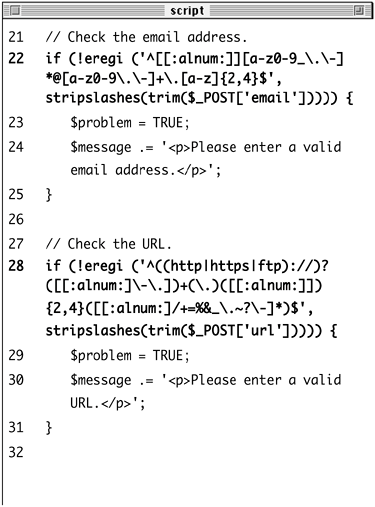
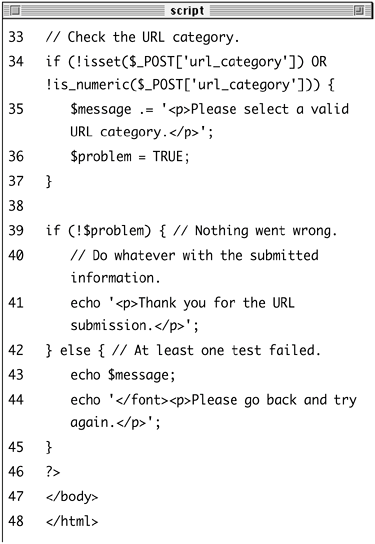
Script 10.7. This script handles the submit_url.html form using primarily regular expressions to validate the submitted data. 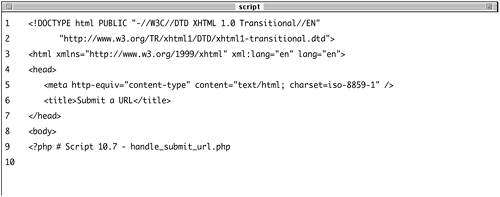 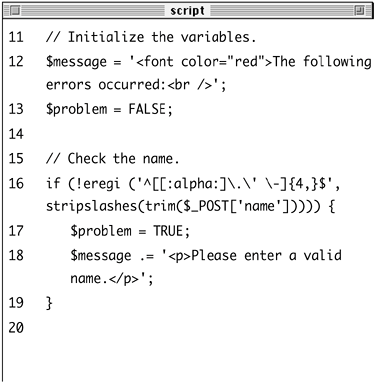
This script will receive the data from the form on submit_url.html (refer to Script 10.6).
| 2. | Create the error-checking variables.
$message = '<font color="red">The following errors occurred:<br />'; $problem = FALSE;
The $message variable will be used to store the accumulated errors. The $problem variable (like its JavaScript counterpart) will be used to test for problems, naturally.
| 3. | Validate the submitted name.
if (!eregi ('^[[:alpha:]\.\' \-] {4,}$', stripslashes(trim($_POST ['name])))) { $problem = TRUE; $message .= '<p>Please enter a valid name.</p>'; }
This conditional will check the submitted name against a particular pattern. If the submitted value does not meet the criteria of the regular expression, the $problem variable will be set to trUE.
The pattern in question is a class consisting of [:alpha:] (all letters), the period, the apostrophe, a blank space, and the dash. The pattern says that the name must begin and end with these characters (meaning only those are allowed) and must be at least four characters long.
Each of the inputs will be stripped of any slashes (presuming that Magic Quotes is on) and trimmed of extraneous white spaces (both of which could invalidate a regular expression).
| 4. | Validate the email address.
if (!eregi ('^[[:alnum:]][a-z0-9_\. \-]*@[a-z0-9\.\-]+\.[a-z]{2,4}$', stripslashes(trim($_POST ['email])))) { $problem = TRUE; $message .= '<p>Please enter a valid email address.</p>'; }
Email addresses and URLs are notoriously difficult to validate with absolute accuracy. The pattern I am using here mandates that the email address begin with a letter or number and then continue with some combination of letters, numbers, the underscore, the period, and the hyphen. An email address must have an @, which will be followed by some combination of letters, numbers, the period, and the hyphen. Finally, there will be a period, followed by a two- to four-letter string (e.g., com, edu, uk, info).
| 5. | Validate the URL.
if (!eregi ('^((http|https|ftp) ://)?([[:alnum:]\-\.])+(\.)([[: alnum:]]){2,4}([[:alnum:]/+=%&_ \.~?\-]*)$', stripslashes(trim ($_POST['url])))) { $problem = TRUE; $message .= '<p>Please enter a valid URL.</p>'; }
To validate the URL, I first check for the optional http://, https://, or ftp://. Then I want to see letters, numbers, or the dash, followed by a period (sitename.), followed by a two- to four-letter string (com, edu, etc.). Finally, I allow for the possibility of many other characters, which would constitute a specific filename, parameters being passed to it, and so forth.
| 6. | Validate the URL category.
if (!isset($_POST['url_category']) OR !is_numeric($_POST['url_ category])) { $message .= '<p>Please select a valid URL category.</p>'; $problem = TRUE; }
Since the url_category comes from a pull-down menu and should be a number, I can verify it without regular expressions.
| 7. | Create the conditional checking on the status of the tests.
if (!$problem) { echo '<p>Thank you for the URL submission.</p>'; } else { echo $message; echo '</font><p>Please go back and try again.</p>'; }
If no problem occurred, a simple thank you is displayed (in Chapter 12 the information will be stored in the database). If any problem was found, the error message is displayed.
| 8. | Complete the PHP code and the HTML page.
?> </body> </html>
| 9. | Save the file as handle_submit_url.php, upload to your Web server (in the same directory as submit_url.html), and test in your Web browser (Figures 10.19 and 10.20).
Figure 10.19. If any data fails to match the regular expressions, error messages are displayed. 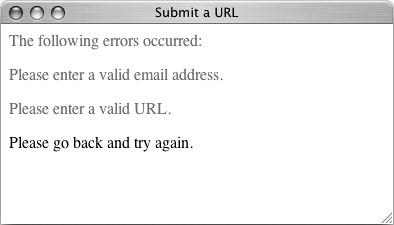
Figure 10.20. If the submitted data matches the appropriate patterns, a thank-you message is printed. 
|
Tips Although it demonstrates good dedication to programming to learn how to write and execute your own regular expressions, numerous working examples are available already by searching the Internet. Remember that regular expressions in PHP are case-sensitive by default. The eregi() function overrules this standard behavior. If you are looking to match an exact string within another string, use the strstr() function, which is faster than regular expressions. In fact, as a rule of thumb, you should use regular expressions only if the task at hand cannot be accomplished using any other function or technique.
Matching and replacing patterns While the ereg() and eregi() functions are great for validating a string, you can take your programming one step further by matching a pattern and then replacing it with a slightly different pattern or with specific text. The syntax for doing so is ereg_replace('pattern', 'replace', 'string);
or $pattern = 'pattern'; $replace = 'replace'; $string = 'string'; eregi_replace($pattern, $replace, $string);
The ereg_replace() function is case-sensitive, whereas eregi_replace() is not. One reason you might want to use either function would be to turn a user-entered Web site address (a URL) into a clickable HTML link, by encapsulating it in the <a href="url"></a> tags. There is a related concept to discuss that is involved with these two functions: back referencing. In a ZIP code matching pattern'^([0-9]{5})(\-[0-9]{4})?$'there are two groupings within parentheses (the first representing the obligatory initial five digits and the second representing the optional dash plus four-digit extension). Within a regular expression pattern, PHP will automatically number parenthetical groupings beginning at 1. Back referencing allows you to refer to each individual section by using a double backslash in front of the corresponding number. For example, if you match the ZIP code 94710-0001 with this pattern, referring back to \\1 will give you 94710. The code \\0 refers to the whole initial string. To match and replace a pattern 1. | Open handle_submit_url.php (refer to Script 10.7) in your text editor.
| 2. | Add the following to the email validation (Script 10.8).
} else { $email = eregi_replace ('^[[: alnum:]][a-z0-9_\.\-]*@[a-z0-9\. \-]+\.[a-z]{2,4}$', '<a href= "mailto:\\0>Email</a>', stripslashes(trim($_POST ['email]))); }
Script 10.8. The modified version of the handle_submit_url.php script uses eregi_replace() to create new strings based upon matched patterns in existing ones. 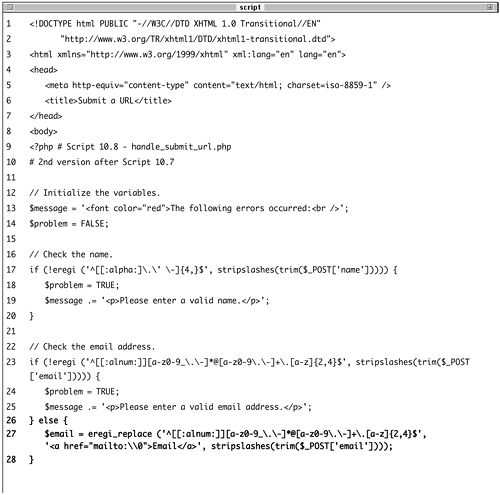 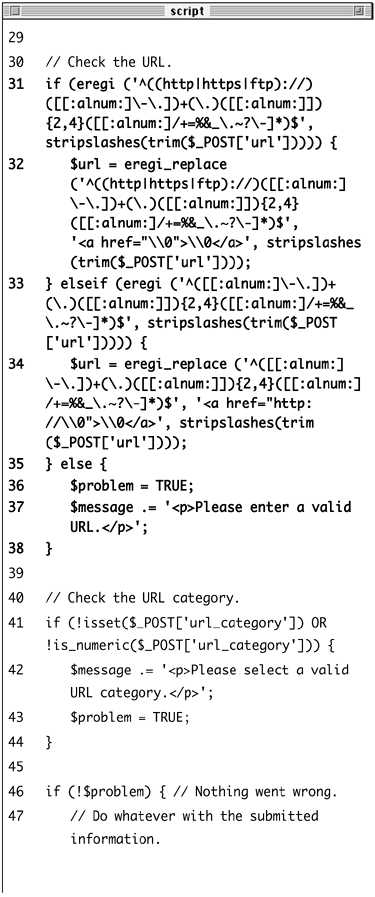
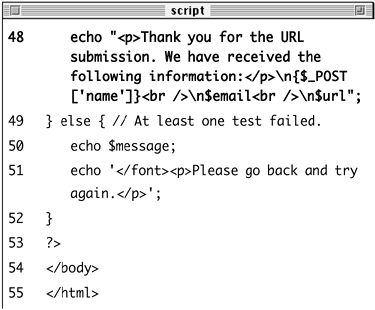
If the email address passed the original regular expression, I'll run it through eregi_replace() using that same pattern. This function will turn an email address (say phpmysql2@dmcinsights.com) into the HTML code
<a href="mailto:phpmysql2@ dmcinsights.com>Email</a>.
| 3. | Replace the URL validation with these lines:
if (eregi ('^((http|https|ftp) ://)([[:alnum:]\-\.])+(\.)([[: alnum:]]){2,4}([[:alnum:]/+=%&_\. ~?\-]*)$', stripslashes(trim ($_POST['url])))) { $url = eregi_replace ('^((http| https|ftp)://)([[:alnum:]\-\.])+ (\.)([[:alnum:]]){2,4}([[: alnum:]/+=%&_\.~?\-]*)$', '<a href="\\0>\\0</a>', stripslashes (trim($_POST['url]))); } elseif (eregi ('^([[:alnum:] \-\.])+(\.)([[:alnum:]]){2,4} ([[:alnum:]/+=%&_\.~?\-]*)$', stripslashes(trim($_POST['url] )))) { $url = eregi_replace ('^([[: alnum:]\-\.])+(\.)([[:alnum:]]) {2,4}([[:alnum:]/+=%&_\.~?\- ]*)$', '<a href="http://\\0> \\0</a>', stripslashes(trim ($_POST['url]))); } else { $problem = TRUE; $message .= '<p>Please enter a valid URL.</p>'; }
This is a more complicated extension of the previous example. Here I'll first test for whether or not the initial http://, https://, or ftp:// string is present. If it is (and the URL matches the overall pattern), the entire URL will be used in creating an HTML link.
If that initial string is not present, the HTML link will manually include it, followed by the submitted value.
| 4. | Change the problem conditional so that the first part reads
echo "<p>Thank you for the URL submission. We have received the following information:</p> \n{$_POST['name]}<br />\ n$email<br />\n$url;
The thank-you message will now also print out the submitted values, including the reformatted email address and URL.
| 5. | Save the file, upload to your Web server, and test in your Web browser (Figure 10.21).
Figure 10.21. The form now prints out the values submitted and creates links using the email address and URL. 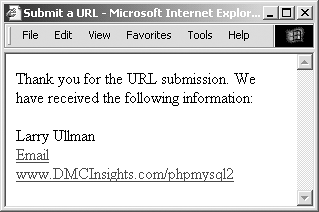
| 6. | View the page source to see the results of the eregi_replace() function (Figure 10.22).
Figure 10.22. The HTML source of the page shows the generated links. 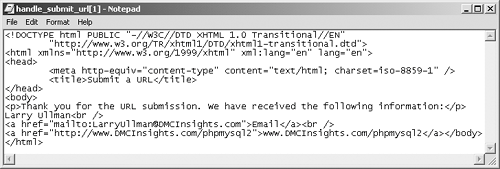
|
Tips The ereg() and eregi() functions will also return matched patterns in an optional third argument, meaning that the code in this example could be replicated using those two functions. PHP's split() function works like explode() in that it turns a string into an array, but it allows you to use regular expressions to define your separator. The Perl-compatible version of the ereg_replace() function is preg_replace().
|
