[Previous] [Next]
Toy Car Parts has a legacy application that order entry clerks have been using to enter customer purchase orders. This application, PlaceOrder.htm, is an HTML document that calls a CGI program, written in OmniMark, to process the order. The interface for PlaceOrder.htm is shown in Figure 11-8.
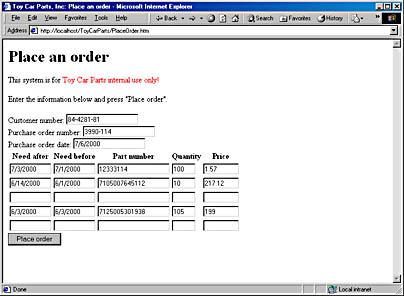
Figure 11-8. The legacy order-processing application, PlaceOrder.htm
PlaceOrder.htm is a simple HTML document with a form allowing the clerk to enter appropriate information for a purchase order. The data in the HTML form is sent to an OmniMark program that processes the order in accordance with business rules, updates the appropriate databases, and sends a response to the user. This response screen is shown in Figure 11-9.
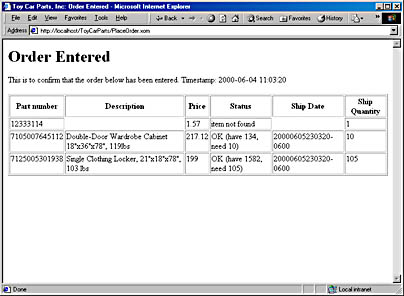
Figure 11-9. The response generated by PlaceOrder.xom.
A BizTalk-based automated purchase order processing system needs to perform the same tasks as the legacy application. We could write an application that processes a BizTalk-based document using the same rules as the legacy application, but that smells too much like work. We still want to have the manual legacy application available for entries that come in on paper purchase orders. If we wrote a BizTalk-smart application, we would need to maintain the same business rules in two places. It would be nice if we could somehow tie our automated system into the legacy application, using the BizTalk document as a surrogate human clerk.
So let's do that. Our BizTalk server must create the same kind of document that PlaceOrder.htm does and post that document to PlaceOrder.xom. This is not really that hard, and OmniMark makes it possible. What's a bit harder is interpreting the HTML response page that comes back from the application and doing something useful with it. We will generate and interpret the HTML response page with the BizTalk server.
Automating Purchase Order Processing
Continuing with our process flow scenario, a process at Toy Car Parts has received a request to invoke a method on a BizTalk server object. This method, which was discovered in the SDL request, is BizTalkMessage, and it is processed by a CGI application acting as the BizTalk server. The program BTServer.xom is written in OmniMark.
NOTE
The SOAP message created by poGen is not really what we need. At the time of this writing, the ROPE object is still being written. To use the late-bound method invocations, the SOAP document has to be fairly standardized. While these invocations work for most applications, the special requirements of a BizTalk message make the ROPE-generated SOAP envelope inadequate. Check http://architag.com/support to get a final version of this code. Ah, the joy of cutting-edge technology!
BizTalkMessage requires a single parameter, which is the BizTalk document. The ROPE object in the poGen program created the SOAP document. When it did, it created an HTTP header parameter that is defined by the SOAP specification, SOAPAction. This parameter indicates to the SOAP server which method it will invoke. OmniMark grabs this parameter using the UTIL_GetEnv function, shown here.
set SOAPAction to UTIL_GetEnv ("HTTP_SOAPACTION") |
The SOAPAction parameter takes this form: ;http://localhost/toycarparts/BTServer.xar#BizTalkMessage. We need to isolate the action from the URL. The SOAPAction variable is checked using the code in Listing 11-7 to see whether it is one of the supported methods.
Listing 11-7. Determining the method to invoke.
Checking SOAPAction open SOAPResponse as buffer do scan #main-input match any{formVars{"CONTENT_LENGTH"}} => inputData put Debug "%ninputData:%n%x(inputData)%n" set SOAPAction to UTIL_GetEnv ("HTTP_SOAPACTION") put Debug "%nSOAPAction (http):%g(SOAPAction)%n" ;http://localhost/toycarparts/BTServer.xar#BizTalkMessage do scan SOAPAction match [any except "#"]+ "#" any* => SOAPmethod set SOAPAction to SOAPMethod else set SOAPAction to "" done put Debug "%nSOAPAction (http):%g(SOAPAction)%n" do when SOAPAction = "" put SOAPResponse "%n<SOAP-ENV:Fault>" || "%n <faultcode>101</faultcode>" || "%n <faultstring>no method specified" || "%n</faultstring>" || "%n</SOAP-ENV:Fault>" else do scan SOAPAction match "BizTalkMessage" using group processPO do do xml-parse instance scan inputData suppress done done do when errorMsg = "" put SOAPResponse "%n <BizTalkMessageResponse>" || "%n <DeliveryReceipt status='OK'>" || "BizTalk Message received at " || format-ymdhms "=W, =xD =n =xY, =h:=m:=s =a.m. =t%n" with-date now-as-ymdhms || " From confirmation server: " || escapeXML (fromPOConf) || "</DeliveryReceipt>" || "%n </BizTalkMessageResponse>" else put SOAPResponse "%n <BizTalkMessageResponse>" || "%n <DeliveryReceipt status='ERROR'>" || "BizTalk Message Error: " || errorMsg || ". Processed at " || format-ymdhms "=W, =xD =n =xY, =h:=m:=s =a.m. =t%n" with-date now-as-ymdhms || "</DeliveryReceipt>" || "%n </BizTalkMessageResponse>" done match "checkInventory" put SOAPResponse "%n <checkInventoryResponse>" || "%n <DeliveryReceipt status='OK'>" || "This method is not supported (2nd edition...). " || "Processed at " || format-ymdhms "=W, =xD =n =xY, =h:=m:=s =a.m. =t%n" with-date now-as-ymdhms || "</DeliveryReceipt>" || "%n </checkInventoryResponse>" match "RUOK" put SOAPResponse "<RUOKResponse><status>" || "OK at " || format-ymdhms "=W, =xD =n =xY, =h:=m:=s =a.m. =t%n" with-date now-as-ymdhms || "</status></RUOKResponse>" else put SOAPResponse "%n<SOAP-ENV:Fault>" || "%n <faultcode>100</faultcode>" || "%n <faultstring>method not supported:" || "%n %g(SOAPAction)</faultstring>" || "%n</SOAP-ENV:Fault>" done done done close SOAPResponse |
The important part of this listing is invoked using the following six lines:
using group processPO do do xml-parse instance scan inputData suppress done done |
These code lines pass processing to a set of rules that are combined into an OmniMark group. The XML parser is invoked, and the XML document is passed there.
The processPO group starts dealing with the elements in the BizTalk document. The processPO group is shown in Listing 11-8.
Listing 11-8. The processPO group that contains rules to process XML elements in the BizTalk message.
processPO ;---------------------------------------------- group processPO ;---------------------------------------------- global stream txtSendTo global stream txtReplyTo global stream itemNum global stream itemQty global stream itemPrice global stream poDate global stream poNumber global stream custID global stream msgBody global counter itemCounter global stream needAfter global stream needBefore global stream promiseDate global counter promiseQty global stream rowData variable initial-size 0 element purchaseOrder_Chapter11_1.0 local stream HTMLResponse local counter stepper local stream payload set poDate to attribute poDate set poNumber to attribute poNumber set custID to attribute custID set itemCounter to 0 open msgBody as buffer put msgBody "CustNum=%g(custID)" put msgBody "&PONum=%g(poNumber)" put msgBody "&PODate=%g(poDate)" output "%c" close msgBody set HTMLResponse to postMsg (msgBody, "http://localhost/ToyCarParts/PlaceOrder.xar") clear rowData using group parseResponse do submit HTMLResponse done open payload as buffer put payload "<purchaseOrder_Confirm_Chapter11_1.0 " || "%n xmlns='urn:purchaseOrder_Confirm_Chapter11_1.0'" || "%n CustNum='%g(custID)'" || "%n PONum='%g(poNumber)'>" repeat set itemNum to rowData item stepper increment stepper by 4 set promiseDate to rowData item stepper increment stepper by 1 set promiseQty to rowData item stepper do unless promiseDate = "" put payload "%n <item reqID='" || "d" % (reqIDMapper item (stepper / 6)) || "'>" || "%n <datePromised>" || promiseDate || "</datePromised>" || "%n <qtyPromised>" || "d" % promiseQty || "</qtyPromised>" || "%n </item>" done increment stepper by 1 exit when stepper > number-of rowData again put payload "%n</purchaseOrder_Confirm_Chapter11_1.0>" close payload do local stream originalBizTalk set originalBizTalk to makeResponse(payload, txtReplyTo, txtSendTo) set fromPOConf to postMsg (originalBizTalk, txtReplyTo) done element #implied suppress element "dlv:address" when parent is "dlv:to" set txtSendTo to "%c" element "dlv:address" when parent is "dlv:from" set txtReplyTo to "%c" element item output "%c" increment itemCounter put msgBody "&After%d(itemCounter)=%v(needAfter)" put msgBody "&Before%d(itemCounter)=%v(needBefore)" put msgBody "&Part%d(itemCounter)=%g(itemNum)" put msgBody "&Qty%d(itemCounter)=%g(itemQty)" put msgBody "&Price%d(itemCounter)=%g(itemPrice)" set new reqIDMapper to attribute reqID element number when parent is item set itemNum to "%c" element price when parent is item set itemPrice to "%c" element qty when parent is item set itemQty to "%c" |
In Listing 11-8, the first element to be processed is purchaseOrder_Chapter11_1.0. The main job of this element is to do enough processing to fool the legacy order processing program, ProcessOrder.xom, into thinking it is being called by PlaceOrder.htm. When purchaseOrder_Chapter11_1.0 is encountered, ProcessOrder.xom starts building the body of an HTTP POST document. The HTTP POST method is covered in more detail in Chapter 8. The document is posted to the CGI program (PlaceOrder.xom) by the postMsg function, which is shown in Listing 11-9.
Listing 11-9. The postMsg function performs an HTTP POST method to a CGI program.
postMsg define stream function postMsg ( value stream payload, value stream url ) as local HttpRequest Request local HttpResponse Response local stream request-Headers variable local stream response-Headers variable HttpRequestSetFromURL Request from (url) set Request key "method" to "POST" set Request key "entity-body" to payload HttpRequestSend Request into Response HttpObjectGetHeaders Request into request-Headers HttpObjectGetHeaders Response into response-Headers do when not(HttpObjectIsInError Request) return Response key "entity-body" done |
As shown in Listing 11-9, the postMsg function uses the OmniMark HTTP library of functions. The HttpRequestSetFromURL function initializes an HTTP packet. After that packet is set, we need to change the parameters to POST and put our payload inside the body of the document. Then we use the HttpRequestSend function to send the packet and place the response into another object. An example of the body of the HTTP POST package is shown here. (This code is one long line broken to fit here.)
 CustNum=84-4281-81&PONum=1182&PODate=2000-06-04&After1=2000-05-
24&Before1=2000-06-22&Part1=LSC91023&Qty1=1&Price1=340&After2=2000-05-
21&Before2=2000-06-11&Part2=LSC91012&Qty2=12&Price2=35 |
The only thing we are interested in is the body of the HTTP response document, which is returned to us after we post. This returned document is the HTML created by the CGI program. An example is shown in Listing 11-10.
Listing 11-10. The HTML response document created by PlaceOrder.xom.
Return.htm <HTML> <HEAD> <TITLE>Toy Car Parts, Inc: Order Entered</TITLE> </HEAD> <BODY> <H1>Order Entered</H1> <P>This is to confirm that the order below has been entered. Timestamp: 2000-06-04 11:54:52</P> <TABLE BORDER='1'> <THEAD> <TR> <TH>Part number</TH> <TH>Description</TH> <TH>Price</TH> <TH>Status</TH> <TH>Ship Date</TH> <TH>Ship Quantity</TH> </TR> </THEAD> <TR> <TD VALIGN='TOP'>LSC91023</TD> <TD VALIGN='TOP'>"Marine Corps" Locker, 265lbs </TD> <TD VALIGN='TOP'>340</TD> <TD VALIGN='TOP'>Manager approval (price too low)</TD> <TD VALIGN='TOP'>20000605235452-0600</TD> <TD VALIGN='TOP'>1</TD> </TR> <TR> <TD VALIGN='TOP'>LSC91012</TD> <TD VALIGN='TOP'>Single Clothing Locker, 21"x18"x78", 117lbs</TD> <TD VALIGN='TOP'>35</TD> <TD VALIGN='TOP'>Manager approval (price too low)</TD> <TD VALIGN='TOP'>20000605235452-0600</TD> <TD VALIGN='TOP'>12</TD> </TR> </TABLE> </BODY> </HTML> |
Once the HTML document comes back, the rules in another group, parseResponse, are executed using the following code:
using group parseResponse do submit HTMLResponse done |
The parseResponse group contains a set of find rules that look for patterns in the text and set a keyed shelf (an associative array) of stream variables to values found in the table cells. The parseResponse group is shown in Listing 11-11.
Listing 11-11. The parseResponse group contains find rules to process the HTML document returned from PlaceOrder.xom.
parseResponse ;---------------------------- group parseResponse ;---------------------------- find ("<TD VALIGN='TOP'>" any** "</TD>" white-space*)+ => Cells repeat scan Cells match "<TD VALIGN='TOP'>" any** => Content "</TD>" set new rowData to Content match any again find any ; suppress the rest |
The rowData shelf contains all the content in the cells. Now it's time to finish the purchase order confirmation document that will be sent back to Toi Carz. The purchase order document should look something like this:
<purchaseOrder_Confirm_Chapter11_1.0 xmlns='urn:purchaseOrder_Confirm_Chapter11_1.0' CustNum='84-4281-81' PONum='1189'> <item reqID='62'> <datePromised>20000606000352-0600</datePromised> <qtyPromised>1</qtyPromised> </item> <item reqID='70'> <datePromised>20000606000352-0600</datePromised> <qtyPromised>12</qtyPromised> </item> </purchaseOrder_Confirm_Chapter11_1.0> |
To achieve this document structure, we use the code shown in Listing 11-12.
Listing 11-12. Creating line items for the purchase order confirmation program.
Creating line items put payload "<purchaseOrder_Confirm_Chapter11_1.0 " || "%n xmlns='urn:purchaseOrder_Confirm_Chapter11_1.0'" || "%n CustNum='%g(custID)'" || "%n PONum='%g(poNumber)'>" repeat set itemNum to rowData item stepper increment stepper by 4 set promiseDate to rowData item stepper increment stepper by 1 set promiseQty to rowData item stepper do unless promiseDate = "" put payload "%n <item reqID='" || "d" % (reqIDMapper item (stepper / 6)) || "'>" || "%n <datePromised>" || promiseDate || "</datePromised>" || "%n <qtyPromised>" || "d" % promiseQty || "</qtyPromised>" || "%n </item>" done increment stepper by 1 exit when stepper > number-of rowData again put payload "%n</purchaseOrder_Confirm_Chapter11_1.0>" close payload |
The purchase order document is then wrapped inside a BizTalk document by using the makeResponse function, shown in Listing 11-13.
Listing 11-13. The makeResponse function creates a BizTalk envelope and places a payload document inside.
makeResponse define stream function makeResponse( value stream strPayload, value stream strSendTo, value stream strReplyTo ) as local stream response set response to "<?xml version='1.0'?>" || "%n<SOAP-ENV:Envelope" || "%n xmlns:SOAP-ENV='http://schemas.xmlsoap.org/soap/envelope/'" || "%n xmlns:SOAP-ENC='http://schemas.xmlsoap.org/soap/encoding/'" || "%n xmlns:xsi='http://www.w3.org/1999/XMLSchema-instance'>" || "%n <SOAP-ENV:Header>" || "%n <dlv:delivery SOAP-ENV:mustUnderstand='1'" || "%n xmlns:dlv='http://schemas.biztalk.org/btf-2-0/delivery'" || "%n xmlns:agr='http://www.trading-agreements.org/types/'>" || "%n <dlv:to>" || "%n <dlv:address xsi:type='agr:department'>" || escapeXML(strSendTo) || "</dlv:address>" || "%n </dlv:to>" || "%n <dlv:from>" || "%n <dlv:address xsi:type='agr:organization'>" || escapeXML(strReplyTo) || "</dlv:address>" || "%n </dlv:from>" || "%n </dlv:delivery>" || "%n <prop:properties SOAP-ENV:mustUnderstand='1'" || "%n xmlns:prop='http://schemas.biztalk.org/btf-2-0/properties'>" || "%n <prop:identity>uuid:" || genUUID() || "</prop:identity>" || "%n <prop:sentAt>" || iso8601(now-as-ymdhms) || "</prop:sentAt>" || "%n <prop:expiresAt>" || iso8601(add-to-ymdhms now-as-ymdhms hours 2) || "</prop:expiresAt>" || "%n <prop:topic>" || escapeXML(strReplyTo) || "</prop:topic>" || "%n </prop:properties>" || "%n </SOAP-ENV:Header>" || "%n <SOAP-ENV:Body>" || "%n" || strPayload || "%n </SOAP-ENV:Body>" || "%n</SOAP-ENV:Envelope>" return response |
In the next section we see the purchase order confirmation-processing program, which consists of an ASP page that processes an HTTP POST document containing a BizTalk message. It is called in the same way we called the order-processing program, PlaceOrder.xom.
