This task is intended for owners of PDAs such as Palm or Pocket PC devices or Microsoft Smartphones. If you have an iTunes phone such as a Motorola ROKR or SLVR, iTunes supports it natively and fills the phone with music in the same way that it does the iPod shuffle. See  Autofill Your iPod Shuffle or iTunes Phone for more information.
After you've filled your iTunes Library with music from your CDs, you'll want a way to carry the music with you. Although Apple wants everyone to buy an iPod for that task, not everyone has jumped on board that bandwagon yet. In particular, people who already own Portable Digital Assistantsdevices that can be powered by Palm OS or be of the Microsoft Pocket PC persuasionmight be reluctant to add yet another geek toy to their utility belts just to listen to music. Although the iPod has PDA-like functionalitysuch as the ability to view contacts, calendar items, and text notes and to take voice notes using third-party add-on softwarethat doesn't make it a PDA. In this day and age, when your PDA might also be your cell phone and your digital camera, it seems sensible to want to use it to play your iTunes music, too.
Copying your iTunes music to your Palm PDA, Pocket PC, or Microsoft Smartphone is not a function that's built into iTunesyou must purchase and install third-party software for this. You also cannot transfer copy-protected AAC songs (purchased from the iTunes Music Store) to the device; to play copy-protected AAC songs, you need an iPod. Playing unprotected AAC files is often not supported on devices that don't have special software, and you'll have to restrict yourself to MP3s (or uncompressed formats such as WAV). With these caveats, however, loading iTunes music onto your PDA can be as seamless a process as it is with an iPod.
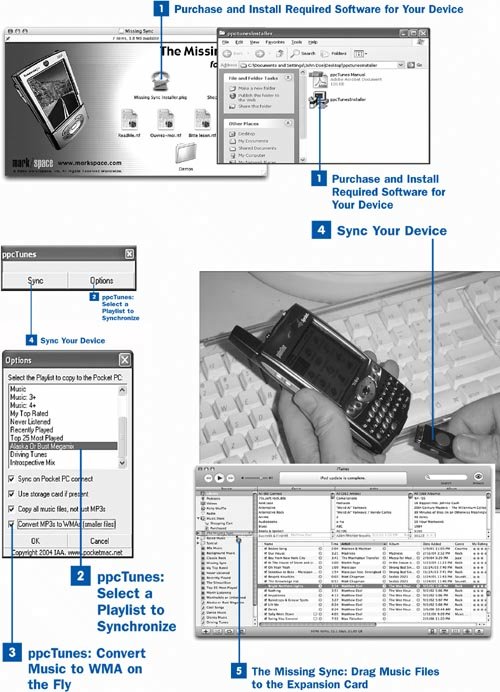
 Purchase and Install Required Software for Your Device
The first step is to determine what kind of device you have and, by extension, what software you must acquire before you can sync your music with it. This decision also, naturally, depends on what kind of computer you have.
In Windows: PocketMac produces a utility called ppcTunes, which integrates into Microsoft ActiveSync and lets you pick your iTunes music by playlist. It can (optionally) convert your MP3 files to higher-compression WMA format as you sync it to save space. ppcTunes is available for $9.95 at http://www.pocketmac.net/products/ppctunes/. (If you have a Palm PDA, unfortunately, it does not appear that syncing your iTunes music with it is currently possible from Windows.)
On the Mac: Whether you have a Palm OS or Pocket PC handheld device, the best software for the job is The Missing Sync by Mark/Space, Inc. This software enhances your Mac's ability to synchronize not just your iTunes music, but all the rest of your computer's relevant information to your PDA, whether it's a Palm, Pocket PC, or even a T-Mobile Sidekick ("hiptop"). If you have a Pocket PC device, the Missing Sync is the only way to sync it with your Mac. If you have a Palm PDA, the Missing Sync actually does a better job than the official Palm Desktop software integrated with iSync. The Missing Sync sells for $39.95 at http://www.missingsync.com.
Note
Most PDAs don't have enough built-in storage space to carry more than a few songs at once. Even with an expansion card, you'll have no more than 512MB or 1GB of space, the same as an iPod shuffle.
Purchase and download the appropriate software for your platform and PDA type, and install it according to the procedures outlined in its included documentation. Be sure to read the instructions carefully. The various kinds of sync software differ from each other significantly, and they're changing rapidly as the needs of consumers develop. What you see might be nothing like what's described in this book.
 ppcTunes: Select a Playlist to Synchronize
On Windows, run the ppcTunes program. (It should be available in the All Programs menu after you install it.) Register the program using the serial number you received when you purchased it. When you see the small two-button ppcTunes window, click Options.
Select a single playlist to copy to your Pocket PC device. ppcTunes will copy as many songs from this playlist as will fit on the device when you sync it.
Tip
Enable the Use storage card if present option to indicate that the transferred music should go to the expansion card rather than the device's internal memory. This option usually enables you to put much more music on the device.
Enable Sync on Pocket PC connect if you want ppcTunes to sync the selected playlist each time you connect the device to your iTunes computer.
 ppcTunes: Convert Music to WMA on the Fly
To save as much space as possible (at the expense of some audio quality), enable the Convert MP3s to WMAs (smaller files) check box. This option reencodes the selected songs during transfer, resulting in files about half the size of the original MP3s. This option doesn't change the original songs in iTunes.
Click OK and quit ppcTunes.
 Sync Your Device
Connect your Pocket PC or Palm device to your computer using its regular USB cable and press the Sync button on the cradle or cable if necessary. If you're using a Pocket PC with Windows, ppcTunes launches during the normal sync process and copies your selected playlist's songs to the device. After you disconnect the device, you can use the mobile version of Windows Media Player on the device to play your transferred songs.
 The Missing Sync: Drag Music Files to the Expansion Card
On the Mac, with the Pocket PC or Palm device connected, look in the Source pane in the iTunes window; you should see a new item labeled Missing Sync (or a similar label that indicates your device's brand). This item is a representation of your device's storage medium. You can now load songs onto the device by dragging them from the Library view to the Missing Sync item, just as though it were an iPod mounted in manual mode. After you disconnect the device, you can play your transferred songs using Windows Media Player (on Pocket PC devices) or any available Palm music-player application, such as Pocket Tunes (available from http://www.pocket-tunes.com/).
 Before You Begin
 See Also
 Import a Music CD into iTunes
 Transfer Your Music and Videos to Your iPod
 Transfer and View Contacts
 Transfer and View Calendar Events
 Transfer Your Music to a Mobile Device