Using ActiveX Controls with .NET
 |
The definition of an ActiveX Control is any COM object that implements the IUnknown interface and handles its own registry entries on installation and removal. As this includes just about any modern COM object, the definition isnt very useful. In this section, Ill discuss ActiveX controls in the original sense, meaning components (often graphical) that can be used in a form-based programming environment.
GUI applications in .NET are constructed using Windows Forms, and they make use of Windows Forms controls. To the programmer, these controls look a lot like ActiveX controls, but theyre implemented using .NET rather than COM. This situation is similar to what happened when ActiveX controls were first released and started to eclipse the existing Visual Basic VBX controls: they looked the same but worked very differently underneath. To ease the transition from traditional Windows GUI applications to .NET applications, Microsoft has made it possible to use ActiveX controls in Windows forms projects.
ActiveX controls are used via an RCW just like any other COM object. However, because they are usually used in Windows Forms projects, the System.Windows.Forms namespace contains a special class, AxHost , that forms the basis of RCWs used to talk to ActiveX controls. AxHost also takes care of interacting with the development environment so that the control wrapper can appear in the Toolbox, be dragged onto forms, and have its properties edited in the normal way.
As with plain RCWs, there are two ways to create an RCW for an ActiveX control, depending on whether you are using Visual Studio .NET or working from the command line:
-
If youre using Visual Studio.NET, you can simply add a reference to a COM object as if it were a .NET object. The Visual Studio wizard will automatically generate an appropriate wrapper class derived from AxHost and add a suitable icon to the Toolbox.
-
If youre building from the command line, the .NET Framework contains a tool called Aximp.exe, which generates RCWs for ActiveX controls.
Adding an ActiveX Control to the Toolbox
To import an ActiveX control into a Visual Studio .NET Windows Forms project and add it to the Toolbox, do one of two things:
-
Use Add/Remove Toolbox Items from the Tools menu.
-
Right-click anywhere on the Toolbox, and choose Add/Remove Items from the context menu.
Either of these methods will display the Customize Toolbox dialog, which you can use to add Windows Forms controls and ActiveX controls to the Toolbox.
To add the Web browser control used in the previous section, select the COM Components tab and scroll down until you find the Microsoft Web Browser entry, as shown in Figure 3-4. Make sure that the check box next to the name is selected, and press OK.
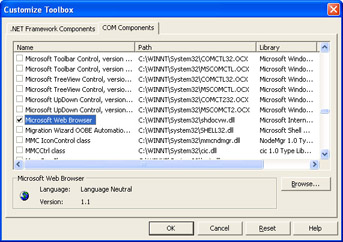
Figure 3-4: The Customize Toolbox dialog, used to add controls to the Visual Studio .NET Toolbox
Youll see that an icon has been added to the end of the list of controls in the Toolbox. Now use the icon to place a browser control on the form. There will be a pause while the control is imported and the wrapper code is generated. Youll find that two new references have been added to the project:
-
SHDocVw is the interop assembly.
-
AxSHDocVw is a wrapper that lets the ActiveX control function as a Windows Forms control.
In the code, youll find that an object of type AxSHDocVw.AxWebBrowser has been created to represent the browser. You can work with the methods and properties of this object in the same way you would with any other Windows Forms control.
Using the Command Line
The Aximp.exe utility generates interop assemblies for ActiveX controls from the command line. Running Aximp against an ActiveX control DLL will generate the same two assemblies that Visual Studio .NET generates: an interop assembly, and a Forms control wrapper with an Ax prefix.
aximp%systemroot%/system32/shdocvw.dll
You can add references to these two assemblies to a Visual Studio .NET project or include them in command line builds using the /reference flag.
| |

EAN: 2147483647
Pages: 140