Flylib.com

Books Software


Binary Numbers


Decimal Numbers

We first analyze the decimal numbers that we are familiar with. Decimal numbers are known as base 10 numbers. Within all numbering systems, the symbols used as digits range from 0 up to one less than the base; thus, within decimal numbers, the following ten unique symbols are used as digits:

0 1 2 3 4 5 6 7 8 9

When multiples of these symbols are combined to create a decimal number, each digit in the number is weighted based on its position within the number. The weights used are all powers of 10 (which is what base 10 means). The rightmost digit, which is the least significant, has a weight of 10 (1). The next digit has a weight of 10 1 (10). The next has a weight of 10 2 (100), and so on.

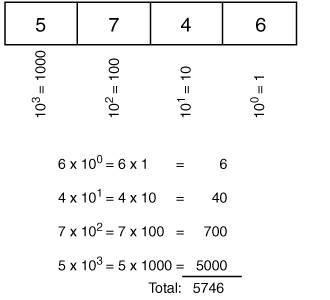
For example, consider the decimal number 5746. Figure C-1 illustrates how this number is interpreted.

Figure C-1. Interpreting a Decimal Number


Figure C-1 describes the following points:

  • The least significant digit, 6, has a weight of 10 ; thus, it represents 6 * 10 = 6 * 1 = 6.

  • The next digit, 4, has a weight of 10 1 ; thus, it represents 4 * 10 1 = 4 * 10 = 40.

  • The next digit, 7, has a weight of 10 2 ; thus it represents 7 * 10 2 = 7 * 100 = 700.

  • The most significant digit, 5, has a weight of 10 3 ; thus, it represents 5 * 10 3 = 5 * 1000 = 5000.

  • The decimal number is the sum of these representations: 5000 + 700 + 40 + 6 = 5746.

We read this number as "five thousand seven hundred and forty-six."

The next section provides a similar analysis of binary numbers.


Binary Numbers

Binary numbers are base 2 numbers; within binary numbers, only the following two unique symbols are used as digits:

0 1

Just as for decimal numbers, when multiple binary symbols are combined to create a binary number, each digit in the number is weighted based on its position within the number. The weights used are all powers of 2 (which is what base 2 means). The rightmost digit, which is the least significant, has a weight of 2 (1). The next digit has a weight of 2 1 (2). The next has a weight of 2 2 (4), and so on.

Consider the binary number 11001010. This number is read as "one one zero zero one zero one zero." This representation can get tedious after only a few digits and isn't practical in our everyday decimal world. Therefore, we typically convert binary numbers to decimal numbers.


Converting Binary IP Addresses to Decimal

Routers, being computers, work in binary. For example, 32-bit IPv4 addresses are used throughout the Internet, so you need to understand how to work with IP addresses. Because people usually like to work in decimal, IP addresses are typically written in a format called dotted decimal notation . The 32 bits in the address are divided into four 8-bit chunksthese chunks are called octets . Each octet is converted into decimal and then separated by dots.

When converting a binary octet to decimal, each binary digit is weighted based on its position, as described earlier. The weights for the eight bit positions in an octet are shown in Figure C-2.

Figure C-2. Binary Digits Are Weighted Based on Their Position


For example, consider the following IP address, written in binary:

10101100000100001000001100001100

Follow these steps to write this binary address in dotted decimal notation:

Step 1.

Divide the 32 bits into four octets, as follows :

10101100 00010000 10000011 00001100

Step 2.

Convert the first octet into decimal, as illustrated in Figure C-3.

Figure C-3. Converting an Octet from Binary to Decimal


Note the following points in Figure C-3:

  • The least significant digit, 0, has a weight of 2 ; thus, it represents 0 * 2 = 0 * 1 = 0.

  • The next digit, also 0, has a weight of 2 1 ; thus, it represents 0 x* 2 1 = 0 * 2 = 0.

  • The next digit, 1, has a weight of 2 2 ; thus, it represents 1 * 2 2 = 1 * 4 = 4. The weighted value for each of the other digits is calculated in the same way.

  • The most significant digit (on the far left), 1, has a weight of 2 7 ; thus, it represents 1 * 2 7 = 1 * 128 = 128.

  • Therefore, the binary number 10101100 in decimal is the sum of each of these representations: 128 + 0 + 32 + 0 + 8 + 4 + 0 + 0 = 172.

Step 3.

Repeat this process for the other three octets. The results are as follows:

  • 00010000 binary equals 16 decimal.

  • 10000011 binary equals 131 decimal.

  • 00001100 binary equals 12 decimal.

Note

You can confirm these results using the decimal-to-binary conversion chart in Table C-1.


Thus, the IP address 10101100000100001000001100001100 in dotted decimal notation is 172.16.131.12.