How Ajax Works
| Although it may not be a standardized technology or even a completely new idea, Ajax is quickly changing not only the way that Web designers think about visitors' experiences, but also the expectations of Web surfers themselves. The reason for this is simple: Ajax allows for a more fluid and seamless interaction model over the "classic" Web-interaction model. How the Classic Web User Experience WorksAlthough you can use DHTML to make changes to the content being displayed on the screen, all of the data used to create the content (displayed or not) of a Web page must be contained within the code that was initially sent. If the user interacts with the page and new data is required to respond to what they have done, a new Web page must be sent from the server and loaded in the browser (Figure 19.5). Figure 19.5. The classic model for delivering Web applications.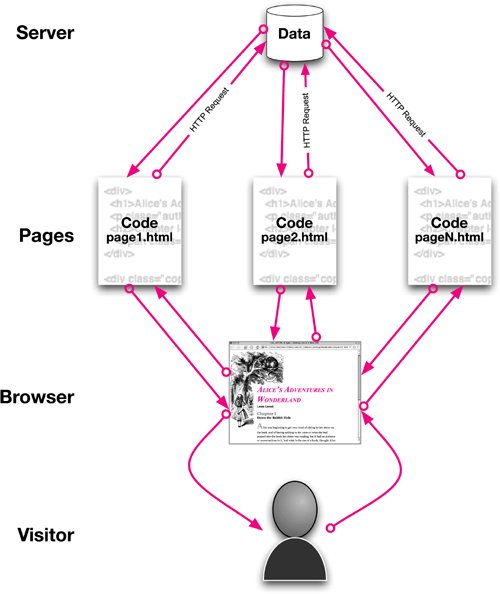 However, for making small changes to the content of a page or when the content of the page needs to change fluidly without interruption, this model is not only inconvenient, it leads to a deeply unsatisfying Web experience. As time passes, the visitor interacts with the page and then has to wait as data is transferred back and forth (Figure 19.6). Figure 19.6. As time progresses, visitors' Web experiences are constantly interrupted as they wait for data to be sent back and forth, to and from, the server.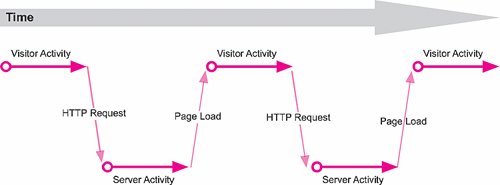 How the Ajax Web User Experience WorksAjax changes the classic Web experience by allowing the browser to go back to the server incrementally to make changes to the content, turning the Web page into a filter that processes data coming from the server (Figure 19.7). Figure 19.7. The Ajax model for delivering Web applications.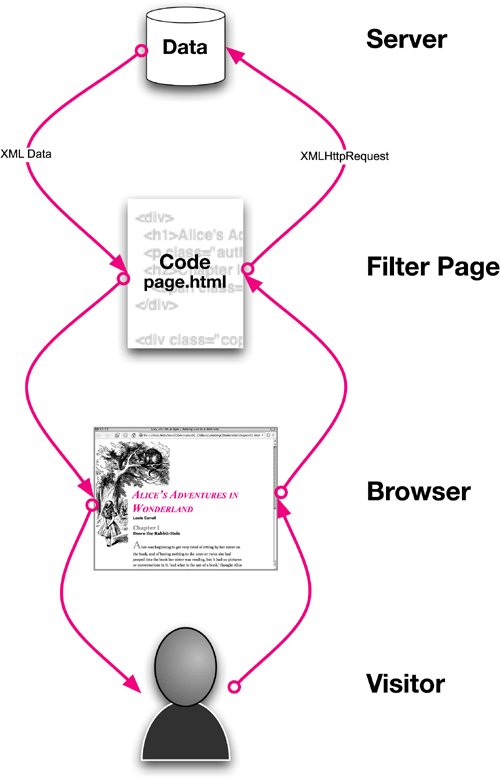 Instead of having to wait as data is sent to the server, the data is sent and received in the background while the visitor continues to work (Figure 19.8). That's the asynchronous part of Ajax. The Web page acts as filter for the data being sent from the server, generally using DHTML to add content to the page using the innerHTML method (see "Changing an Object's Content" in Chapter 16). Figure 19.8. Visitors can continue to work as data is transferred between the page and the server.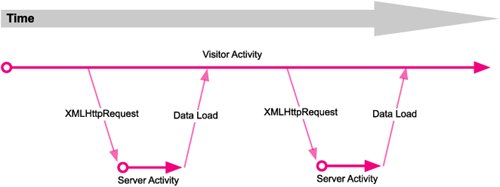 So not only do visitors not have to wait as small amounts of new data are processed and loaded, but the server also doesn't have to reprocess an entire Web page worth of data just to make small incremental changes. |

EAN: 2147483647
Pages: 230