Counting Rows
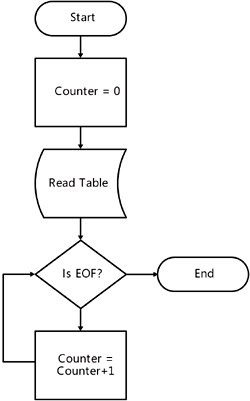
| Sometimes in your applications, you need to tell the user how many items are in a data table. If you look at a sampling of e-commerce sites on the Internet, you will see that many of them on the home page inform the reader about how many items the site has available for purchase. This kind of information might be obtained by using an algorithm like this: The same example written in Visual Basic looks like this: Dim Counter As Integer = 0 While dataReader.Read Counter += 1 End While dataReader.Close() However, using this procedure in a table with many rows will take a very long time and require a great deal of resources. This slowdown occurs because the script must access each row, one at a time, to count them. There is another way to get the number of rows in the same DataReader object, as shown here: Dim Counter As Integer = dataReader.RecordsAffected() However, this procedure uses the same amount of network resources as the previous one by connecting to the database. As in other database-related tasks, system performance will be optimized by accessing data from within the database itself. Using T-SQL Functions to Find the Number of RecordsTransact-SQL (T-SQL) has special functions for aggregation (summarization of information about the data); these functions are scalar functions (which return only one value) and usually operate over a set of records. Using COUNTIf you want to count the records in a table, you can use the following script: SELECT COUNT(*) AS [Count] FROM Production.Product Tip
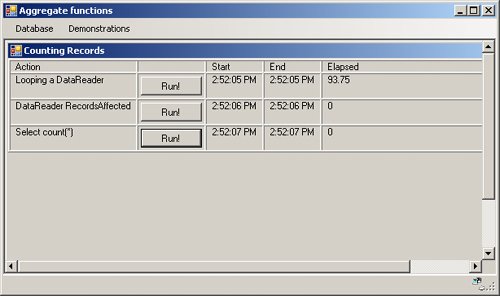
Running a Visual Basic Sample Application that Utilizes the Count Function
These time-elapsed values will not be the same each time the operations are performed. Other factors affect the results, like connection pooling and the size of the script cache. However, you can get an idea about the average length of time each operation takes to complete. Important
You can use the COUNT function in several ways. The first way simply counts records. In this case, the COUNT function receives an asterisk (*) as argument. However, sometimes you need to count only those records that do not have a NULL value in a particular field. In that case, you can use the name of the field as an argument. The following sentence returns two different counts for the same table: SELECT COUNT(*) AS [Count], COUNT(Class) AS [Classes with values] FROM Production.Product
Perhaps you would like to know how many different credit card brands have been used by your customers to make their purchases. In this case, you need to count the number of distinct brands of credit cards, not the total number of credit card entries listed in the database. To do this, you need to apply the DISTINCT modifier to the COUNT function. SELECT COUNT(DISTINCT CardType) AS [Different Credit Cards] FROM Sales.CreditCard Tip
Filtering Your ResultsSometimes, you have to query the database to answer questions like: "How many customers do we have from Seattle?" To answer this question, you can't use a simple COUNT(*) or a COUNT(DISTINCT field_name). You have to filter the counting process. In fact, the aggregate syntax is simply a modification of the SELECT statement. If you consider this, you can filter the query using the WHERE clause just as in any other SELECT statement. SELECT COUNT(*) AS [Customers In Seattle] FROM Person.Address WHERE (City = 'Seattle') However, it would be better if you could give the user information for multiple cities instead of the count for just one city. Of course, you could repeat the query with a parameter in the WHERE clause so the user can specify the city they are interested in. What if you need to the answer the question: "How many customers do we have in each city?" To answer this question, you have to change your SELECT statement by adding a GROUP BY clause. Look at this script and its result: SELECT City, COUNT(*) AS [Count of Customers] FROM Person.Address GROUP BY City
It is hard to find a specific city in a long list unless it is sorted. To sort the information for the users, do the following. Creating a Sorted Totals Summary
The difference between the WHERE clause and the HAVING clause is over what kind of information the filter is applied. The WHERE clause filters the original set of information from your table. The HAVING clause filters the information after the execution of the aggregation function and normally filters based on the results of the aggregate. If we look at the estimated execution plan for one script using the WHERE clause and another using the HAVING clause, the difference between the two is very clear. View the estimated execution plan for the two previous queries using the following procedure. The two execution plans are shown in Figure 5-1 and Figure 5-2. Figure 5-1. Estimated execution plan for a T-SQL sentence using aggregates and the WHERE clause. Figure 5-2. Estimated execution plan for a T-SQL sentence using aggregates and the HAVING clause.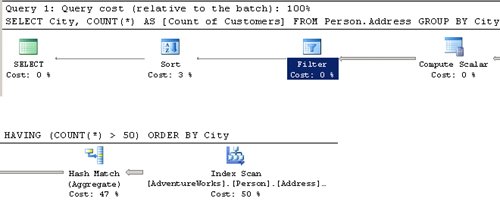 Viewing the Estimated Execution Plan
|



EAN: 2147483647
Pages: 115
- ERP Systems Impact on Organizations
- The Second Wave ERP Market: An Australian Viewpoint
- The Effects of an Enterprise Resource Planning System (ERP) Implementation on Job Characteristics – A Study using the Hackman and Oldham Job Characteristics Model
- Healthcare Information: From Administrative to Practice Databases
- Relevance and Micro-Relevance for the Professional as Determinants of IT-Diffusion and IT-Use in Healthcare