Building an Inline Transparent Bridging Firewall with iptables (Stealth Firewalls)
|
| ebtables is a far more powerful interface for manipulating traffic at Layer 2; however, in environments where you do not need to control Layer 2 traffic with the granularity of ebtables, iptables can be used for handling firewall rules at Layer 3, implemented in a Layer 2 bridge. An example of using iptables in a Layer 2 transparent firewall is as a worm defense system. As Figure 11.4 shows, we have several of these firewalls deployed throughout the network where we place restrictions on what kinds of traffic can come into and out of the networks. Our users are on the network 192.168.1.0, and we will use this firewall to block all NetBIOS traffic going into and out of this network. Figure 11.4. The use of inline Layer 2 firewalls.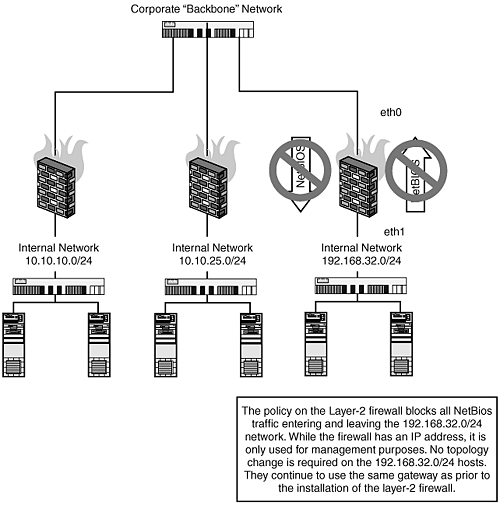 The following script would be applied to each firewall, modifying the management IP and gateway variables as required. #!/bin/sh IPTABLES=/sbin/iptables IFCONFIG=/sbin/ifconfig BRCTL=/usr/sbin/brctl ROUTE=/sbin/route MANAGEMENTIP=192.168.1.51 MANAGEMENTGATEWAY=192.168.1.1 # shut down our Ethernet devices $IFCONFIG eth0 down $IFCONFIG eth1down # bring the Ethernet devices back up with no IP addresses $IFCONFIG eth0 up 0.0.0.0 $IFCONFIG eth1 up 0.0.0.0 # create our bridge device, and add our Ethernet devices $BRCTL addbr br0 $BRCTL addif br0 eth0 $BRCTL addif br0 eth1 # add an IP address to the bridge device, this is for management purposes only $IFCONFIG br0 $MANAGEMENTIP $ROUTE add default gw $MANAGEMENTGATEWAY # now for our firewall rules # note that when bridging these rules are applied against the FORWARD chain $IPTABLES -A FORWARD -p all sport 135 -j REJECT $IPTABLES -A FORWARD -p all dport 135 -j REJECT $IPTABLES -A FORWARD -p all sport 137 -j REJECT $IPTABLES -A FORWARD -p all dport 137 -j REJECT $IPTABLES -A FORWARD -p all sport 139 -j REJECT $IPTABLES -A FORWARD -p all dport 139 -j REJECT $IPTABLES -A FORWARD -s 192.168.1.0/24 -j ACCEPT $IPTABLES -A FORWARD -d 192.168.1.0/24 -j ACCEPT |
|
