Flylib.com

Books Software


Want It Now? Then Ask for It


Want It Now? Then Ask for It!

If you can't find exactly what you want on the eBay site, all hope is not lost. eBay offers a feature called Want It Now, which lets you post the online equivalent of an "item wanted" ad; sellers who have what you want can then contact you to make a deal.

Here's how it works:

1.

Go to eBay's home page and click the Want It Now link (in the Specialty Sites section). Alternately, just go directly to pages.ebay.com/wantitnow/.

2.

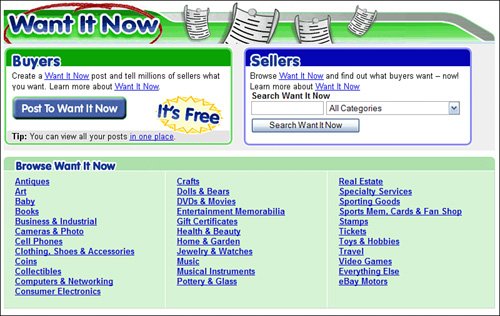
When the Want It Now page appears, as shown in Figure 7.10, click the Post to Want It Now button.

Figure 7.10. eBay's Want It Now page.


3.

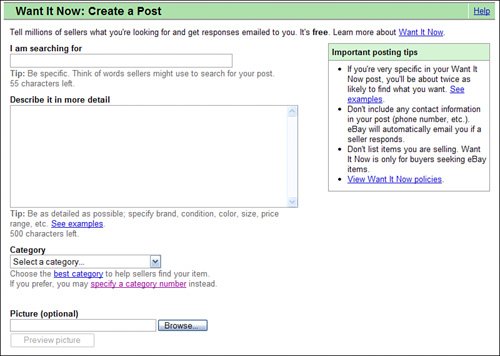
eBay now displays the Create a Post page, shown in Figure 7.11. Enter a short title for your query into the I Am Searching For box.

Figure 7.11. Creating a Want It Now request.


4.

Enter a description of what you're looking for into the Describe It in More Detail box.

5.

Select a category for the item from the pull-down menu.

6.

If you want to show a picture of what you're looking for, click the Browse button to select and upload a digital photo from your computer's hard drive.

7.

Click the Post to Want It Now button.

Your request now appears in eBay's Want It Now database, where it can be searched by interested sellers. Your request stays live for 60 days, or until you find something to buy.

Sellers can either browse or search the Want It Now listings from the main Want It Now page. If they have an item that fits your request, they click the Respond button in the listing. This automatically sends you an email with a link to the seller's item listing. Click the View This Item button to view the item listing; you can then decide to bid on or buy the itemor not. It's a great way to locate otherwise hard-to-find items.

The Absolute Minimum

Here are the key points to remember from this chapter:

  • Browse through eBay's categories and subcategories when you're not sure of the exact item you're looking for.

  • Use eBay's search pages to track down specific items for sale.

  • Use wildcards and other search operators to fine-tune your item search.

  • Click the Add to Favorite Searches link to save your search criteria for future useand to set up automatic email notification of matching items.

  • If you can't find what you're looking for, use eBay's Want It Now feature to post a request for a particular item.


Chapter 8. Bidding in Online Auctions

I N T HIS C HAPTER

  • Understanding the Bidding Process

  • How to Read an Item Listing

  • Before You Bid

  • Just Do ItPlacing a Bid

  • Bidding in Other Types of Auctions

  • What to Do After You've Bid

  • Five Common Bidding Mistakes

  • You Won! Now What?

There are two ways to buy items on eBayvia the traditional online auction format, or at a fixed price. Not all items offered by eBay sellers have a fixed-price option; the auction format is still the most popular way to sell and buy items on eBay.

To many new users, however, the concept of bidding in an online auction is exotic and perhaps a little intimidating. It needn't be. Every day, millions of people just like you place bids in eBay auctions; anyone can do it, and it's really quite easy.

So how does bidding work? In a nutshell , it's as simple as telling eBay how much you'd be willing to pay for an itemand then finding out whether anyone else is willing to pay more than you. If you've made the highest bid, you win the auction and you buy the item.

It's important to remember that it doesn't cost you anything to bid. You only have to pay if you winand even then, you don't have to pay any fees to eBay. (All eBay fees are charged to the seller.) You'll have to pay the seller the amount of your winning bid, plus any necessary shipping and handling costs to get the item to you.

Sounds easy enough, doesn't it?