Flylib.com

Books Software


How to Leave Feedback


How to Leave Feedback

You can leave feedback from any item listing page; just click the Leave Feedback link. When you see the Leave Feedback page, shown in Figure 3.3, you can choose to leave Positive, Negative, or Neutral feedback, along with a brief comment (80 characters maximum).

Figure 3.3. Leaving feedback comments for a transaction partner.
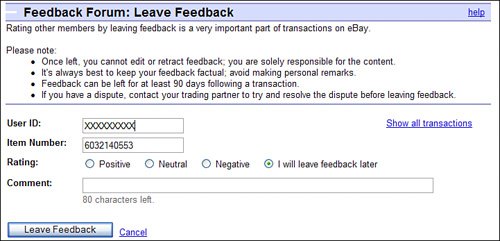

Make sure your feedback is accurate before you click the Leave Feedback button; you can't change your comments after they've been registered.


Figuring Out What Kind of Feedback to Leave

You should leave feedback at the end of every auctionwhether it was a positive or a negative experience for you. Don't miss your chance to inform other eBay users about the quality of the person you just got done dealing with.

Table 3.2 offers some guidelines on when you should leave positive or negative feedbackand the types of comments you might use to embellish your feedback.

Table 3.2. Recommended eBay Feedback Comments.

Transaction

Feedback

Comments

Transaction transpires in a timely fashion.

Positive

"Great transaction. Fast. payment/shipment. Recommended."

Transaction goes through, but buyer/seller is slow or you have to pester the other user to complete the transaction.

Positive

"Item received as described" or "Payment received," accompanied by "a little slow, but otherwise a good seller/buyer."

Transaction is very slow (over a month to completion).

Neutral

"Very slow payment/shipment;" if you're buying, follow by "item received as described."

Other user backs out of transaction, but with a good excuse .

Neutral

"Buyer/seller didn't follow through on sale but had a reasonable excuse."

Other user backs out of transaction without a good excuse, disappears off the face of the earth before paying/shipping, or bounces a check.

Negative

"Buyer/seller didn't complete transaction.".

Transaction goes through, but item isn't what you expected or was damaged in transit; seller refunds your money.

Positive

"Inaccurate description of item" or "Item was damaged in shipping," followed by "seller refunded money."

Transaction goes through, but item isn't what you expected; seller won't refund your money.

Negative

"Item not as described and seller ignored my complaint."


As you can see, there's a proper feedback and response for every situation. Just be sure to think twice before leaving any feedback (particularly negative feedback). After you submit your feedback, you can't retract it.

Tip

If you must leave negative feedback, avoid leaving personal comments. Keep to the facts as much as you canyou're only commenting on the transaction, not on the buyer/seller himself.


Dealing with Negative Feedback

Many eBay users are zealous about their feedback ratings. Although it's a good thing to want to build up a high rating, some users get quite obsessive about it.

For that reason, you want to be very sure of yourself before you leave negative feedback about a user . Some overly zealous users might retaliate by leaving negative feedback about youeven if it wasn't warranted.

"Mike Sez"

Don't get too upset if you receive the occasional negative feedback; it happens to the best of usespecially those who run a lot of auctions. You can't please everyone all the time, and sometimes you make mistakes that justify a negative feedback response. Just try to work out as many issues with other users as you can, and don't let the occasional negative feedback get to you.


Unfortunately, there's not much you can do if you receive negative feedback; under normal conditions, feedback comments cannot be retracted. (There have been some exceptions, when the feedback has been obscene or slanderous in nature.) What you can do is offer a response to the feedback, which you do by going to your Feedback Forum page then scrolling down to and clicking the Reply to Feedback Received link. When the feedback comments list appears, click the Reply link next to a particular comment and then enter your response, as shown in Figure 3.4. Your new comment is listed below the original feedback comment on the Feedback Profile page. Just try not to get defensive; the best response is one that is calm, clear, and well-reasoned.

Figure 3.4. Replying to feedback left about you.


Note

If you and the other user work out your issues, you can agree to mutually withdraw any negative feedback. Complete the form at feedback.ebay.com/ws/eBayISAPI.dll?MFWRequest to initiate the removal process.


The Absolute Minimum

Here are the key points to remember from this chapter:

  • In You can use feedback ratings and comments to judge the trustworthiness of other eBay users.

  • For quick reference, different levels of feedback ratings are indicated by a different color and type of star.

  • You can view other users' feedback by clicking on the feedback rating numbers next to their user names .

  • At the end of every auction, you should take the time to leave feedback about the other useralthough you should be cautious about leaving negative feedback.