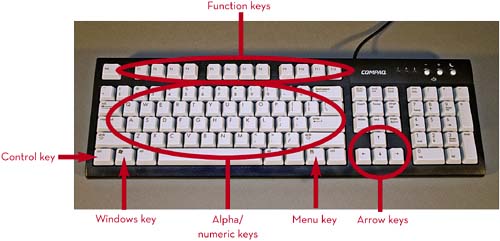
KEYBOARD
A computer keyboard looks and functions just like a typewriter keyboard, except that computer keyboards have a few more keys (for navigation and special program functions). When you press a key on your keyboard, it sends an electronic signal to your system unit that
|
MOUSEA mouse is a small, handheld input device for your computer. When you move the mouse along a flat surface, an onscreen pointer (called a cursor ) moves in response. When you click (press and release) a mouse button, this motion initiates an action in your program.
|
SOUND CARDS AND
|
|
VIDEO CARDS AND
|
|
PRINTERS
For permanent records of your work, you must add a printer to your system. The two most common types are
laser
printers and
inkjet
printers. Laser printers work much like copy machines, applying toner (powdered ink) to paper by using a small laser. Inkjet printers shoot
|
Part 2. SETTING UP YOUR COMPUTER
Now it's time to get connected. Position your system unit so you easily can access all the connections on the back, and
When you plug in a cable, you should make sure that it's firmly connected-both to the system unit and to the specific piece of hardware. Loose cables can cause all sorts of weird problems, so be sure they're plugged in really good. |
TYPICAL CONNECTIONS
|
CONNECTING THE MOUSE AND KEYBOARDThe first items you connect should be your mouse and keyboard. Most mice connect to a dedicated mouse port on your system unit. Most keyboards connect to a similar dedicated keyboard port on your system unit. Know, however, that many new mice and keyboards also connect via USB ports, so you should use whatever connection is appropriate.
|