1.3 Elements
| Elements are the basis of CSS display. In HTML, the most common elements are easily recognizable, such as p, table, span, a, and div. In XML languages, the elements are defined by the language's Document Type Definition (DTD). Every single element in a document plays a part in its presentation. In CSS terms, at least as of CSS2.1, that means each element generates a box that contains the element's content. 1.3.1 Replaced and Nonreplaced ElementsAlthough CSS depends on elements, not all elements are created equally. For example, images and paragraphs are not the same type of element, nor are span and div. In CSS, elements generally take two forms: replaced and nonreplaced. The two types are explored in detail in Chapter 7, which covers the particulars of the box model, but I'll address them briefly here. 1.3.1.1 Replaced elementsReplaced elements are those where the element's content is replaced by something that is not directly represented by document content. The most familiar XHTML example is the img element, which is replaced by an image file external to the document itself. In fact, img has no actual content, as you can see by considering a simple example: <img src="/books/2/882/1/html/2/howdy.gif" /> This code snippet contains no actual content only an element name and an attribute. The element presents nothing unless you point it to some external content (in this case, an image specified by the src attribute). The input element is also replaced by a radio button, checkbox, or text input box, depending on its type. Replaced elements also generate boxes in their display. 1.3.1.2 Nonreplaced elementsThe majority of HTML and XHTML elements are nonreplaced elements. This means their content is presented by the user agent (generally a browser) inside a box generated by the element itself. For example, <span>hi there</span> is a nonreplaced element, and the text "hi there" will be displayed by the user agent. This is true of paragraphs, headings, table cells, lists, and almost everything else in XHTML. 1.3.2 Element Display RolesIn addition to replaced and nonreplaced elements, CSS2.1 uses two other basic types of elements: block-level and inline-level. These types will be more familiar to authors who have spent time with HTML or XHTML markup and its display in web browsers; the elements are illustrated in Figure 1-1. Figure 1-1. Block- and inline-level elements in an XHTML document 1.3.2.1 Block-level elementsBlock-level elements generate an element box that (by default) fills its parent element's content area and cannot have other elements at its sides. In other words, it generates "breaks" before and after the element box. The most familiar block elements from HTML are p and div. Replaced elements can be block-level elements, but they usually are not. List items are a special case of block level elements. In addition to behaving in a manner consistent with other block elements, they generate a marker typically a "bullet" for unordered lists and a number for ordered lists that is "attached" to the element box. Except for the presence of this marker, list items are in all other ways identical to other block elements. 1.3.2.2 Inline-level elementsInline-level elements generate an element box within a line of text and do not break up the flow of that line. The best inline element example is the a element in XHTML. Other candidates would be strong and em. These elements do not generate a "break" before or after themselves, and so they can appear within the content of another element without disrupting its display. Note that while the names "block" and "inline" share a great deal in common with block- and inline-level elements in XHTML, there is an important difference. In HTML and XHTML, block-level elements cannot descend from inline-level elements. In CSS, there is no restriction on how display roles can be nested within each other. To see how this works, let's consider a CSS property.
You may have noticed that there are a lot of values, only three of which I've even come close to mentioning: block, inline, and list-item. We're not going to explore the others now, mostly because they get covered in some detail in Chapter 2 and Chapter 7. For the moment, let's just concentrate on block and inline. Consider the following markup: <body> <p>This is a paragraph with <em>an inline element</em> within it.</p> </body> Here we have two block elements (body and p) and an inline element (em). According to the XHTML specification, em can descend from p, but the reverse is not true. Typically, the XHTML hierarchy works out such that inlines can descend from blocks, but not the other way around. CSS, on the other hand, has no such restrictions. You can leave the markup as it is but change the display roles of the two elements like this: p {display: inline;} em {display: block;} This would cause the elements to generate a block box inside an inline box. This is perfectly legal and violates no specification. The only problem would be if you tried to reverse the nesting of the elements: <em><p>This is a paragraph improperly enclosed by an inline element.</p></em> No matter what you do to the display roles via CSS, this is not legal in XHTML. While changing the display roles of elements can be useful in XHTML documents, it becomes downright critical for XML documents. An XML document is unlikely to have any inherent display roles, so it's up to the author to define them. For example, you might wonder how to lay out the following snippet of XML: <book> <maintitle>Cascading Style Sheets: The Definitive Guide</maintitle> <subtitle>Second Edition</subtitle> <author>Eric A. Meyer</author> <publisher>O'Reilly and Associates</publisher> <pubdate>2004</pubdate> <isbn>blahblahblah</isbn> </book> <book> <maintitle>CSS2 Pocket Reference</maintitle> <author>Eric A. Meyer</author> <publisher>O'Reilly and Associates</publisher> <pubdate>2004</pubdate> <isbn>blahblahblah</isbn> </book> Since the default value of display is inline, the content would be rendered as inline text by default, as illustrated in Figure 1-2. This isn't a terribly useful display. Figure 1-2. Default display of an XML document You can define the basics of the layout with display: book, maintitle, subtitle, author, isbn {display: block;} publisher, pubdate {display: inline;} You've now set five of the seven elements to be block and two to be inline. This means each of the block elements will be treated much as div is treated in XHTML, and the two inlines will be treated in a manner similar to span. This fundamental ability to affect display roles makes CSS highly useful in a variety of situations. You could take the preceding rules as a starting point, add a number of other styles, and get the result shown in Figure 1-3. Figure 1-3. Styled display of an XML document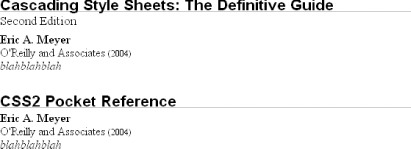 Throughout the rest of this book, we'll explore the various properties and values that allow presentation like this. First, though, we need to look at how one can associate CSS with a document. After all, without tying the two together, there's no way for the CSS to affect the document. We'll explore this in an XHTML setting since it's the most familiar to people. |

EAN: 2147483647
Pages: 135