4.3 UDP Port ScanningBecause UDP is a connectionless protocol, there are only two ways to effectively enumerate accessible UDP network services across an IP network:
Many security-conscious organizations filter ICMP messages to and from their Internet-based
Figures Figure 4-12 and Figure 4-13 show the UDP packets and ICMP responses generated by hosts when ports are open and closed. Figure 4-12. An inverse UDP scan result when a port is open
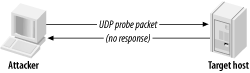
UDP port scanning is an inverted scanning type in which open ports don't respond. What is
Figure 4-13. An inverse UDP scan result when a port is closed
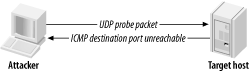
4.3.1 Tools That Perform UDP Port Scanningnmap supports UDP port scanning with the - sU option. The latest version of Foundstone's SuperScan also supports UDP port scanning. However, both tools wait for negative "ICMP destination port unreachable" messages to identify open ports (i.e., those ports that don't respond). If these ICMP messages are filtered by a firewall as they try to travel out of the target network, inaccurate results are gleaned. During a comprehensive audit of Internet-based network space, you should send crafted UDP client packets to popular services and await a positive response. The scanudp utility developed by Fryxar (http://www.geocities.com/fryxar/) does this very well. Example 4-5 shows the scanudp utility being downloaded, compiled, and run from my Linux launch system against a Windows 2000 server at 192.168.0.50 . Example 4-5. Downloading, building, and running scanudp# wget http://www.geocities.com/fryxar/scanudp_v2.tgz # tar xvfz scanudp_v2.tgz scanudp/ scanudp/scanudp.c scanudp/enum.c scanudp/enum.h scanudp/makefile scanudp/enum.o scanudp/scanudp.o scanudp/scanudp # cd scanudp # make gcc enum.o scanudp.o -o scanudp # ./scanudp ./scanudp v2.0 - by: Fryxar usage: ./scanudp [options] <host> options: -t <timeout> Set port scanning timeout -b <bps> Set max bandwidth -v Verbose Supported protocol: echo daytime chargen dns tftp ntp ns-netbios snmp(ILMI) snmp(public) # ./scanudp 192.168.0.50 192.168.0.50 53 192.168.0.50 137 192.168.0.50 161 |
4.4 IDS Evasion and Filter CircumventionIDS evasion, when launching any type of IP probe or scan, involves one or both of the following tactics:
Filtering mechanisms can be circumvented at times using
First, I'll discuss IDS evasion techniques of fragmenting data and emulating multiple hosts, and then filter circumvention methodologies. These techniques can often be mixed to launch attacks using source routed, fragmented packets to bypass both filters and IDS systems. 4.4.1 Fragmenting Probe Packets
Probe packets can be fragmented easily with
fragroute
to fragment all probe packets
4.4.1.1 fragtest
Dug Song's
fragtest
utility (available as part of the
fragroute
package from http://www.
After undertaking ICMP probing exercises (such as ping sweeping and hands-on use of the sing utility) to ensure that ICMP messages are processed and responded to by the remote host, fragtest can perform three particularly useful tests:
Here is an example that uses fragtest to assess responses to fragmented ICMP echo request messages with the frag , frag-new , and frag-old options: # fragtest frag frag-new frag-old www.bbc.co.uk frag: 467.695 ms frag-new: 516.327 ms frag-old: 471.260 ms
After ascertaining that fragmented and
4.4.1.2 fragrouteDug Song's fragroute utility intercepts, modifies, and rewrites egress traffic destined for a specific host, according to a predefined rule set. When built and installed, Version 1.2 comprises the following binary and configuration files:
The
fragroute.conf
file defines the way
fragroute
fragments, delays,
Using the default configuration file, fragroute can be run from the command line in the following manner: # cat /usr/local/etc/fragroute.conf tcp_seg 1 new ip_frag 24 ip_chaff dup order random print # fragroute Usage: fragroute [-f file] dst # fragroute 192.168.102.251 fragroute: tcp_seg -> ip_frag -> ip_chaff -> order -> print
Egress traffic processed by
fragroute
is displayed in
tcpdump
format if the
print
option is used in the configuration file. When running
fragroute
in its default configuration, TCP data is broken down into 1-byte segments and IP data into 24-byte segments, along with IP chaffing and random
4.4.1.2.1 fragroute.conf
The
fragroute
ip_frag 8 old order random print
TCP data can be segmented into 4-byte, forward-overlapping
tcp_seg 4 new tcp_chaff paws order random print
I recommend testing the variables used by
fragroute
in a controlled environment before live networks and systems are
4.4.1.3 nmap
nmap
can fragment probe packets when launching
Example 4-6. Using nmap to perform a fragmented SYN scan# nmap -sS -f 192.168.102.251 Starting nmap 3.45 ( www.insecure.org/nmap/ ) Interesting ports on cartman (192.168.102.251): (The 1524 ports scanned but not shown below are in state: closed) Port State Service 25/tcp open smtp 53/tcp open domain 8080/tcp open http-proxy Nmap run completed -- 1 IP address (1 host up) scanned in 0 seconds 4.4.2 Emulating Multiple Attacking Hosts
By emulating a large number of attacking hosts all launching probes and port
The flag that defines decoy addresses within nmap is - D [decoy1,ME,decoy2,decoy3,...] . Example 4-7 shows nmap being used in this fashion to scan 192.168.102.251 . Example 4-7. Using nmap to specify decoy addresses# nmap -sS -P0 -D 62.232.12.8,ME,65.213.217.241 192.168.102.251 Starting nmap 3.45 ( www.insecure.org/nmap/ ) Interesting ports on cartman (192.168.102.251): (The 1524 ports scanned but not shown below are in state: closed) Port State Service 25/tcp open smtp 53/tcp open domain 8080/tcp open http-proxy Nmap run completed -- 1 IP address (1 host up) scanned in 0 seconds Notice that the - P0 flag is also specified. When performing any kind of stealth attack, it is important that even initial probing (in the case of nmap , an ICMP echo request and attempted connection to TCP port 80) isn't undertaken, because it will reveal the true source of the attack in many cases. 4.4.3 Source Routing
Source routing is a feature traditionally used for network troubleshooting purposes. Tools such as
traceroute
can be provided with details of gateways the packet should be loosely or
Source routing information is provided as an IP options field in the packet header, as shown in Figure 4-14. Figure 4-14. IP datagram format
The format of the IP option data within a source-routed packet is quite simple. The first three bytes are reserved for IP option code, length, and pointer. Because IP option data can be used for different functionality (timestamp, strict routing, route, and record), the code field specifies the option type. The length field, oddly enough, states the
Figure 4-15. The source routing IP option and flags
There are two types of source routing, both defined in RFC 791:
Loose source routing allows the packet to use any number of intermediate gateways to reach the next address in the route. Strict source routing requires the next address in the source route to be on a directly connected network; if not, the delivery of the packet can't be completed. The source route options have a variable length, containing a series of IP addresses and an offset pointer indicating the next IP address to be processed. A source-routed datagram completes its delivery when the offset pointer points beyond the last field and the address in the destination address has been reached.
There is a limit of 40
Source routing vulnerabilities can be exploited by:
If a firewall or gateway reverses the source routing information when sending packets back, you can sniff traffic at one of the hops you defined. In a similar fashion to using sniffer-based spoofed scanning, you can launch scans and probes from
In the case of Microsoft Windows NT hosts, the circumvention of filters involves manipulating the source routing options information to have an offset pointer set greater than the length of the list of hops and defining an internal host as the last hop (which is then
4.4.3.1 Assessing source-routing vulnerabilities
Todd MacDermid of Syn Ack Labs (http://www.synacklabs.net) has written two
Both tools require libpcap and libdnet to build, and they run quite smoothly in Linux and BSD environments. A white paper written by Todd that explains source routing problems in some detail is also available from http://www.synacklabs.net/OOB/LSR.html. 4.4.3.1.1 lsrscanThe lsrscan tool crafts probe packets with specific source routing options to determine exactly how remote hosts deal with source-routed packets. The tool checks for the following two problems:
The basic usage of the tool is as follows:
#
lsrscan
usage: lsrscan [-p dstport] [-s srcport] [-S ip]
[-t (tothroughboth)] [-b host<:host ...>]
[-a host<:host ...>] <hosts>
Some operating systems will reverse source-routed traffic only to ports that are open, so lsrscan should be run against an open port. By default, lsrscan uses a destination port of 80. The source port and source IP addresses aren't so necessary ( lsrscan selects a random source port and IP address) but can be useful in some cases.
The -
b
option
Example 4-8. Using lsrscan to identify source routing issues# lsrscan 217.53.62.0/24 217.53.62.0 does not reverse LSR traffic to it 217.53.62.0 does not forward LSR traffic through it 217.53.62.1 reverses LSR traffic to it 217.53.62.1 forwards LSR traffic through it 217.53.62.2 reverses LSR traffic to it 217.53.62.2 does not forward LSR traffic through it
Because some systems reverse the source route, spoofing attacks using
lsrtunnel
can be performed
.
Knowing that systems forward source-routed traffic, accurate details of internal IP addresses need to be
4.4.3.1.2 lsrtunnel
lsrtunnel
spoofs connections using source-routed packets. For the tool to work, the target host must reverse the source route (
Running lsrtunnel with no options shows the usage syntax: # lsrtunnel usage: ./lsrtunnel -i <proxy IP> -t <target IP> -f <spoofed IP> The proxy IP is an unused network address an attacker uses to proxy connections between her host and the target address. The spoofed IP address is the host that appears as the originator of the connection. For additional detail, consult the lsrtunnel manpage. In this example of lsrtunnel in use, 192.168.102.2 is on the same local subnet as the host: # lsrtunnel -i 192.168.102.2 -t 217.53.62.2 -f relay2.ucia.gov At this point, lsrtunnel listens for traffic on the proxy IP ( 192.168.102.2 ). Using another system on the network, any TCP-based scan or attack launched against the proxy IP, is forwarded to the target ( 217.53.62.2 ) and appears as if it originated from relay2.ucia.gov . 4.4.4 Using Specific TCP and UDP Source PortsWhen using a tool such as nmap to perform either UDP or TCP port scanning of hosts, it is important to assess responses using specific source ports. Here are four source ports you should use along with UDP, half-open SYN, and inverse FIN scan types:
Using specific source ports,
Check Point Firewall-1, Cisco PIX, and other stateful firewalls aren't vulnerable to these issues (unless grossly misconfigured) because they maintain a state table and allow traffic back into the network only if a relative outbound connection or request has been initiated.
An inverse FIN scan should be attempted when scanning the HTTP service port because a Check Point Firewall-1 option known as
fastmode
is sometimes enabled for web traffic in high throughput environments (to limit use of firewall processing resources). For specific information regarding circumvention of Firewall-1 in certain configurations, consult the excellent presentation from Black Hat Briefings 2000 by Thomas Lopatic, John McDonald, and Dug Song, titled "A Stateful Inspection of Firewall-1" (available as a Real media video stream and Powerpoint presentation from http://www.blackhat.com/html/bh-usa-00/bh-usa-00-
On Windows 2000 and other Microsoft platforms that can run IPsec, a handful of default exemptions to the IPsec filter exist, including one that allows Kerberos (source TCP or UDP port 88) traffic into the host if the filter is enabled. These default exemptions are removed in Windows Server 2003, but still pose a problem in some environments that rely on filtering at the operating-system kernel level. With the -g option, nmap can launch a half-open TCP SYN port scan that uses the source port of 88 against a Windows 2000 server running IPsec filtering, as shown in Example 4-9. Example 4-9. Using nmap to specify source ports when scanning# nmap -sS -g 88 192.168.102.250 Starting nmap 3.45 ( www.insecure.org/nmap/ ) Interesting ports on kenny (192.168.102.250): (The 1528 ports scanned but not shown below are in state: closed) Port State Service 7/tcp open echo 9/tcp open discard 13/tcp open daytime 17/tcp open qotd 19/tcp open chargen 21/tcp open ftp 25/tcp open smtp 42/tcp open nameserver 53/tcp open domain 80/tcp open http 88/tcp open kerberos-sec 135/tcp open loc-srv 139/tcp open netbios-ssn 389/tcp open ldap 443/tcp open https 445/tcp open microsoft-ds 464/tcp open kpasswd5 515/tcp open printer 548/tcp open afpovertcp 593/tcp open http-rpc-epmap 636/tcp open ldapssl 1026/tcp open nterm 2105/tcp open eklogin 6666/tcp open irc-serv Nmap run completed -- 1 IP address (1 host up) scanned in 1 secondsecond |