Advanced Techniques for Technology Identification
Advanced Techniques for Technology Identification
If HTTP headers, file extensions, URL signatures, HTML comments, and cookies are insufficient to identify Web application server technologies, the only remaining approach is to force the application to generate an error. Not only do error messages give away the type of application server being used, but they also reveal other sensitive data, including physical path mappings, references to files and library files, and even entire SQL queries!
We can force a Web application server to return an error by using:
Truncated URLs
Requests for nonexistent files
Parameter tampering
Let's find out whether we can use error forcing to determine the type of application servers being used in the following two examples.
Examples
URL: http://www8.example.com/webapp/wcs/stores/servlet/Display?storeId= 10001&langId=-1&catalogId=10001&categoryId=10052&clearance=0&catTree= 10052
Instead of sending the full URL, we send a truncated URL: http://www8.example.com/webapp/wcs/stores/. The resultant error is shown in Figure 6-9.
Figure 6-9. Forcing an error on www8.example.com
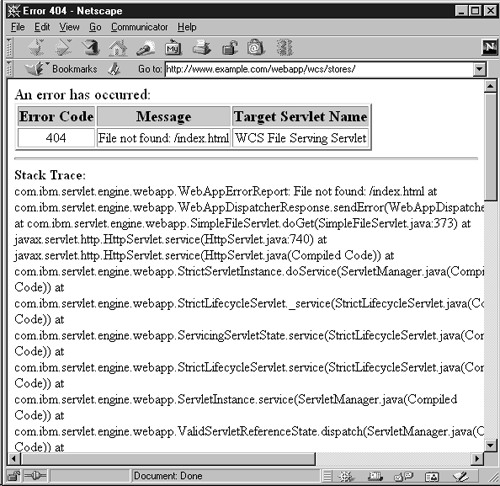
The error messages states that the application server being used on www8.example.com is IBM WebSphere.
URL: https://www9.example.com/OA_HTML/store.jsp?section=101&prod_ses=j= 4081:Guest:US:jtfpfalse:jtfpi-1:671:504:75123~zv=75123~zs=t~zp=504~zo=2~zm= 101~zj=Guest~zi=504
The front-end server in this case is Apache. Sending a request with multiple combinations of truncated URLs didn't work. All we got back was a 404 File not found error, which said nothing about the application server type. The HTTP 404 error message was being served by the front-end Web server when it couldn't find the resource. Hence we have to devise a URL that forces an error out of the application server but that is not touched by the front-end Web server itself.
Let's think about interfacing the application server with the front-end Web server for a minute. Of the various interfacing techniques we discussed earlier in the chapter, this URL suggests that the front-end Web server is be using URL rewriting and internal proxying to execute .jsp files. Keeping this in mind, if we make a request for a nonexistent .jsp file called x.jsp, we should bypass the front-end Web server, because all requests for .jsp are handed to the application server. When we do so, we get the error message returned by the application server shown in Figure 6-10.
Figure 6-10. Forcing an error on www9.example.com
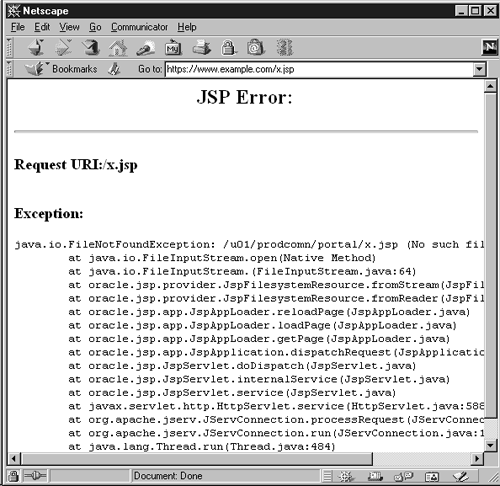
The trick worked! We now have an error returned by an Oracle application server running behind an Apache Web server. The error message also discloses the physical path, /u01/prodcomm/portal/, which is mapped to the JSP directory.

EAN: 2147483647
Pages: 156