Traceroute
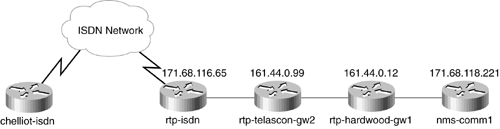
| Traceroute is most commonly used to troubleshoot connectivity issues. If all you know is that you can't get to host D from host A, traceroute will show you whether the connectivity loss exists at one of the intermediate routers B or C or elsewhere. Note that traceroute works at Layer 3 and is most commonly implemented for IP using UDP. In the first set of packets sent, the time-to-live (TTL) field is set to 1 and the port number is set to a port that is not likely to be valid, most commonly 33434. The consequence of setting TTL to 1 is that the first node receiving this packet will decrement the TTL, notice that the TTL is now 0, drop the packet, and return an ICMP timeout message. The TTL and port numbers are increased by one for each subsequent set of packets until either the TTL hits a maximum or the desired remote host is reached. Therefore, one link in the path to the destination will be discovered per packet. Traceroute determines that the destination has been reached when it receives an ICMP destination port unreachable message. Note that you are actually discovering the path that the ICMP timeout messages are taking when they come back. In most cases, this will be the same as the forward path, but not always. Most traceroute implementations will send several packets with the same TTL and port, and then increment the TTL and port for the next set of packets to assist in the discovery of alternate routes or lossy connections. An example of using traceroute is to trace the path from one router to another. Figure 8-1 contains an example network. Starting from the router chelliot-isdn and tracing the route to nms-comm1, the results are shown in Example 8-1. Figure 8-1. Example Network for Traceroute
Example 8-1 Results of a traceroute. chelliot-isdn#traceroute nms-comm1 Type escape sequence to abort. Tracing the route to nms-comm1 (171.68.118.221) 1 rtp-isdn (171.68.116.65) 28 msec 28 msec 28 msec 2 rtp-telascon-gw2 (161.44.0.99) 32 msec 28 msec 28 msec 3 rtp-hardwood-gw1 (161.44.0.12) 56 msec 32 msec 28 msec 4 nms-comm1 (171.68.118.221) 32 msec * 40 msec chelliot-isdn# By default, Cisco IOS devices repeat the traceroute for each TTL three times, as indicated by the three time measurements on each line of the output. Notice that the last line has an asterisk instead of the middle time measurement. This is because Cisco routers limit the rate of ICMP destination unreachable messages it outputs. Therefore, the second message is dropped before the destination sends it back. |

EAN: 2147483647
Pages: 200