Conduct a Physical Inventory Audit
| The first step in a network audit is to identify physical network assets. The audit provides a nice side benefit because you can collect the device asset information. If your company requires the collection and reporting of asset information, you'll be able to do both with the same effort. A physical inventory audit consists of the following:
Where Are Your Wiring Closets?It's 2 a.m. and the network is down; do you know where your wiring closets are? Surprisingly, some enterprises would have to answer "no" to this question. You must document the location of each wiring closet, lab, and raised floor area in which cabling terminates and network devices are located. This is an important step in documenting the network because knowing where the wiring closets are helps you determine where connections terminate. The documentation of wiring closets will become invaluable when fighting network problems and trying to isolate the source of a problem. You should document the location of each wiring closet in two ways. First, develop and maintain a list of wiring closets that contains the following information about each location:
Second, obtain building engineering documents and mark up the wiring closet locations. By visually representing the wiring closets, such documents aid you in understanding the relationship of the wiring closets to each other. TIP Scan the plans or save them with a CAD system as JPEG files and put them on a secured website. Link them together so that a person can drill down. Starting with a map of the various corporate sites, drill down to a location, then a building, then a floor and up pops the appropriate floor plans with the wiring closets highlighted. This procedure can help your operators or anyone else needing access to the wiring closets to quickly drill down and determine the location. If you are not sure where each of the wiring closets are, this is a perfect opportunity to hunt them down and understand what state of disrepair they may be in. If you end up visiting each of the wiring closets in order to verify their location and purpose, use the opportunity to answer the question raised in the following section. NOTE While you're out inventorying the wiring closet, make sure you lock them down. It becomes an impossible task to maintain good documentation and integrity with the network when multiple groups of people with possible conflicts of interest have access to the wiring closet. If someone walks in and moves cables around or switches off a device, you may be ultimately held responsible for their actions. Where Are Your Wires?You've got wiring closets spread all over the campus, perhaps all over the world. Fiber between floors, service provider demarcations, cables running under a bridge, copper running between wiring closets all of these become indistinguishable when you are sitting in a wiring closet or computer center trying to isolate a problem. You must have and maintain accurate schematics of wiring termination and purpose. The main purpose of a cabling audit is to ensure that connections run where you think they run. This is important when documenting the logical connections. The easiest method to track connections is by implementing an organized labeling system in the wiring closet by labeling both ends of a cable with the same label. The label should clearly identify the source, destination, and purpose of the cable. Thus, when looking at a cable or a wiring rack, you can clearly understand the purpose and termination of the cable.
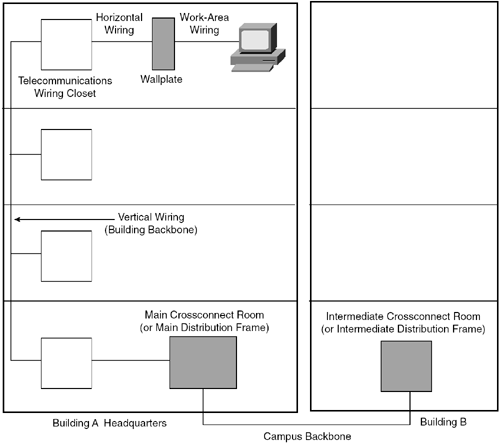
If you haven't tracked physical connections or feel that the current documentation method is out-of-date, you will need to audit each wiring closet and trace where the wiring goes. This can be a tedious process, especially if you have no idea of the state of the cabling. TIP If you have a third party managing your cable for you, be sure that they maintain the labeling as they make changes. Build incentives into their contract, which are based on the cleanliness and accuracy of the wiring closet. In addition to cleanly running and maintaining cabling, they should remove cables that run nowhere that is, cables that once connected network devices that have been removed. Figure 1-2 is an example of a typical floor wiring diagram. Figure 1-2. Example of a Floor Wiring Diagram
This example represents a typical floor wiring diagram in which the source and destination of wiring is documented. Table 1-1 is used to document the wiring locations and terminations.
Where Are Your Network Devices?You've found and documented all of the wiring closets worldwide and implemented a well-documented wiring system with labels. Now, it's time to physically learn and document the location of the routers, switches, hubs, firewalls, and other network-related equipment that make up your network. You should start by collecting and recording an inventory of the devices and their locations. At a minimum, you should track the following:
Note that although manual tracking of information is quite common, you should consider automating the collection of device information and the association of that information with contact information. For instance, use a Layer 3 auto-discovery routine to generate the device list. Then, have a routine query each of the devices to obtain the MIB II sysContact and sysName variables to correlate the device name and contact name. The routine can then use the contact name to look up contact information (phone number, pager). The final report would then include all information listed previously, but would be generated in an automated fashion. This will save time compared to the manual method as well as increase the chances that the documentation is up-to-date and accurate. Table 1-2 is an example of a spreadsheet used to track network devices.
In Table 1-2, the network manager chose to track the minimum amount of device information, as well as the device contact. Typically, the contact is the person who should be called when an incident involves the owned device.
Where Are Your Servers?Tracking the location of shared servers and how they are connected into the network is just as important as tracking network devices. Too often, when a user complains of slow response time, the server support teams point the finger at the network support team. By knowing how servers and key applications connect into the network, you will be able to determine definitively whether the source of a slow response problem, for example, is the network or a device connected to it. Using the methods described in the previous sections, you should document where the servers are physically located and how they connect back to their associated switches or hubs. Server types include the following:
Table 1-3 illustrates a server tracking spreadsheet.
Documenting the servers, as shown in Table 1-3, is important when troubleshooting. It also makes a handy reference when performing administrative tasks on the servers. You may consider working with the server administrators to develop a questionnaire that identifies relevant information concerning each server that would help to understand the server and its application's availability. Examples include the documentation of the following:
By documenting and keeping accurate the server information, your operations staff will be able to distinguish between planned maintenance and unplanned outages. The server administrators may never offer thanks, but you will impress them when your network documentation actually helps them do their job. Where Are Your Key Users?For larger organizations, it can become burdensome to track every network connection for every user. Each managed connection requires a bit more hard disk space and network bandwidth. Only those ports that are considered business-critical should be monitored. This avoids filling event logs with link-down messages when users turn their PCs off for the day. Additionally, monitoring that many ports will generate reams of data that will probably not be used and can complicate the reporting process. Network performance and server access for a user or group of users can be inferred by measuring the availability and performance of the connecting network devices and servers involved. This conserves the amount of polling to the network devices (because information for every hub or switch port will not be generated) and considerably cuts down the amount of stored data to process. However, from a management perspective, monitoring certain key users may still be important. It can be helpful to identify a single user out of a group in order to measure their network connectivity and performance. The information from the single user can then be used to infer performance for the rest of the group. For instance, you may choose to monitor the network port for named users from individual groups in order to use the port as a gauge for the availability of the network for the entire group. It may also make political sense to monitor the ports of certain executives (or "mahogany row") to ensure that you catch performance problems before they occur. With both fault and performance monitoring, it is usually in the network manager's best interest to ensure that the boss's connection is running smoothly. This may seem sneaky or underhanded (it is), but it generally ensures that the executive's view of the network (and, therefore, your company's investment in the network) is as fast and clean as the network infrastructure. You do not want the VP of Sales who is responsible for your network's funding to call in a network down or performance problem with their connection. You should never sacrifice the performance and availability of network services for a group of people in order to provide greater-than-ordinary access to an executive. Or as Spock once said, "The needs of the many outweigh the needs of the few or the one." NOTE Sometimes, catering too much to the executive level can backfire. It may be advantageous to have certain executives experience network problems, as felt by the majority users, in order to gain budget. If this is the case, let them feel your pain! | |||||||||||||||||||||||||||||||||||||||||||||||||||||||||||||||||||||||||||||||||||||||||||||||||||||||||||||||||||||||||||||||||||||||||||||||||||||||||||||||||||||||||||||||||||||||||||||||||||||||||||||||||||||||||||||||||||||||||||||

EAN: 2147483647
Pages: 200