Flylib.com

Books Software


ArcSegment


ArcSegment

Type: Geometry

Hierarchy: Freezable

Animatable

PathSegment

<ArcSegment
        LargeArc="truefalse"
        Point="


5,5


"
        Size="


10,10


"
        SweepFlag="truefalse"
        XRotation="


45


" />

or:

<ArcSegment
        LargeArc="truefalse"
        Size="


10,10


"
        SweepFlag="truefalse"
        XRotation="


45


">
        <ArcSegment.Point>
            <Point X="


5


" Y="


5


" />
        </ArcSegment.Point>
 
    </ArcSegment>

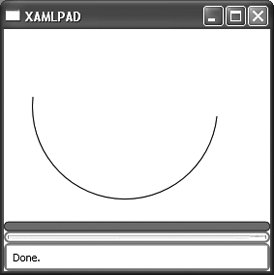
<ArcSegment .../> should be a child of PathFigure . It represents an elliptical arc between two instances of Point (Figure 9-2). ArcSegment does not contain its start point location because the start point is assumed to be the current Point of the parent PathFigure .

Figure 9-2. ArcSegment

Attributes


LargeArc (optional)

This Boolean value determines whether the arc should be drawn with an angle of 180 degrees or greater.


true

The arc will be drawn with an angle greater than 180 degrees.


false

The arc will be drawn with an angle less than 180 degrees.


Point (required)

This attribute describes the end point of the arc. This attribute can be described as a Point either explicitly or using abbreviated markup syntax.


Size (required)

This attribute describes the x- and y-radius of the arc as a Size .


SweepFlag (optional)

This Boolean value determines whether the angle of the arc is drawn in a positive-angle or negative-angle direction.


true

The angle is drawn in a positive-angle direction.


false

The angle is drawn in a negative-angle direction.


XRotation (optional)

This Double value indicates how the arc should be rotated relative to the current coordinate system.


BezierSegment Hierarchy: Freezable Animatable PathSegment

Type: Geometry

<BezierSegment
    Point1="


1,1


"

    Point2="


150,50


"
    Point3="


140,10


" />

<BezierSegment .../> describes a Bezier curve between two points. Like ArcSegment , BezierSegment must be the child of a PathFigure . Point1 affects the beginning segment of the curve, while Point2 affects the ending segment of the curve. Control points act like magnets, pulling the curve toward them. Figure 9-3 shows the BezierSegment described above.

Figure 9-3. BezierSegment

Attributes


Point1 (required)

Describes the first control point on the curve


Point2 (required)

Describes the second control point on the curve


Point3 (required)

Describes the end point of the curve


CloseSegment Hierarchy: Freezable Animatable PathSegment

Type: Geometry

<CloseSegment />

<CloseSegment .../> represents the final line of a PathFigure , which joins the figure's last Point to its first Point .


CombinedGeometry Hierarchy: Freezable Animatable Geometry

Type: Geometry

<CombinedGeometry
        CombineMode="UnionXorExcludeIntersect" />

<CombinedGeometry .../> combines two Geometry elements as specified by the CombineMode attribute.

Attributes


CombineMode (optional)

Determines how the two child Geometry elements will be combined


Exclude

The two regions described by the child elements will be combined by excluding the area in the second geometry from the area in the first geometry. The result is Geometry A - Geometry B.


Intersect

The two regions described by the child elements will be combined by taking the area that exists in both regions. This is the opposite of Xor mode. The result is (Geometry A - Geometry B) - ((Geometry B - Geometry A) + (Geometry A - Geometry B)).


Union

The two regions described by the child elements will be combined by including the union of both regions. The result is Geometry A + Geometry B.


Xor

The two regions described by the child elements will be combined by including the area that exists in the first region but not the second and the area that exists in the second region but not the first. The result is (Geometry A - Geometry B) + (Geometry B - Geometry A). This is the opposite of the Intersect mode.